This is the content of the pop-over!

Lightning Deal Alert – 12% Off Ends at Midnight!

Strike while the savings are hot! Use promo code FlashSale at checkout for 12% off any Exam Edge test or bundle. Hurry—the clock is ticking!

CEOE Library-Media Specialist (038) Practice Tests & Test Prep by Exam Edge


CEOE Library-Media Specialist  product image
(5.0)
Based on 28 Reviews

  • Real Exam Simulation: Timed questions and matching content build comfort for your CEOE Library-Media Specialist test day.
  • Instant, 24/7 Access: Web-based CEOE Library-Media Specialist practice exams with no software needed.
  • Clear Explanations: Step-by-step answers and explanations for your CEOE exam to strengthen understanding.
  • Boosted Confidence: Reduces anxiety and improves test-taking skills to ace your CEOE Library-Media Specialist (038).

Featured on

CEOE Library-Media Specialist Online Practice Test Bundles

BEST VALUE
20 practice tests

$174.00

$799.00

SAVE $625

Only $8.70 per test!

  • 100% Pass Guarantee
  • 20 online practice tests
  • 80 questions per test
  • Bonus: 100 Flash Cards + Study Guide
  • Instant access
  • Detailed Explanations
  • Practice tests never expire
  • Timed, untimed, or study guide mode
MOST POPULAR
10 practice tests

$99.50

$399.50

SAVE $300

Only $9.95 per test!

  • 10 online practice tests
  • 80 questions per test
  • Bonus: 100 Flash Cards + Study Guide
  • Instant access
  • Detailed Explanations
  • Practice tests never expire
  • Timed, untimed, or study guide mode
5 practice tests

$69.75

$199.75

SAVE $130

Only $13.95 per test!

  • 5 online practice tests
  • 80 questions per test
  • Bonus: 100 Flash Cards
  • Instant access
  • Detailed Explanations
  • Practice tests never expire
  • Timed, untimed, or study guide mode
1 practice test

$39.95

  • 1 online practice test
  • 80 questions per test
  • Instant access
  • Detailed Explanations
  • Practice tests never expire
  • Timed, untimed, or study guide mode
Quick Select
Tap to choose a bundle

** All Prices are in US Dollars (USD) **


CEOE Library-Media Specialist (038) Resources

Jump to the section you need most.

Understanding the exact breakdown of the CEOE Library-Media Specialist test will help you know what to expect and how to most effectively prepare. The CEOE Library-Media Specialist has 80 multiple-choice questions and 1 essay questions. The exam will be broken down into the sections below:

CEOE Library-Media Specialist Exam Blueprint
Domain Name % Number of
Questions
The School Library Program 25% 24
School Library Resources and Collections 22% 21
Information Literacy and Inquiry Skills 22% 21
Program Administration 16% 15

CEOE Library-Media Specialist Study Tips by Domain

  • Align the school library program with district curriculum and CEOE standards through documented collaboration with teachers; red flag: activities that are “fun” but not tied to specific learning outcomes or assessments.
  • Implement equitable access and inclusive services (students with disabilities, multilingual learners, varied reading levels) using universal design and multiple formats; common trap: assuming one-size-fits-all scheduling or relying only on print resources.
  • Teach and model ethical use of information (copyright, fair use, licensing, citation, privacy) within instruction; priority rule: default to protecting student data and obtain permissions when sharing student work publicly.
  • Use flexible scheduling and co-teaching to integrate library instruction at point of need; red flag: fixed, “planning-period coverage” schedules that limit collaboration and reduce instructional impact.
  • Promote reading engagement and a culture of inquiry with targeted programming (book talks, makerspace/inquiry cycles, student choice) tracked by participation and circulation data; common trap: measuring success only by event attendance rather than learning evidence.
  • Maintain clear policies and procedures (circulation, reconsideration of materials, acceptable use, behavior, makerspace safety) and apply them consistently; red flag: handling challenges informally without a documented reconsideration process and communication chain.
  • Use a written collection development policy with clear selection criteria (curriculum alignment, authority, age appropriateness) and reconsideration steps—red flag: removing a title based on a single complaint without following the formal process.
  • Weed routinely using objective criteria (e.g., outdated science/health, poor condition, low use) and document decisions—common trap: keeping obsolete nonfiction because it’s a “classic” despite inaccurate information.
  • Balance print and digital resources based on instructional need, accessibility features, and licensing limits—priority rule: confirm concurrent user limits before assigning an e-book to a whole-class activity.
  • Ensure diverse, inclusive representation across the collection and avoid tokenism—red flag: diversity limited to a single month/theme display rather than integrated, year-round coverage.
  • Apply cataloging and metadata standards consistently (accurate subjects, series entries, call numbers) to improve discovery—common trap: inconsistent labels/shelving that causes students to abandon searches.
  • Protect student privacy and intellectual freedom when providing digital resources—contraindication: using platforms that collect identifiable student data without district approval and appropriate consent/agreements.
  • Teach a repeatable inquiry cycle (question → keywords → search → evaluate → synthesize → reflect) and require a documented search plan; red flag: students start with a single Google hit and stop.
  • Model search strategy moves (Boolean, phrase searching, truncation, field limits) and have students revise searches based on results; common trap: treating a lack of results as failure instead of changing terms/filters.
  • Use explicit credibility criteria (authority, accuracy, bias/purpose, currency, evidence) and require students to justify acceptance/rejection of sources; red flag: assuming a .org or professional-looking site is automatically reliable.
  • Differentiate primary vs. secondary sources and match source type to task requirements; priority rule: for historical events, confirm at least one primary source before drawing conclusions.
  • Teach ethical use of information (copyright, fair use, Creative Commons, citation) and build in checkpoints for paraphrasing vs. quoting; common trap: patchwriting that looks like paraphrase but is still plagiarism.
  • Assess synthesis with a product plus process evidence (notes, annotated bibliography, reflection on bias/limitations); red flag: reports that are a string of summaries with no claim, comparison, or attribution.
  • Align the library program plan to campus/district goals with measurable targets (e.g., circulation, instruction sessions, database usage) and review them at least each grading period—red flag: reporting activities without evidence of impact.
  • Manage the budget by prioritizing core instructional needs first (curriculum-aligned resources, accessibility tools) and tracking encumbrances monthly—common trap: spending down funds late and missing purchasing deadlines.
  • Implement clear circulation, privacy, and acceptable-use procedures consistent with district policy; limit access to student records and reading histories on a need-to-know basis—red flag: sharing patron data in public reports or displays.
  • Supervise staff and volunteers with documented roles, schedules, and training on confidentiality and safety—priority rule: never assign untrained volunteers to tasks involving student data or cash handling.
  • Maintain an annual inventory, weeding, and loss-prevention cycle with written criteria and audit trails—common trap: skipping inventory and allowing “phantom” items to distort collection decisions.
  • Plan for facilities, technology, and emergency procedures (traffic flow, device checkout, drills) and regularly test critical routines—red flag: no backup process for system outages during high-demand periods.


Built to Fit Into Your Busy Life

Everything you need to prepare with confidence—without wasting a minute.

Three Study Modes

Timed, No Time Limit, or Explanation mode.

Actionable Analytics

Heatmaps and scaled scores highlight weak areas.

High-Yield Rationales

Concise explanations emphasize key concepts.

Realistic Interface

Matches the feel of the actual exam environment.

Accessible by Design

Clean layout reduces cognitive load.

Anytime, Anywhere

Web-based access 24/7 on any device.
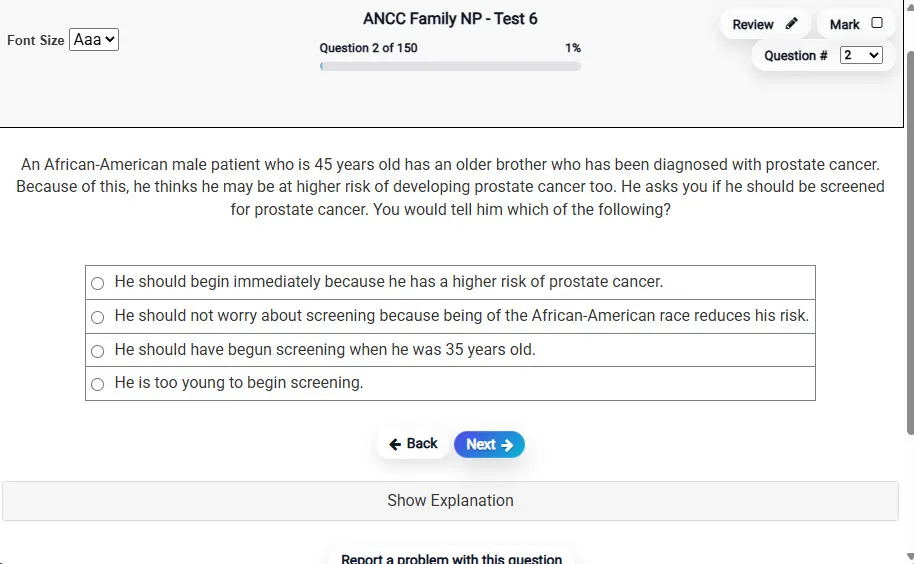
Answering a Question screen – Multiple-choice item view with navigation controls and progress tracker.
Answering a Question Multiple-choice item view with navigation controls and progress tracker.

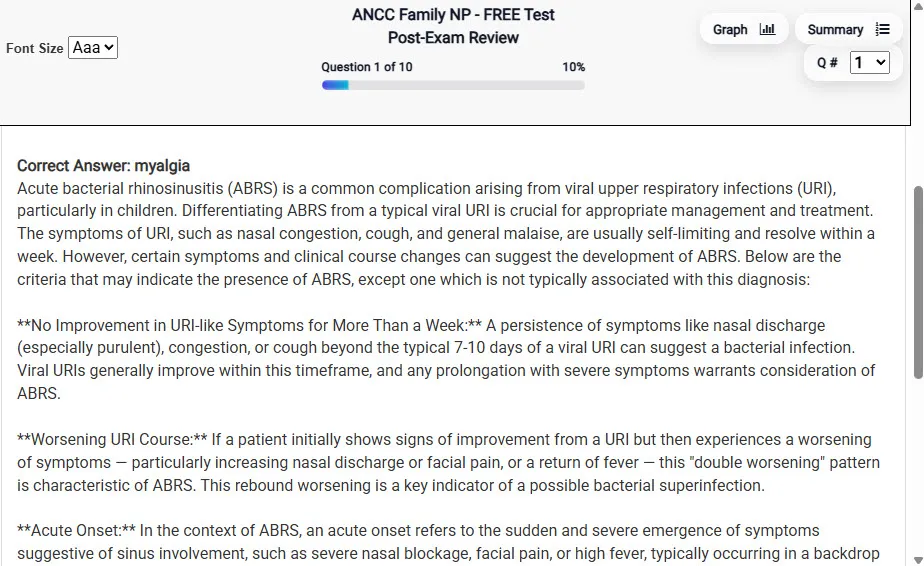
                           Detailed Explanation screen – 
                         Review mode showing chosen answer and rationale and references.
Detailed Explanation Review mode showing chosen answer and rationale and references.

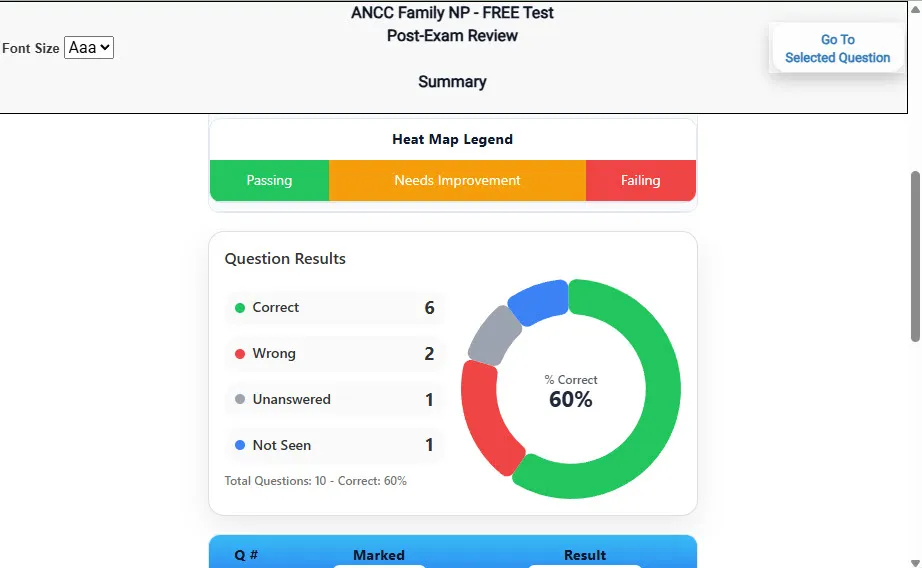
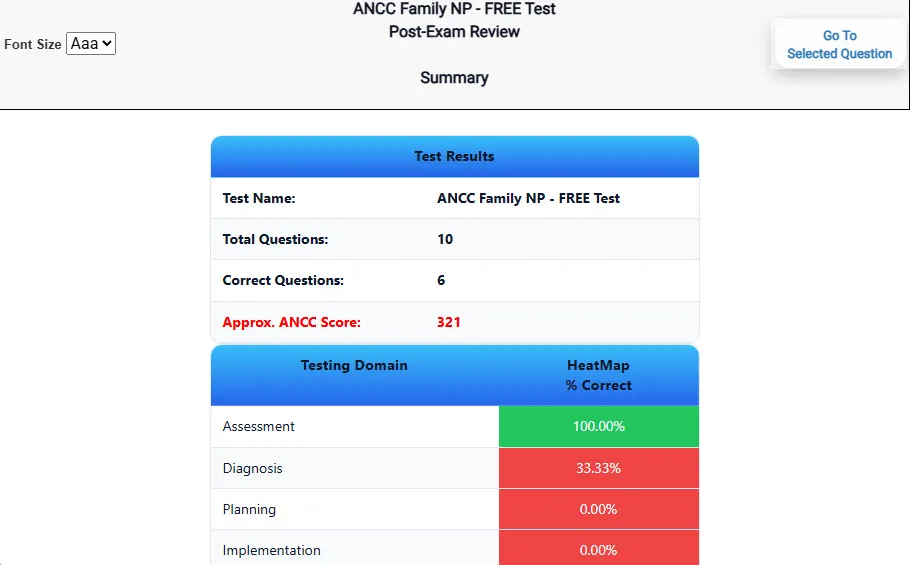
                           Review Summary 1 screen – 
                         Summary with counts for correct/wrong/unanswered and not seen items.
Review Summary 1 Summary with counts for correct/wrong/unanswered and not seen items.

                           Review Summary 2 screen – 
                         Advanced summary with category/domain breakdown and performance insights.
Review Summary 2 Advanced summary with category/domain breakdown and performance insights.

What Each Screen Shows

Answer Question Screen

  • Clean multiple-choice interface with progress bar.
  • Mark for review feature.
  • Matches real test pacing.

Detailed Explanation

  • Correct answer plus rationale.
  • Key concepts and guidelines highlighted.
  • Move between questions to fill knowledge gaps.

Review Summary 1

  • Overall results with total questions and scaled score.
  • Domain heatmap shows strengths and weaknesses.
  • Quick visual feedback on study priorities.

Review Summary 2

  • Chart of correct, wrong, unanswered, not seen.
  • Color-coded results for easy review.
  • Links back to missed items.

Top 10 Reasons to Use Exam Edge for your CEOE Library-Media Specialist Exam Prep

  1. Focused on the CEOE Library-Media Specialist Exam

    Our practice tests are built specifically for the CEOE Library-Media Specialist exam — every question mirrors the real topics, format, and difficulty so you're studying exactly what matters.

  2. Real Exam Simulation

    We match the per-question time limits and pressure of the actual CEOE exam, so test day feels familiar and stress-free.

  3. 20 Full Practice Tests & 1,600 Unique Questions

    You'll have more than enough material to master every CEOE Library-Media Specialist concept — no repeats, no fluff.

  4. Lower Cost Than a Retake

    Ordering 5 practice exams costs less than retaking the CEOE Library-Media Specialist exam after a failure. One low fee could save you both time and money.

  5. Flexible Testing

    Need to step away mid-exam? Pick up right where you left off — with your remaining time intact.

  6. Instant Scoring & Feedback

    See your raw score and an estimated CEOE Library-Media Specialist score immediately after finishing each practice test.

  7. Detailed Explanations for Every Question

    Review correct and incorrect answers with clear, step-by-step explanations so you truly understand each topic.

  8. Trusted & Accredited

    We're fully accredited by the Better Business Bureau and uphold the highest standards of trust and transparency.

  9. Web-Based & Always Available

    No software to install. Access your CEOE Library-Media Specialist practice exams 24/7 from any computer or mobile device.

  10. Expert Support When You Need It

    Need extra help? Our specialized tutors are highly qualified and ready to support your CEOE exam prep.


Pass the CEOE Library-Media Specialist Exam with Realistic Practice Tests from Exam Edge

Preparing for your upcoming CEOE Library-Media Specialist (038) Certification Exam can feel overwhelming — but the right practice makes all the difference. Exam Edge gives you the tools, structure, and confidence to pass on your first try. Our online practice exams are built to match the real CEOE Library-Media Specialist exam in content, format, and difficulty.

  • 📝 20 CEOE Library-Media Specialist Practice Tests: Access 20 full-length exams with 80 questions each, covering every major CEOE Library-Media Specialist topic in depth.
  • Instant Online Access: Start practicing right away — no software, no waiting.
  • 🧠 Step-by-Step Explanations: Understand the reasoning behind every correct answer so you can master CEOE Library-Media Specialist exam concepts.
  • 🔄 Retake Each Exam Up to 4 Times: Build knowledge through repetition and track your improvement over time.
  • 🌐 Web-Based & Available 24/7: Study anywhere, anytime, on any device.
  • 🧘 Boost Your Test-Day Confidence: Familiarity with the CEOE format reduces anxiety and helps you perform under pressure.

These CEOE Library-Media Specialist practice exams are designed to simulate the real testing experience by matching question types, timing, and difficulty level. This approach helps you get comfortable not just with the exam content, but also with the testing environment, so you walk into your exam day focused and confident.


Exam Edge CEOE Reviews


I failed the CEOE OSAT Business Education five times before I found your site. After taking all your practice tests, on my next attempt I passed by five points! I can honestly say this site is the reason I passed. Thank you!!!

Jake,

The exams are very helpful.

Cherice , Edmond, OK

So far no problems

vanessa , Silver Spring , MD


CEOE Library-Media Specialist Aliases Test Name

Here is a list of alternative names used for this exam.

  • CEOE Library-Media Specialist
  • CEOE Library-Media Specialist test
  • CEOE Library-Media Specialist Certification Test
  • CEOE
  • CEOE 038
  • 038 test
  • CEOE Library-Media Specialist (038)
  • Library-Media Specialist certification