This is the content of the pop-over!

TExES Special Education (186) Practice Tests & Test Prep by Exam Edge


TExES Special Education Specialist EC–12 product image
(4.8)
Based on 22 Reviews

  • Real Exam Simulation: Timed questions and matching content build comfort for your TExES SPED Specialist test day.
  • Instant, 24/7 Access: Web-based TExES Special Education Specialist EC–12 practice exams with no software needed.
  • Clear Explanations: Step-by-step answers and explanations for your TExES exam to strengthen understanding.
  • Boosted Confidence: Reduces anxiety and improves test-taking skills to ace your TExES Special Education Specialist EC–12 (186).

Featured on

TExES Special Education Specialist EC–12 Online Practice Test Bundles

BEST VALUE
20 practice tests

$174.00

$799.00

SAVE $625

Only $8.70 per test!

  • 100% Pass Guarantee
  • 20 online practice tests
  • 90 questions per test
  • Bonus: 100 Flash Cards + Study Guide
  • Instant access
  • Detailed Explanations
  • Practice tests never expire
  • Timed, untimed, or study guide mode
MOST POPULAR
10 practice tests

$99.50

$399.50

SAVE $300

Only $9.95 per test!

  • 10 online practice tests
  • 90 questions per test
  • Bonus: 100 Flash Cards + Study Guide
  • Instant access
  • Detailed Explanations
  • Practice tests never expire
  • Timed, untimed, or study guide mode
5 practice tests

$69.75

$199.75

SAVE $130

Only $13.95 per test!

  • 5 online practice tests
  • 90 questions per test
  • Bonus: 100 Flash Cards
  • Instant access
  • Detailed Explanations
  • Practice tests never expire
  • Timed, untimed, or study guide mode
1 practice test

$39.95

  • 1 online practice test
  • 90 questions per test
  • Instant access
  • Detailed Explanations
  • Practice tests never expire
  • Timed, untimed, or study guide mode
MOST FLEXIBLE
Question Bank

As low as $59.95

750 Questions

Choose 1, 3, 6, or 12 months
A second login is required.

  • Exam Edge content in a powerful question bank
  • Customize Tests
  • Multiple Test & Flash Card Modes
  • Track performance over time
  • Instant access
  • Detailed Explanations
Quick Select
Tap to choose a bundle

** All Prices are in US Dollars (USD) **


TExES SPED Specialist (186) Resources

Jump to the section you need most.

Understanding the exact breakdown of the TExES Special Education Specialist EC–12 test will help you know what to expect and how to most effectively prepare. The TExES Special Education Specialist EC–12 has 90 multiple-choice questions and 1 essay questions. The exam will be broken down into the sections below:

TExES Special Education Specialist EC–12 Exam Blueprint
Domain Name % Number of
Questions
Legal and Ethical Guidelines and Knowledge of Learners 18% 16
Assessment and Program Planning 18% 16
Curricular Knowledge and Instructional Practices 27% 24
Professional Collaboration - Learning Responsibilities 18% 16
Analysis and Response 20% 18

TExES Special Education Specialist EC–12 Study Tips by Domain

  • Use multiple data sources (CBM/progress monitoring, classroom performance, and family input) to make eligibility and planning decisions—red flag: relying on a single test score or one setting.
  • Differentiate screening, diagnostic, and progress-monitoring purposes and match tools accordingly—common trap: using a benchmark screener to set IEP baselines or goals.
  • Write present levels (PLAAFP) that are measurable and directly tied to disability impact and access to the general curriculum—priority rule: include baseline data (frequency, duration, accuracy, or rate), not just narrative.
  • Develop IEP goals that are SMART and aligned to standards/functional needs with clear mastery criteria and measurement method—red flag: goals like “will improve” without conditions, criteria, or timeframe.
  • Plan specially designed instruction, accommodations, and modifications based on assessed need—common trap: listing accommodations that change what is taught/tested without documenting why or how they will be monitored.
  • Create a progress-monitoring plan (schedule, tool, decision rules) and adjust instruction when data show insufficient growth—threshold cue: if trend lines miss the aim line across repeated data points, revise intervention rather than waiting for annual review.
  • Design instruction using evidence-based practices aligned to TEKS and IEP goals; red flag: teaching only “life skills” without documented access to grade-level content.
  • Differentiate with accommodations vs. modifications and ensure they match the IEP; common trap: reducing learning expectations (modification) when the plan calls only for supports (accommodations).
  • Use explicit, systematic instruction (model–guided practice–independent practice) with frequent checks; priority rule: reteach immediately when progress-monitoring data show stalled growth over multiple probes.
  • Implement behavior supports within instruction (antecedent strategies, reinforcement, replacement skills) and connect to learning routines; red flag: relying on punishment or removing instruction time without a skill-building plan.
  • Embed assistive technology and accessibility tools (AAC, text-to-speech, visual supports) to increase participation; common trap: selecting tools by availability rather than the student’s needs and documented training/support.
  • Plan inclusive instructional delivery (co-teaching, small-group, scaffolded materials) to maximize time in the least restrictive environment; priority cue: if a separate setting is proposed, document why supports in the general classroom are insufficient.
  • Build and sustain collaborative relationships with families, general educators, related service providers, and administrators to support IEP implementation; red flag: communicating only at ARD time instead of documenting ongoing contact and follow-up.
  • Facilitate effective ARD/IEP meetings by ensuring required members are present and input is captured in measurable commitments; common trap: allowing informal agreements (e.g., “we’ll try”) that aren’t written into services, accommodations, or goals.
  • Use a consultative/co-teaching approach to support access in the least restrictive environment (LRE) while maintaining high expectations; priority rule: start with general education supports and add intensity systematically rather than defaulting to removal.
  • Provide job-embedded coaching to staff on accommodations, behavior supports, and progress monitoring; red flag: confusing accommodations (access) with modifications (reduced expectations) and failing to align them to the IEP.
  • Promote student self-determination by teaching self-advocacy, goal-setting, and participation in transition planning; common trap: making decisions for students who could meaningfully contribute, especially in secondary settings.
  • Maintain professional learning responsibilities by using data to refine instruction and by following campus procedures for documentation and confidentiality; contraindication: sharing identifiable student information via unsecured email or casual conversation.
  • Start with a clear problem statement (observable behavior + conditions + frequency/duration) before choosing an intervention—red flag: jumping to a label or placement without baseline data.
  • Use multiple data sources (work samples, CBM, observations, interviews) to verify a pattern across settings/time—common trap: relying on a single test score to explain performance.
  • When behavior interferes with learning, analyze function (antecedent–behavior–consequence) and match responses to function—priority rule: teach a replacement skill, don’t just increase punishment.
  • Differentiate error type (skill deficit vs performance deficit) to select the response—red flag: adding consequences for a skill deficit instead of providing explicit instruction and practice.
  • Check for environmental and accessibility barriers (materials, sensory needs, language, assistive tech) before escalating supports—common trap: treating an accommodation need as noncompliance.
  • Monitor response to intervention with a set decision rule (e.g., data trend over 4–6 points) and adjust intensity promptly—red flag: waiting for end-of-grading-period grades to decide next steps.


Built to Fit Into Your Busy Life

Everything you need to prepare with confidence—without wasting a minute.

Three Study Modes

Timed, No Time Limit, or Explanation mode.

Actionable Analytics

Heatmaps and scaled scores highlight weak areas.

High-Yield Rationales

Concise explanations emphasize key concepts.

Realistic Interface

Matches the feel of the actual exam environment.

Accessible by Design

Clean layout reduces cognitive load.

Anytime, Anywhere

Web-based access 24/7 on any device.
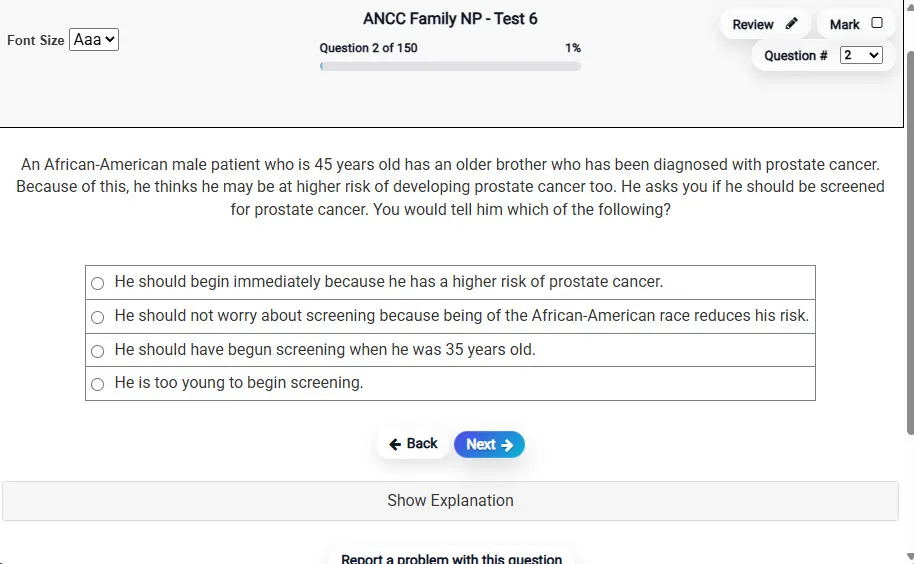
Answering a Question screen – Multiple-choice item view with navigation controls and progress tracker.
Answering a Question Multiple-choice item view with navigation controls and progress tracker.

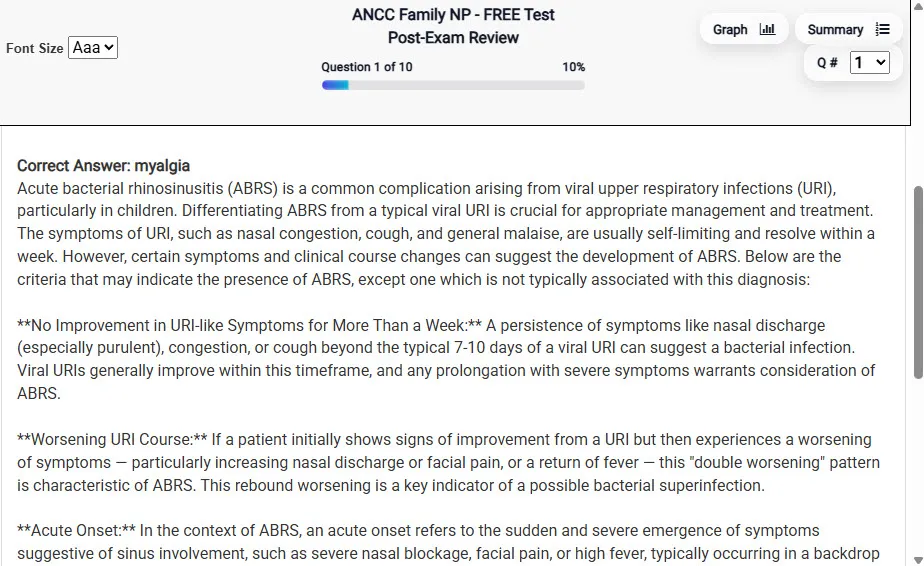
                           Detailed Explanation screen – 
                         Review mode showing chosen answer and rationale and references.
Detailed Explanation Review mode showing chosen answer and rationale and references.

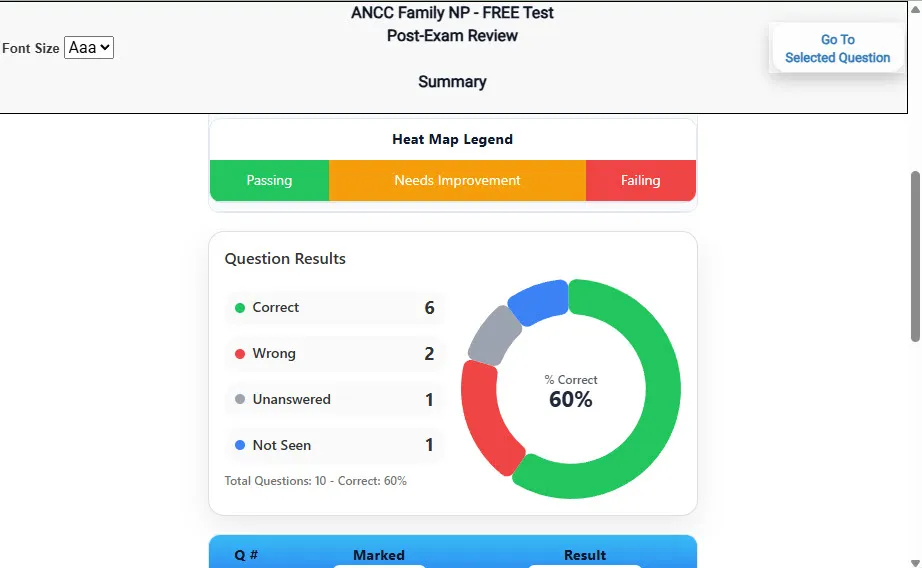
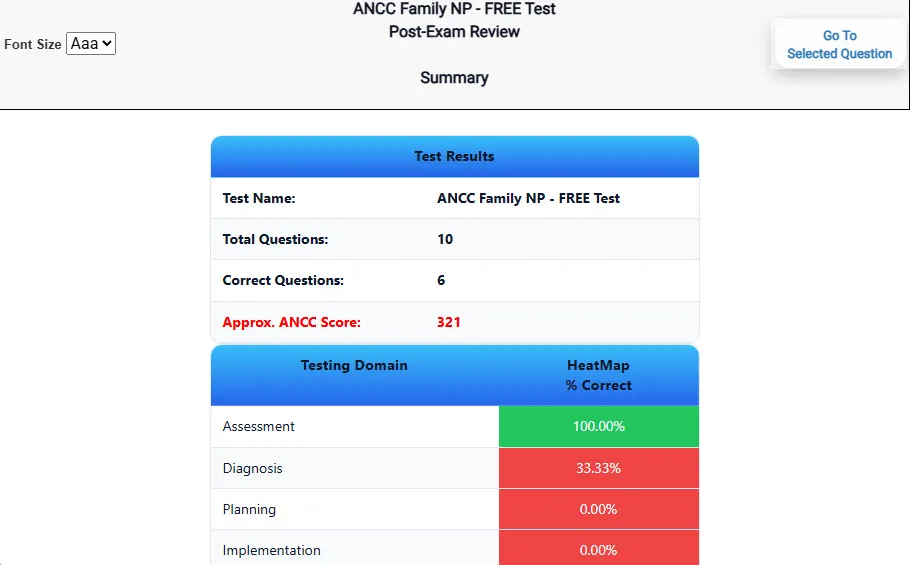
                           Review Summary 1 screen – 
                         Summary with counts for correct/wrong/unanswered and not seen items.
Review Summary 1 Summary with counts for correct/wrong/unanswered and not seen items.

                           Review Summary 2 screen – 
                         Advanced summary with category/domain breakdown and performance insights.
Review Summary 2 Advanced summary with category/domain breakdown and performance insights.

What Each Screen Shows

Answer Question Screen

  • Clean multiple-choice interface with progress bar.
  • Mark for review feature.
  • Matches real test pacing.

Detailed Explanation

  • Correct answer plus rationale.
  • Key concepts and guidelines highlighted.
  • Move between questions to fill knowledge gaps.

Review Summary 1

  • Overall results with total questions and scaled score.
  • Domain heatmap shows strengths and weaknesses.
  • Quick visual feedback on study priorities.

Review Summary 2

  • Chart of correct, wrong, unanswered, not seen.
  • Color-coded results for easy review.
  • Links back to missed items.

Top 10 Reasons to Use Exam Edge for your TExES Special Education Specialist EC–12 Exam Prep

  1. Focused on the TExES Special Education Specialist EC–12 Exam

    Our practice tests are built specifically for the TExES SPED Specialist exam — every question mirrors the real topics, format, and difficulty so you're studying exactly what matters.

  2. Real Exam Simulation

    We match the per-question time limits and pressure of the actual TExES exam, so test day feels familiar and stress-free.

  3. 20 Full Practice Tests & 1,800 Unique Questions

    You'll have more than enough material to master every TExES SPED Specialist concept — no repeats, no fluff.

  4. Lower Cost Than a Retake

    Ordering 5 practice exams costs less than retaking the TExES Special Education Specialist EC–12 exam after a failure. One low fee could save you both time and money.

  5. Flexible Testing

    Need to step away mid-exam? Pick up right where you left off — with your remaining time intact.

  6. Instant Scoring & Feedback

    See your raw score and an estimated TExES Special Education Specialist EC–12 score immediately after finishing each practice test.

  7. Detailed Explanations for Every Question

    Review correct and incorrect answers with clear, step-by-step explanations so you truly understand each topic.

  8. Trusted & Accredited

    We're fully accredited by the Better Business Bureau and uphold the highest standards of trust and transparency.

  9. Web-Based & Always Available

    No software to install. Access your TExES SPED Specialist practice exams 24/7 from any computer or mobile device.

  10. Expert Support When You Need It

    Need extra help? Our specialized tutors are highly qualified and ready to support your TExES exam prep.


Pass the TExES Special Education Specialist EC–12 Exam with Realistic Practice Tests from Exam Edge

Preparing for your upcoming TExES Special Education Specialist EC–12 (186) Certification Exam can feel overwhelming — but the right practice makes all the difference. Exam Edge gives you the tools, structure, and confidence to pass on your first try. Our online practice exams are built to match the real TExES SPED Specialist exam in content, format, and difficulty.

  • 📝 20 TExES Special Education Specialist EC–12 Practice Tests: Access 20 full-length exams with 90 questions each, covering every major TExES Special Education Specialist EC–12 topic in depth.
  • Instant Online Access: Start practicing right away — no software, no waiting.
  • 🧠 Step-by-Step Explanations: Understand the reasoning behind every correct answer so you can master TExES SPED Specialist exam concepts.
  • 🔄 Retake Each Exam Up to 4 Times: Build knowledge through repetition and track your improvement over time.
  • 🌐 Web-Based & Available 24/7: Study anywhere, anytime, on any device.
  • 🧘 Boost Your Test-Day Confidence: Familiarity with the TExES format reduces anxiety and helps you perform under pressure.

These TExES Special Education Specialist EC–12 practice exams are designed to simulate the real testing experience by matching question types, timing, and difficulty level. This approach helps you get comfortable not just with the exam content, but also with the testing environment, so you walk into your exam day focused and confident.


Exam Edge TEXES Reviews


Your test prep exams prepared me for the actual exam. Before using your system, I took the Special Education Test and failed. With your help, I took the test again and passed!!!!!! Thanks for the guidance 

Ty, Freeport Texas

These tests prepared me so well for three different exams. I passed all three exams on my first attempt. Two of them with flying colors. I definitely recommend these study aids!

Vanessa , WESLACO, Texas

Great exam site that helped me pass my tests.

June , Murphy, Texas

Dear Exam Edge, I passed my exam on the first attempt with a score of 271/300 (exactly what the practice tests showed). Your practice tests were excellent and very representative of the exam. They helped my preparation and focus my study. Without question of all the test aids yours was head and shou ...
Read More
Donald , Beaumont Texas

Just wanted to say thanks for your helpful product. I purchased and took 5 practice exams to help prepare for the TEXES Math 7-12 235 exam, and am happy to say I passed the certification exam last week on the first try. Practice with your tests definitely was a big factor in preparing successfully. ...
Read More
Mobi , Dallas

I just passed my TEXES Math 4-8 certification and I want to thank you for the quality of your practice tests that was a key to my preparation. Your tests were very rigorous, even a little beyond and above the level of the test I would say, but definitely it was better to be over prepared than have t ...
Read More
Miguel , Huston


TExES Special Education Specialist EC–12 Aliases Test Name

Here is a list of alternative names used for this exam.

  • TExES Special Education Specialist EC–12
  • TExES Special Education Specialist EC–12 test
  • TExES Special Education Specialist EC–12 Certification Test
  • TExES SPED Specialist test
  • TEXES
  • TEXES 186
  • 186 test
  • TExES Special Education Specialist EC–12 (186)
  • TExES Special Education Specialist EC–12 certification