This is the content of the pop-over!

Praxis Special Education: Teaching Students with Visual Impairments (5282) Practice Tests & Test Prep by Exam Edge


Praxis Special Education Teaching Students with Visual Impairments   product image
(5.0)
Based on 32 Reviews

  • Real Exam Simulation: Timed questions and matching content build comfort for your Praxis SPED: Teaching Students with Visual Impairments test day.
  • Instant, 24/7 Access: Web-based Praxis Special Education Teaching Students with Visual Impairments practice exams with no software needed.
  • Clear Explanations: Step-by-step answers and explanations for your Praxis exam to strengthen understanding.
  • Boosted Confidence: Reduces anxiety and improves test-taking skills to ace your Praxis Special Education Teaching Students with Visual Impairments (5282).

Featured on

Praxis Special Education Teaching Students with Visual Impairments Online Practice Test Bundles

BEST VALUE
5 practice tests

$69.75

$199.75

SAVE $130

Only $13.95 per test!

  • 100% Pass Guarantee
  • 5 online practice tests
  • 120 questions per test
  • Bonus: 100 Flash Cards + Study Guide
  • Instant access
  • Detailed Explanations
  • Practice tests never expire
  • Timed, untimed, or study guide mode
1 practice test

$39.95

  • 1 online practice test
  • 120 questions per test
  • Instant access
  • Detailed Explanations
  • Practice tests never expire
  • Timed, untimed, or study guide mode
Quick Select
Tap to choose a bundle

** All Prices are in US Dollars (USD) **


Praxis SPED: Teaching Students with Visual Impairments (5282) Resources

Jump to the section you need most.

Understanding the exact breakdown of the Praxis Special Education Teaching Students with Visual Impairments test will help you know what to expect and how to most effectively prepare. The Praxis Special Education Teaching Students with Visual Impairments has 120 multiple-choice questions . The exam will be broken down into the sections below:

Praxis Special Education Teaching Students with Visual Impairments Exam Blueprint
Domain Name % Number of
Questions
Foundations of Special Education & Visual Impairment 20% 24
Human Development & Effects of Visual Impairment 18% 22
Assessment & Evaluation 22% 26
Instructional Strategies & Expanded Core Curriculum 25% 30
Professional Practice & Collaboration 15% 18

Praxis Special Education Teaching Students with Visual Impairments Study Tips by Domain

  • Know IDEA and key timelines: the IEP must be implemented as soon as possible after the meeting, and a common trap is assuming services can wait until the next grading period.
  • Apply FAPE in the LRE with a priority rule: start with access in the general education setting using appropriate supports before considering more restrictive placements.
  • Distinguish accommodations from modifications; red flag: changing what the student is expected to learn (modification) without IEP documentation can invalidate grading and accountability decisions.
  • Follow required IEP components (present levels, measurable annual goals, services, progress monitoring, and transition when applicable); threshold cue: goals must be measurable, not “will improve,” and must align to present levels.
  • Understand the legal basis for accessible instructional materials (e.g., Braille/large print/audio/digital) and use a timing cue: accessible formats must be available at the same time as peers to avoid denial-of-access issues.
  • Respect confidentiality and consent rules (FERPA/IDEA); contraindication: sharing vision reports or disability details with staff who lack a legitimate educational interest is a compliance violation.
  • Link vision status to developmental milestones: if a student shows “learned helplessness” or low initiative, treat it as an access/expectation issue and increase opportunities for independent choice-making rather than assuming cognitive delay.
  • Watch for atypical motor patterns: if a student has delayed crawling, poor balance, or wide-based gait, prioritize orientation-and-mobility and safe movement practice; a common trap is restricting movement for safety and worsening motor development.
  • Support concept development through real experiences: when language is advanced but understanding is shallow, treat it as “verbalism” and require hands-on exploration before abstract vocabulary is tested or reinforced.
  • Address social development explicitly: if the student misses nonverbal cues (facial expressions, gestures, proximity), teach concrete replacements (verbal scripts, turn-taking signals); red flag is peer isolation being mislabeled as behavior problems.
  • Consider sensory efficiency and fatigue: if performance drops later in the day or under glare/low contrast, adjust lighting/contrast and schedule visually demanding tasks earlier; contraindication is pushing sustained near-vision tasks without breaks.
  • Account for psychosocial impact and identity: if the student resists aids (cane, braille, magnifier) due to stigma, prioritize self-advocacy and peer education; priority rule is safety and access over “blending in.”
  • Verify the referral question and select tools that match it (e.g., functional vision assessment vs. learning media assessment); red flag: using a single “vision test score” to drive all educational decisions.
  • Ensure accessible testing conditions (lighting, glare control, distance, contrast, tactile access) are documented and consistent; common trap: reporting results without noting accommodations, making scores uninterpretable.
  • Include both clinical eye report data and educational assessments (FVA/LMA, O&M screening, ECC-related checks) to capture functional impact; priority rule: functional performance in real tasks outweighs acuity alone for programming.
  • Use multiple sources and settings (classroom, home, community) and triangulate findings; red flag: conclusions based on one observation session or one rater when performance varies by environment.
  • When interpreting results, distinguish sensory access issues from cognitive/behavioral factors; threshold cue: if performance improves markedly with contrast/spacing/tactile access, treat access as the first hypothesis before labeling a skill deficit.
  • Write recommendations that are measurable and tied to data (e.g., specific print size/spacing, braille readiness indicators, device features, O&M needs) and set a review point; common trap: vague recommendations like “use large print” without parameters or follow-up criteria.
  • Prioritize instruction based on ECC needs (e.g., orientation & mobility, assistive technology, social interaction) alongside access skills; red flag: focusing only on braille/large print while the student’s functional independence skills are declining.
  • Match literacy media to data (Learning Media Assessment/functional vision results) and teach the selected medium systematically; common trap: choosing “large print only” without verifying the student can sustain reading speed and endurance for grade-level demands.
  • When teaching braille, require accuracy and fluency benchmarks before increasing volume/complexity; threshold cue: if frequent reversals or slow tracking persists, reteach tactile discrimination and hand movements rather than assigning more pages.
  • Design instruction for access using explicit accommodations (lighting, contrast, positioning, magnification, tactile graphics) and verify with performance checks; red flag: the student needs repeated verbal prompts to locate information on the page/screen.
  • Teach assistive technology as a daily routine tied to real tasks (notes, research, submission, communication), not a standalone “computer time”; priority rule: if the student can’t independently open, navigate, and submit assignments, AT instruction takes precedence.
  • Embed orientation & mobility and independent living skills into authentic school routines with consistent routes, landmarks, and safety rules; contraindication: introducing new routes or crowded travel without O&M consultation when the student shows unsafe cane technique or disorientation.
  • Know the legal/ethical requirements (IDEA, Section 504, ADA, FERPA) and follow the “written plan first” priority rule—providing services or sharing records outside the IEP/504 and consent is a compliance red flag.
  • Define roles and service minutes with the team (TVI, O&M specialist, classroom teacher, paraeducator, related services) and use a “who/what/when/where” checklist; a common trap is assuming the paraeducator can replace direct TVI instruction.
  • Collaborate with families using accessible communication (preferred language, braille/large print/audio/digital) and confirm understanding; a contraindication is sending time-sensitive forms only in standard print when the caregiver needs accessible format.
  • Coordinate accommodations across settings (classroom, testing, field trips, extracurriculars) and apply the threshold “access equals participation”; it’s a red flag if tactile/braille materials or sighted guide support are arranged only after the activity begins.
  • Use data-based communication in team meetings (baseline, progress monitoring, work samples) and apply the “document decisions and follow-up dates” rule; a common trap is relying on anecdotal updates that don’t tie to IEP goals.
  • Maintain professional boundaries and confidentiality in shared spaces and digital tools; a red flag is discussing student vision needs in hallways or using non-approved messaging apps for student information.


Built to Fit Into Your Busy Life

Everything you need to prepare with confidence—without wasting a minute.

Three Study Modes

Timed, No Time Limit, or Explanation mode.

Actionable Analytics

Heatmaps and scaled scores highlight weak areas.

High-Yield Rationales

Concise explanations emphasize key concepts.

Realistic Interface

Matches the feel of the actual exam environment.

Accessible by Design

Clean layout reduces cognitive load.

Anytime, Anywhere

Web-based access 24/7 on any device.
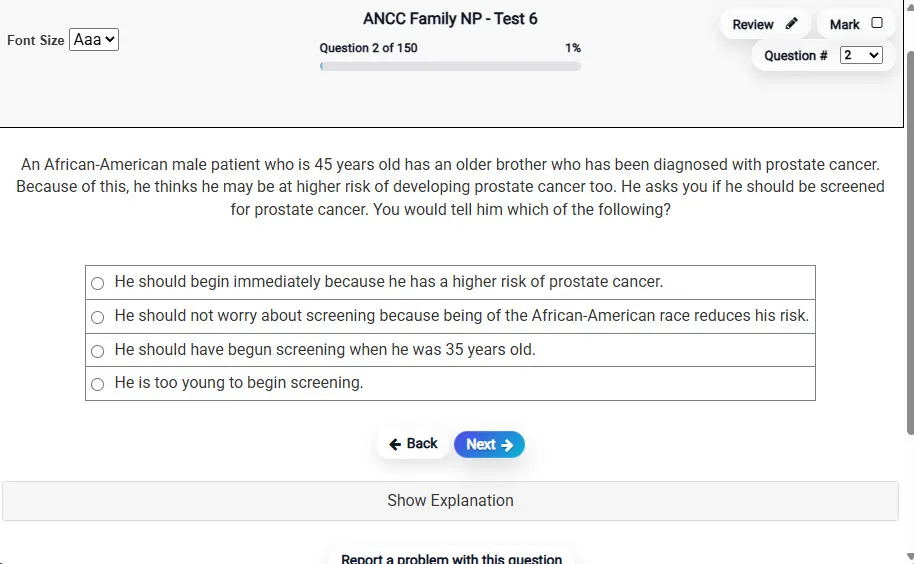
Answering a Question screen – Multiple-choice item view with navigation controls and progress tracker.
Answering a Question Multiple-choice item view with navigation controls and progress tracker.

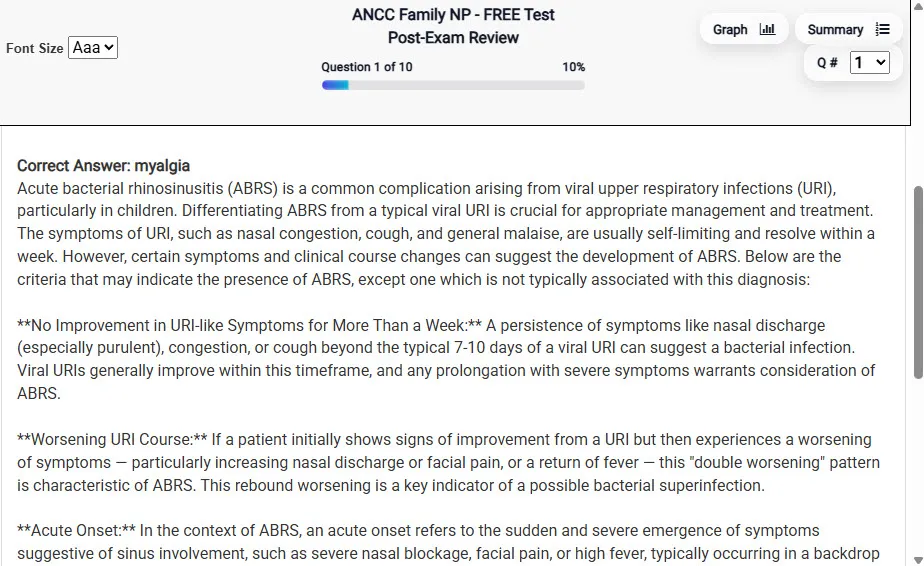
                           Detailed Explanation screen – 
                         Review mode showing chosen answer and rationale and references.
Detailed Explanation Review mode showing chosen answer and rationale and references.

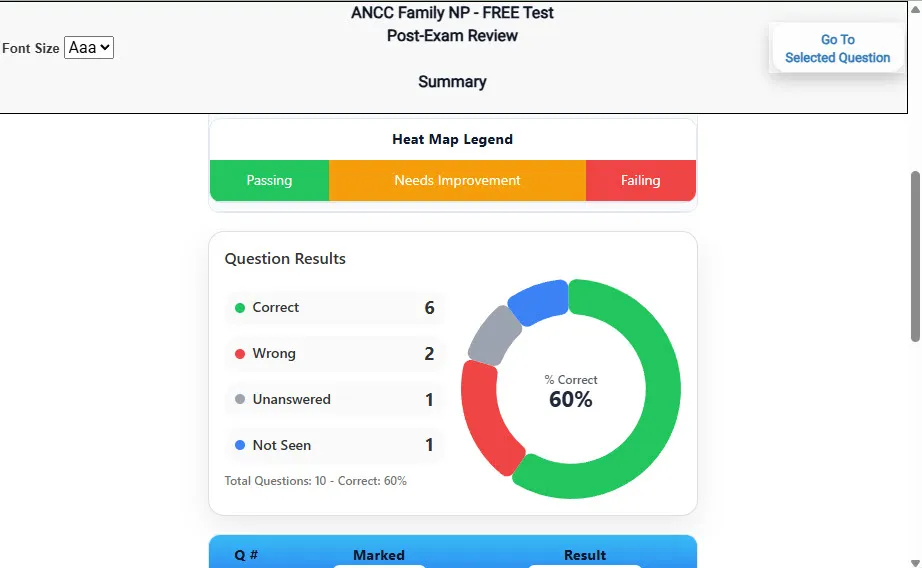
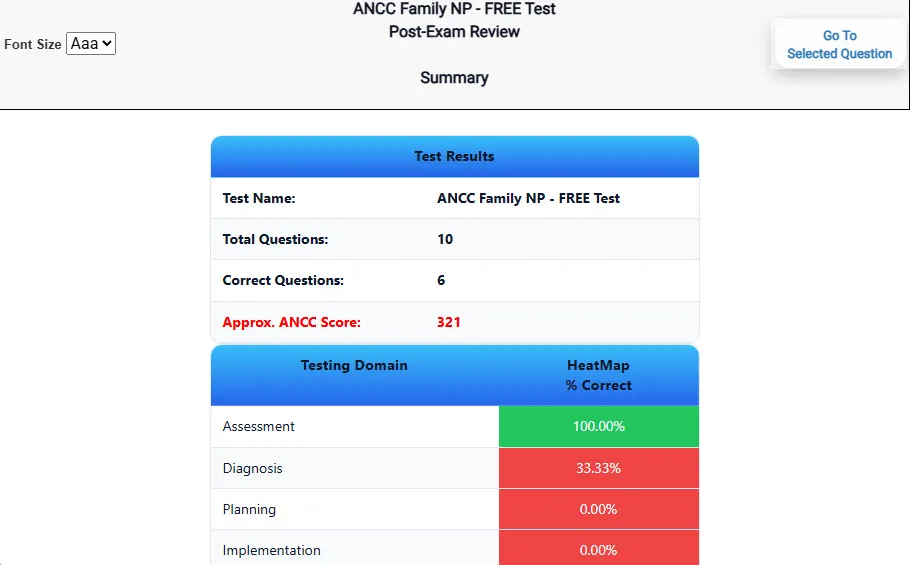
                           Review Summary 1 screen – 
                         Summary with counts for correct/wrong/unanswered and not seen items.
Review Summary 1 Summary with counts for correct/wrong/unanswered and not seen items.

                           Review Summary 2 screen – 
                         Advanced summary with category/domain breakdown and performance insights.
Review Summary 2 Advanced summary with category/domain breakdown and performance insights.

What Each Screen Shows

Answer Question Screen

  • Clean multiple-choice interface with progress bar.
  • Mark for review feature.
  • Matches real test pacing.

Detailed Explanation

  • Correct answer plus rationale.
  • Key concepts and guidelines highlighted.
  • Move between questions to fill knowledge gaps.

Review Summary 1

  • Overall results with total questions and scaled score.
  • Domain heatmap shows strengths and weaknesses.
  • Quick visual feedback on study priorities.

Review Summary 2

  • Chart of correct, wrong, unanswered, not seen.
  • Color-coded results for easy review.
  • Links back to missed items.

Top 10 Reasons to Use Exam Edge for your Praxis Special Education Teaching Students with Visual Impairments Exam Prep

  1. Focused on the Praxis Special Education Teaching Students with Visual Impairments Exam

    Our practice tests are built specifically for the Praxis SPED: Teaching Students with Visual Impairments exam — every question mirrors the real topics, format, and difficulty so you're studying exactly what matters.

  2. Real Exam Simulation

    We match the per-question time limits and pressure of the actual Praxis exam, so test day feels familiar and stress-free.

  3. 5 Full Practice Tests & 600 Unique Questions

    You'll have more than enough material to master every Praxis SPED: Teaching Students with Visual Impairments concept — no repeats, no fluff.

  4. Lower Cost Than a Retake

    Ordering 5 practice exams costs less than retaking the Praxis Special Education Teaching Students with Visual Impairments exam after a failure. One low fee could save you both time and money.

  5. Flexible Testing

    Need to step away mid-exam? Pick up right where you left off — with your remaining time intact.

  6. Instant Scoring & Feedback

    See your raw score and an estimated Praxis Special Education Teaching Students with Visual Impairments score immediately after finishing each practice test.

  7. Detailed Explanations for Every Question

    Review correct and incorrect answers with clear, step-by-step explanations so you truly understand each topic.

  8. Trusted & Accredited

    We're fully accredited by the Better Business Bureau and uphold the highest standards of trust and transparency.

  9. Web-Based & Always Available

    No software to install. Access your Praxis SPED: Teaching Students with Visual Impairments practice exams 24/7 from any computer or mobile device.

  10. Expert Support When You Need It

    Need extra help? Our specialized tutors are highly qualified and ready to support your Praxis exam prep.


Pass the Praxis Special Education Teaching Students with Visual Impairments Exam with Realistic Practice Tests from Exam Edge

Preparing for your upcoming Praxis Special Education Teaching Students with Visual Impairments (5282) Certification Exam can feel overwhelming — but the right practice makes all the difference. Exam Edge gives you the tools, structure, and confidence to pass on your first try. Our online practice exams are built to match the real Praxis SPED: Teaching Students with Visual Impairments exam in content, format, and difficulty.

  • 📝 5 Praxis Special Education Teaching Students with Visual Impairments Practice Tests: Access 5 full-length exams with 120 questions each, covering every major Praxis Special Education Teaching Students with Visual Impairments topic in depth.
  • Instant Online Access: Start practicing right away — no software, no waiting.
  • 🧠 Step-by-Step Explanations: Understand the reasoning behind every correct answer so you can master Praxis SPED: Teaching Students with Visual Impairments exam concepts.
  • 🔄 Retake Each Exam Up to 4 Times: Build knowledge through repetition and track your improvement over time.
  • 🌐 Web-Based & Available 24/7: Study anywhere, anytime, on any device.
  • 🧘 Boost Your Test-Day Confidence: Familiarity with the Praxis format reduces anxiety and helps you perform under pressure.

These Praxis Special Education Teaching Students with Visual Impairments practice exams are designed to simulate the real testing experience by matching question types, timing, and difficulty level. This approach helps you get comfortable not just with the exam content, but also with the testing environment, so you walk into your exam day focused and confident.


Exam Edge Praxis Reviews


I failed the Praxis Math test five times before I found your site. After taking all your practice tests, on my next attempt I passed by five points! I can honestly say this site is the reason I passed. Thank you!!!

Nikki P, Tennessee

Just wanted to say thanks for helping me pass the Praxis I Reading! Your practice tests and especially your explanations are great. They gave me the confidence I needed! Now I can student teach this fall. I'm so glad I found PraxisReading.com!

Denise C, Florida

Thank you so much. I just received my results in the mail. I scored a 179 and passed the Praxis I Writing! I'll never have to worry about retaking this test again! PraxisWriting.com is great. I told all my friends about this site.

Susan K, Virginia

I failed the Parapro test four times before I found your site. After taking all your practice tests, on my next attempt I passed by seven points! I can honestly say that this site is the reason I passed. Thank you!!!

Rebecca S, Texas

Hi! Just returned from taking my Praxis computerized and am happy to say that I passed with a 175. The last time I took the test I missed by 1 point. Your tests definitely made the difference for me! The set up was so similar to the test and the types of questions were also similar that I felt ve ...
Read More
Brad Y, Pennsylvania

I have taken the math praxis 3 times and wanted to give up. I ordered the bundle of math tests and I passed the math praxis today. Thank you for all the help.

Jacob D, South Carolina


Praxis Special Education Teaching Students with Visual Impairments Aliases Test Name

Here is a list of alternative names used for this exam.

  • Praxis Special Education Teaching Students with Visual Impairments
  • Praxis Special Education Teaching Students with Visual Impairments test
  • Praxis Special Education Teaching Students with Visual Impairments Certification Test
  • Praxis SPED: Teaching Students with Visual Impairments test
  • Praxis
  • Praxis 5282
  • 5282 test
  • Praxis Special Education Teaching Students with Visual Impairments (5282)
  • Special Education Teaching Students with Visual Impairments certification