This is the content of the pop-over!

Praxis Technology Education (5051) Practice Tests & Test Prep by Exam Edge


Praxis Technology Education  product image
(5.0)
Based on 28 Reviews

  • Real Exam Simulation: Timed questions and matching content build comfort for your Praxis Technology Education test day.
  • Instant, 24/7 Access: Web-based Praxis Technology Education practice exams with no software needed.
  • Clear Explanations: Step-by-step answers and explanations for your Praxis exam to strengthen understanding.
  • Boosted Confidence: Reduces anxiety and improves test-taking skills to ace your Praxis Technology Education (5053).

Featured on

Praxis Technology Education Online Practice Test Bundles

BEST VALUE
10 practice tests

$99.50

$399.50

SAVE $300

Only $9.95 per test!

  • 100% Pass Guarantee
  • 10 online practice tests
  • 120 questions per test
  • Bonus: 100 Flash Cards + Study Guide
  • Instant access
  • Detailed Explanations
  • Practice tests never expire
  • Timed, untimed, or study guide mode
5 practice tests

$69.75

$199.75

SAVE $130

Only $13.95 per test!

  • 5 online practice tests
  • 120 questions per test
  • Bonus: 100 Flash Cards + Study Guide
  • Instant access
  • Detailed Explanations
  • Practice tests never expire
  • Timed, untimed, or study guide mode
1 practice test

$39.95

  • 1 online practice test
  • 120 questions per test
  • Instant access
  • Detailed Explanations
  • Practice tests never expire
  • Timed, untimed, or study guide mode
Quick Select
Tap to choose a bundle

** All Prices are in US Dollars (USD) **


Praxis Technology Education (5053) Resources

Jump to the section you need most.

Understanding the exact breakdown of the Praxis Technology Education test will help you know what to expect and how to most effectively prepare. The Praxis Technology Education has 120 multiple-choice questions . The exam will be broken down into the sections below:

Praxis Technology Education Exam Blueprint
Domain Name % Number of
Questions
Technology and Society 15% 18
Technological Design and Problem Solving 20% 24
Energy - Power Transportation 15% 18
Information and Communication Technologies 15% 18
Manufacturing and Construction Technologies 15% 18
Pedagogical and Professional Studies 20% 24

Praxis Technology Education Study Tips by Domain

  • Analyze how technologies shift social systems (work, family, health, education) and apply a clear cause-and-effect chain; red flag: claiming a technology is “neutral” without noting who benefits and who bears costs.
  • Evaluate ethical implications using stakeholder and consequence lenses (privacy, equity, safety, sustainability); common trap: treating legality as equivalent to ethical acceptability.
  • Apply responsible digital citizenship (data privacy, cybersecurity hygiene, intellectual property) in school and community contexts; cue: if personal data is collected, use the minimum necessary and get informed consent.
  • Interpret technology policy and regulation basics (accessibility, safety standards, environmental rules, content filtering) and connect them to classroom practice; red flag: ignoring ADA/Section 504-type accessibility needs when selecting tools.
  • Assess environmental and life-cycle impacts (resource extraction, energy use, e-waste, recycling) and propose mitigation; priority rule: prefer reduce/reuse/repair before recycle when comparing options.
  • Identify equity and access issues (digital divide, bias in algorithms, assistive tech needs) and propose inclusive solutions; contraindication: adopting an “AI” or analytics tool without checking for bias, transparency, and accommodations.
  • Use an iterative design process (define criteria/constraints → research → generate ideas → prototype → test → refine) and document decisions; red flag: jumping to a solution without measurable criteria for success.
  • Write clear problem statements and requirements with explicit constraints (cost, size, time, safety, materials); common trap: confusing a “want” with a nonnegotiable constraint.
  • Apply systems thinking (inputs, processes, outputs, feedback, and controls) to diagnose failures; priority rule: change one variable at a time when troubleshooting to avoid false conclusions.
  • Use data to drive design choices (test plans, variables, repeated trials, and simple analysis of results); red flag: relying on opinions or a single trial to claim a design is “best.”
  • Select materials and components based on properties and function (strength, flexibility, conductivity, tolerance); common trap: overdesigning by adding features that reduce reliability or exceed constraints.
  • Communicate solutions with appropriate technical representations (sketches, orthographic/isometric views, dimensions, and specs) and maintain a design log; red flag: missing units or tolerances that make a build nonrepeatable.
  • Differentiate energy forms and transfers (conduction, convection, radiation) and apply conservation of energy; red flag: students often confuse heat (energy transfer) with temperature (measure of average kinetic energy).
  • Analyze power systems using P = VI and Ohm’s law, including series vs. parallel circuits; common trap: assuming current is the same in parallel branches (it’s voltage that stays constant across branches).
  • Compare AC vs. DC generation, transmission, and distribution, including why high-voltage transmission reduces losses; priority rule: line losses scale with I²R, so stepping up voltage to reduce current is key.
  • Evaluate energy resources (fossil, nuclear, solar, wind, hydro, biomass) using efficiency, capacity factor, and environmental impact; threshold cue: distinguish power (kW) from energy (kWh) when interpreting usage and costs.
  • Apply fundamentals of thermodynamics and heat engines to transportation and power generation; red flag: any claim of 100% efficiency violates the second law (waste heat is unavoidable).
  • Explain transportation technologies (internal combustion, electric, hybrid, fuel cell) and tradeoffs in torque, efficiency, range, and infrastructure; common trap: equating battery energy density with gasoline without accounting for drivetrain efficiency and usable capacity limits.
  • Choose the right network type and topology (LAN/WAN, star/bus/mesh) for the scenario; red flag: proposing a bus topology for a modern classroom lab without addressing single-cable failure risk.
  • Differentiate analog vs. digital signals and match media (twisted pair/coax/fiber/wireless) to bandwidth and interference needs; common trap: recommending fiber as a “wireless” solution or ignoring EMI near motors.
  • Apply cybersecurity basics (least privilege, strong authentication, patching, backups) with classroom constraints; priority rule: treat student devices as untrusted and segment them from administrative systems.
  • Use data representation concepts (bits/bytes, binary/hex, compression, file formats) to justify storage and transfer choices; threshold cue: confirm units (Mb vs. MB) before computing download times.
  • Explain how the Internet works at a high level (IP addressing, DNS, routing, client-server) and troubleshoot logically; red flag: confusing DNS failures with lack of physical connectivity.
  • Select appropriate software tools and communication methods (productivity, collaboration, assistive tech) while meeting accessibility and privacy expectations; common trap: using cloud tools without checking FERPA-aligned permissions and sharing settings.
  • Differentiate primary shaping processes (casting, molding, forming) from secondary operations (machining, joining, finishing); red flag: choosing a process that can’t meet a specified tolerance or surface finish without costly rework.
  • Select appropriate material families (wood, metals, polymers, composites) based on strength-to-weight, corrosion/decay resistance, and cost; common trap: ignoring grain direction or moisture content in wood leading to warping and joint failure.
  • Apply correct measurement and layout practices (precision tools, datum references, allowable tolerances); priority rule: “measure twice, cut once” doesn’t help if the reference edge is wrong or out of square.
  • Match joining methods to loads and service conditions (fasteners, adhesives, welding, soldering/brazing, mechanical joints); contraindication: adhesive bonding on oily/dirty surfaces or without proper clamp time causes early delamination.
  • Interpret construction documents (plans, elevations, sections, symbols, specifications) and sequence work from site prep to finish; red flag: missing a note in the specs (e.g., fire rating, fastener type) that overrides what the drawing seems to show.
  • Prioritize shop and jobsite safety (PPE, guarding, lockout/tagout, ventilation, dust control, chemical handling); common trap: bypassing guards or using the wrong blade/bit RPM—most injuries occur during setup and tool changes.
  • Write measurable objectives aligned to standards using clear performance verbs and criteria (e.g., “given a circuit kit, students will wire… with 90% accuracy”)—red flag: objectives that only say “understand” or “learn about” with no evidence of mastery.
  • Use backward design (outcomes → assessments → lessons) and ensure tasks match the target (procedural skill vs. conceptual knowledge)—common trap: a multiple-choice test used to evaluate hands-on fabrication or troubleshooting ability.
  • Prioritize lab safety and risk management: PPE, tool/machine training, supervision ratios, emergency procedures, and documentation—contraindication: allowing student tool use without explicit safety instruction, checks, and enforced procedures.
  • Differentiate for diverse learners with UDL and accommodations/modifications (IEP/504/ELL) such as visuals, chunking, alternative outputs, and scaffolded tool use—red flag: changing task difficulty without preserving the same learning goal when an accommodation is needed.
  • Assess both process and product with analytic rubrics, checkpoints, and student reflection/engineering notebooks—priority rule: grade the documented design process and safety behaviors, not just whether the final prototype “works.”
  • Maintain professional, ethical, and legal practices (copyright/fair use, digital citizenship, privacy, equitable access, and safe classroom culture)—common trap: using student images/work online or copying plans/media without permission or proper attribution.


Built to Fit Into Your Busy Life

Everything you need to prepare with confidence—without wasting a minute.

Three Study Modes

Timed, No Time Limit, or Explanation mode.

Actionable Analytics

Heatmaps and scaled scores highlight weak areas.

High-Yield Rationales

Concise explanations emphasize key concepts.

Realistic Interface

Matches the feel of the actual exam environment.

Accessible by Design

Clean layout reduces cognitive load.

Anytime, Anywhere

Web-based access 24/7 on any device.
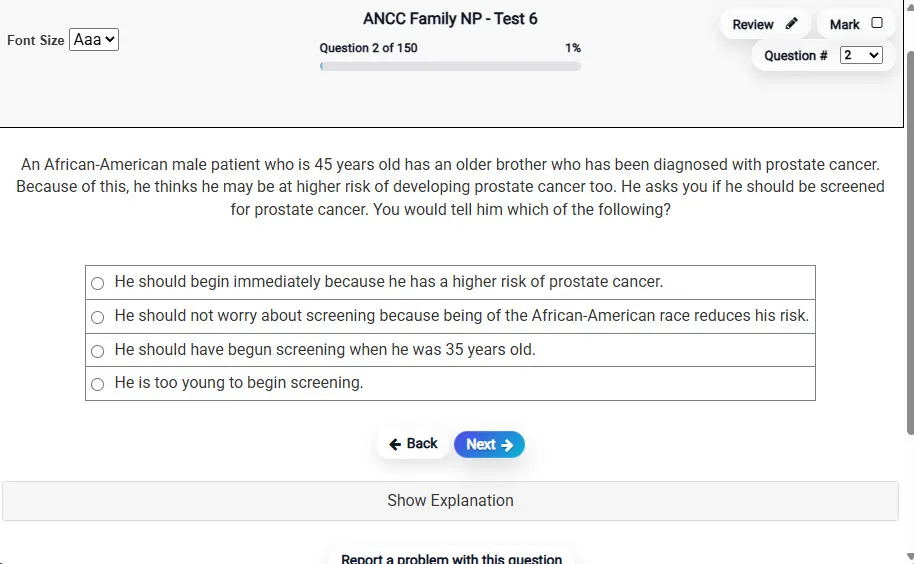
Answering a Question screen – Multiple-choice item view with navigation controls and progress tracker.
Answering a Question Multiple-choice item view with navigation controls and progress tracker.

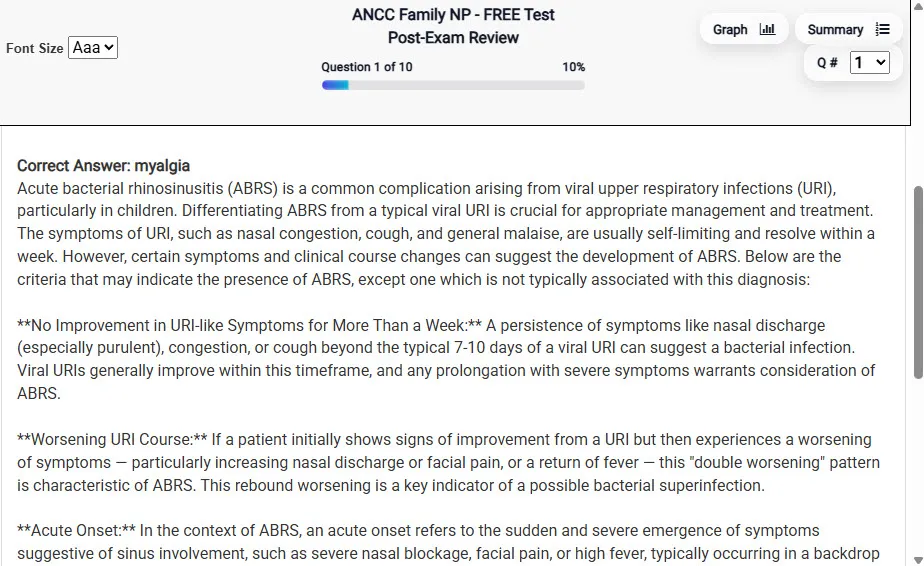
                           Detailed Explanation screen – 
                         Review mode showing chosen answer and rationale and references.
Detailed Explanation Review mode showing chosen answer and rationale and references.

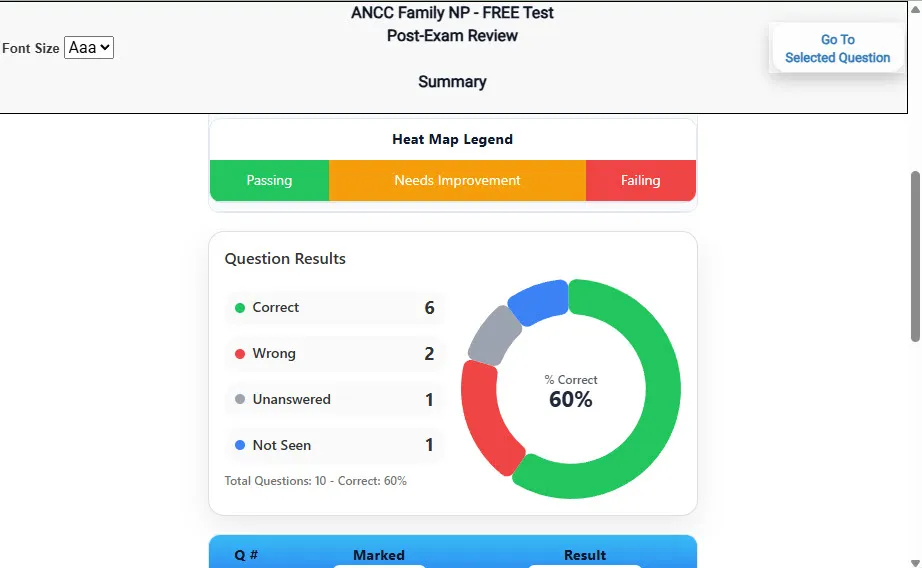
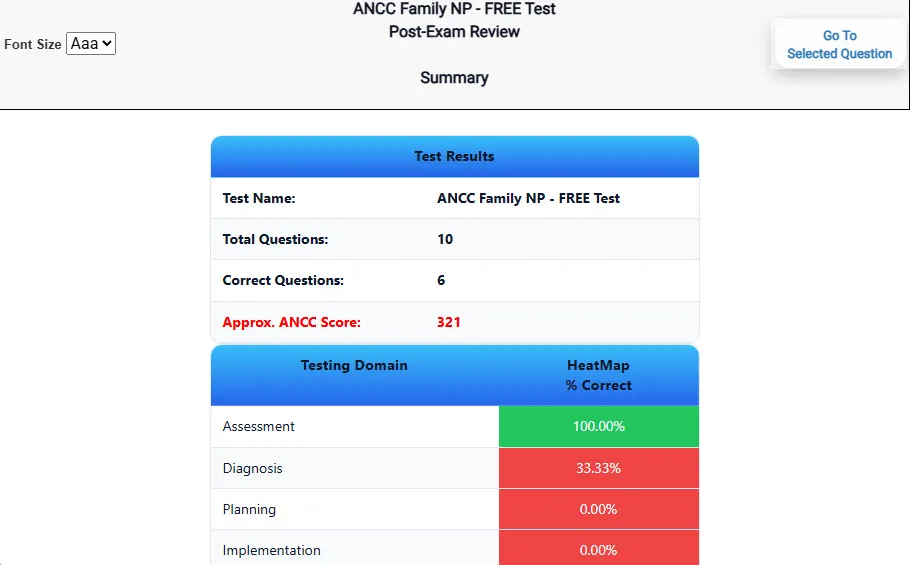
                           Review Summary 1 screen – 
                         Summary with counts for correct/wrong/unanswered and not seen items.
Review Summary 1 Summary with counts for correct/wrong/unanswered and not seen items.

                           Review Summary 2 screen – 
                         Advanced summary with category/domain breakdown and performance insights.
Review Summary 2 Advanced summary with category/domain breakdown and performance insights.

What Each Screen Shows

Answer Question Screen

  • Clean multiple-choice interface with progress bar.
  • Mark for review feature.
  • Matches real test pacing.

Detailed Explanation

  • Correct answer plus rationale.
  • Key concepts and guidelines highlighted.
  • Move between questions to fill knowledge gaps.

Review Summary 1

  • Overall results with total questions and scaled score.
  • Domain heatmap shows strengths and weaknesses.
  • Quick visual feedback on study priorities.

Review Summary 2

  • Chart of correct, wrong, unanswered, not seen.
  • Color-coded results for easy review.
  • Links back to missed items.

Top 10 Reasons to Use Exam Edge for your Praxis Technology Education Exam Prep

  1. Focused on the Praxis Technology Education Exam

    Our practice tests are built specifically for the Praxis Technology Education exam — every question mirrors the real topics, format, and difficulty so you're studying exactly what matters.

  2. Real Exam Simulation

    We match the per-question time limits and pressure of the actual Praxis exam, so test day feels familiar and stress-free.

  3. 10 Full Practice Tests & 1,200 Unique Questions

    You'll have more than enough material to master every Praxis Technology Education concept — no repeats, no fluff.

  4. Lower Cost Than a Retake

    Ordering 5 practice exams costs less than retaking the Praxis Technology Education exam after a failure. One low fee could save you both time and money.

  5. Flexible Testing

    Need to step away mid-exam? Pick up right where you left off — with your remaining time intact.

  6. Instant Scoring & Feedback

    See your raw score and an estimated Praxis Technology Education score immediately after finishing each practice test.

  7. Detailed Explanations for Every Question

    Review correct and incorrect answers with clear, step-by-step explanations so you truly understand each topic.

  8. Trusted & Accredited

    We're fully accredited by the Better Business Bureau and uphold the highest standards of trust and transparency.

  9. Web-Based & Always Available

    No software to install. Access your Praxis Technology Education practice exams 24/7 from any computer or mobile device.

  10. Expert Support When You Need It

    Need extra help? Our specialized tutors are highly qualified and ready to support your Praxis exam prep.


Pass the Praxis Technology Education Exam with Realistic Practice Tests from Exam Edge

Preparing for your upcoming Praxis Technology Education (5053) Certification Exam can feel overwhelming — but the right practice makes all the difference. Exam Edge gives you the tools, structure, and confidence to pass on your first try. Our online practice exams are built to match the real Praxis Technology Education exam in content, format, and difficulty.

  • 📝 10 Praxis Technology Education Practice Tests: Access 10 full-length exams with 120 questions each, covering every major Praxis Technology Education topic in depth.
  • Instant Online Access: Start practicing right away — no software, no waiting.
  • 🧠 Step-by-Step Explanations: Understand the reasoning behind every correct answer so you can master Praxis Technology Education exam concepts.
  • 🔄 Retake Each Exam Up to 4 Times: Build knowledge through repetition and track your improvement over time.
  • 🌐 Web-Based & Available 24/7: Study anywhere, anytime, on any device.
  • 🧘 Boost Your Test-Day Confidence: Familiarity with the Praxis format reduces anxiety and helps you perform under pressure.

These Praxis Technology Education practice exams are designed to simulate the real testing experience by matching question types, timing, and difficulty level. This approach helps you get comfortable not just with the exam content, but also with the testing environment, so you walk into your exam day focused and confident.


Exam Edge Praxis Reviews


I decided to take the Technology Praxis II about 2 weeks ago to try and get a job teaching technology next year... I am already a Biology teacher. Last week, the day before I left on vacation, I got a job offer... based on passing the Praxis II 5051. That gave me two days to get ready.... I purchase ...
Read More
Mindy , New Jersey

I've taken 3 practice test so far and they've been very helpful! Wording on some questions has definitely made me a more cautious reader.

Chris , Bridgeport, Connecticut

I failed the Praxis Math test five times before I found your site. After taking all your practice tests, on my next attempt I passed by five points! I can honestly say this site is the reason I passed. Thank you!!!

Nikki P, Tennessee

Just wanted to say thanks for helping me pass the Praxis I Reading! Your practice tests and especially your explanations are great. They gave me the confidence I needed! Now I can student teach this fall. I'm so glad I found PraxisReading.com!

Denise C, Florida

Thank you so much. I just received my results in the mail. I scored a 179 and passed the Praxis I Writing! I'll never have to worry about retaking this test again! PraxisWriting.com is great. I told all my friends about this site.

Susan K, Virginia

I failed the Parapro test four times before I found your site. After taking all your practice tests, on my next attempt I passed by seven points! I can honestly say that this site is the reason I passed. Thank you!!!

Rebecca S, Texas


Praxis Technology Education Aliases Test Name

Here is a list of alternative names used for this exam.

  • Praxis Technology Education
  • Praxis Technology Education test
  • Praxis Technology Education Certification Test
  • Praxis
  • Praxis 5053
  • 5053 test
  • Praxis Technology Education (5053)
  • Technology Education certification