This is the content of the pop-over!

PECT Special Ed PreK-8 ( Special Ed PreK-8) Practice Tests & Test Prep by Exam Edge


PECT Special Education PreK-8  product image
(5.0)
Based on 34 Reviews

  • Real Exam Simulation: Timed questions and matching content build comfort for your PECT Special Ed PreK-8 test day.
  • Instant, 24/7 Access: Web-based PECT Special Education PreK-8 practice exams with no software needed.
  • Clear Explanations: Step-by-step answers and explanations for your PECT exam to strengthen understanding.
  • Boosted Confidence: Reduces anxiety and improves test-taking skills to ace your PECT Special Education PreK-8 (PSEK-8).

Featured on

PECT Special Education PreK-8 Online Practice Test Bundles

BEST VALUE
20 practice tests

$174.00

$799.00

SAVE $625

Only $8.70 per test!

  • 100% Pass Guarantee
  • 20 online practice tests
  • 82 questions per test
  • Bonus: 100 Flash Cards + Study Guide
  • Instant access
  • Detailed Explanations
  • Practice tests never expire
  • Timed, untimed, or study guide mode
MOST POPULAR
10 practice tests

$99.50

$399.50

SAVE $300

Only $9.95 per test!

  • 10 online practice tests
  • 82 questions per test
  • Bonus: 100 Flash Cards + Study Guide
  • Instant access
  • Detailed Explanations
  • Practice tests never expire
  • Timed, untimed, or study guide mode
5 practice tests

$69.75

$199.75

SAVE $130

Only $13.95 per test!

  • 5 online practice tests
  • 82 questions per test
  • Bonus: 100 Flash Cards
  • Instant access
  • Detailed Explanations
  • Practice tests never expire
  • Timed, untimed, or study guide mode
1 practice test

$39.95

  • 1 online practice test
  • 82 questions per test
  • Instant access
  • Detailed Explanations
  • Practice tests never expire
  • Timed, untimed, or study guide mode
Quick Select
Tap to choose a bundle

** All Prices are in US Dollars (USD) **


PECT Special Ed PreK-8 (PSEK-8) Resources

Jump to the section you need most.

Understanding the exact breakdown of the PECT Special Education PreK-8 test will help you know what to expect and how to most effectively prepare. The PECT Special Education PreK-8 has multiple-choice questions . The exam will be broken down into the sections below:

PECT Special Education PreK-8 Exam Blueprint
Domain Name % Number of
Questions
Module I  
     Foundations and Professional Practice 33% 14
     Understanding Students with Disabilities 33% 14
     Assessment and Program Planning and 33% 14
Module II  
     Inclusive Learning Environments 50% 21
     Delivery of Specially Designed Instruction 50% 21

PECT Special Education PreK-8 Study Tips by Domain

  • Confirm what Module I covers and its test format (selected-response vs. constructed-response) before you study; red flag: using Module II materials and missing Module I competencies.
  • Use the official PECT objectives to build a checklist of subskills for Module I and track weak spots weekly; common trap: studying broad special education content without aligning to listed objectives.
  • Practice time management with a full-length Module I timed run-through early, then again near test day; priority rule: don’t let one difficult item consume time needed for easier points.
  • For scenario-based items in Module I, answer from what the school team should do first (data review, documentation, parent communication), not what feels helpful; common trap: skipping required procedural steps.
  • When eliminating options, watch for absolute language (“always,” “never”) and interventions not supported by the prompt; red flag: selecting an intensive service without evidence of need in the vignette.
  • Plan accommodations for test day (ID, arrival time, breaks) and verify registration details for Module I specifically; contraindication: assuming policies for another exam or module apply without checking.
  • Apply IDEA/Chapter 14 essentials to practice: ensure IEPs include measurable annual goals, specially designed instruction, and services tied to present levels—red flag if goals lack criteria/conditions or can’t be progress-monitored.
  • Follow LRE and continuum-of-placements rules: start with general education with supports and justify any removal with data—common trap is recommending a more restrictive setting based on disability label or convenience.
  • Protect confidentiality and records (FERPA): share student information only with authorized team members and maintain secure documentation—red flag is discussing identifiable details in public areas or unsecured email.
  • Use ethical, evidence-based decision-making: select interventions supported by data and align them to student needs—priority rule is to adjust instruction when progress monitoring shows inadequate response rather than waiting for annual review.
  • Collaborate within multidisciplinary teams: define roles, communicate clearly, and document parent input and notices—common trap is proceeding with evaluation/services without proper written consent or required timelines.
  • Demonstrate cultural and linguistic responsiveness: distinguish disability from language acquisition or cultural factors using multiple data sources—red flag is relying on a single test score or noncompliant assessment accommodations.
  • Differentiate IDEA disability categories by required educational impact (not just a medical label); red flag: identifying a disability without documenting adverse effect on educational performance.
  • Apply developmental expectations for PreK–8 across domains (cognitive, language, social-emotional, motor, adaptive); common trap: misattributing second-language acquisition or cultural differences to a disability.
  • Recognize characteristics of high-incidence disabilities (SLD, ADHD under OHI, speech/language impairment) and align likely instructional needs; priority rule: suspected SLD requires evidence of insufficient progress with appropriate instruction and data-based documentation.
  • Identify signs and educational implications of low-incidence disabilities (ASD, ID, sensory impairments, physical/health disabilities); contraindication: assuming a student with a sensory loss has an intellectual disability without appropriate assessment data.
  • Understand how trauma, mental health needs, and behavior can mimic disability-related challenges; red flag: evaluating based only on behavior incidents rather than patterns across settings and skill deficits.
  • Use assistive technology and accommodations based on functional need and access to the general curriculum; common trap: providing accommodations that change the construct being assessed (i.e., a modification) without IEP team decision.
  • Use multiple data sources (screening, diagnostic, progress monitoring, observations, work samples) to make eligibility and planning decisions—red flag: relying on a single test score or one setting’s data.
  • Ensure assessments are valid and accessible (e.g., language needs, sensory/motor supports, appropriate accommodations) and document what was changed—common trap: providing an accommodation that alters the construct being measured.
  • Interpret evaluation results to identify present levels and disability-related needs, then connect them directly to goals and services—priority rule: every IEP goal must trace back to a documented need in the PLAAFP.
  • Write measurable annual goals with clear conditions, observable behavior, and mastery criteria (e.g., 80% across 3 consecutive sessions)—red flag: vague verbs like “understand” or missing criteria/timeframe.
  • Select progress-monitoring tools that match the skill and frequency needed (often weekly/biweekly for targeted skills) and define decision rules—common trap: collecting data but not specifying when to adjust instruction.
  • Plan services and supports (SDI, related services, assistive technology, accommodations/modifications) based on least restrictive environment considerations—contraindication: choosing a more restrictive placement before documenting attempts/supports in less restrictive settings.
  • Know Module II is a separate scoreable section—don’t assume strong performance on Module I can compensate, so budget time to answer every Module II question.
  • When items ask for the “most appropriate” action, prioritize compliance-driven steps first (e.g., implement current IEP as written while concerns are addressed)—red flag: skipping to a new plan without team process.
  • For scenario questions, select responses grounded in data and documentation (work samples, progress monitoring, observation)—common trap: choosing an intervention based only on a label or hunch.
  • Differentiate accommodations from modifications; pick the option that preserves the intended standard unless the scenario indicates otherwise—red flag: lowering expectations when an accommodation would suffice.
  • Choose answers that reflect collaborative practice (family communication, related services input, general education coordination)—priority rule: decisions affecting services belong to the IEP team, not a single staff member.
  • Watch for confidentiality boundaries in vignettes; share student information only with legitimate educational interest—common trap: discussing a student in public spaces or with uninvolved staff.
  • Use least restrictive environment (LRE) decision-making based on documented supports and services needed to access the general curriculum—red flag: placing a student in a more restrictive setting because of convenience, staffing, or disability label.
  • Apply proactive classroom management (clear routines, expectations, and reinforcement) before punitive responses—common trap: relying on repeated suspension/office referrals without a behavior intervention plan (BIP) tied to data.
  • Implement differentiated supports within inclusive settings (accommodations vs. modifications) and ensure they match IEP requirements—red flag: modifying standards when only accommodations are authorized.
  • Plan accessible instruction using UDL principles (multiple means of engagement, representation, and action/expression)—priority rule: build access first rather than adding last-minute “fixes” for individual students.
  • Coordinate with related service providers and paraprofessionals using defined roles and prompting hierarchies—common trap: paraprofessional over-support that creates dependence and reduces peer interaction.
  • Promote positive peer relationships and participation through structured cooperative learning and social supports—red flag: isolating students with disabilities via separate seating, separate materials, or constant adult proximity.
  • Write IEP goals that are observable and measurable (condition/behavior/criterion) and align them to present levels; red flag: vague verbs like “understand” or “improve” with no performance criterion.
  • Use explicit, systematic instruction (model–lead–test with cumulative review) for skill deficits; common trap: providing extra practice without correcting errors or increasing scaffolds.
  • Match accommodations and modifications to the specific barrier and document them consistently across IEP, lesson plans, and assessments; red flag: changing the construct (modification) when only access supports (accommodation) are intended.
  • Implement progress monitoring with a set schedule, the same measure over time, and a decision rule for instructional changes; priority rule: if data show flat growth across multiple probes, adjust intensity (time, grouping, prompting) rather than waiting for the annual review.
  • Differentiate instruction using flexible grouping, task analysis, and prompting/fading to promote independence; red flag: overprompting (hand-over-hand or verbal cues) that is not systematically faded, creating prompt dependence.
  • Plan for generalization and maintenance by teaching skills across settings/materials/people and coordinating with related services; common trap: success only in the resource/therapy setting with no plan to transfer to the general education routine.


Built to Fit Into Your Busy Life

Everything you need to prepare with confidence—without wasting a minute.

Three Study Modes

Timed, No Time Limit, or Explanation mode.

Actionable Analytics

Heatmaps and scaled scores highlight weak areas.

High-Yield Rationales

Concise explanations emphasize key concepts.

Realistic Interface

Matches the feel of the actual exam environment.

Accessible by Design

Clean layout reduces cognitive load.

Anytime, Anywhere

Web-based access 24/7 on any device.
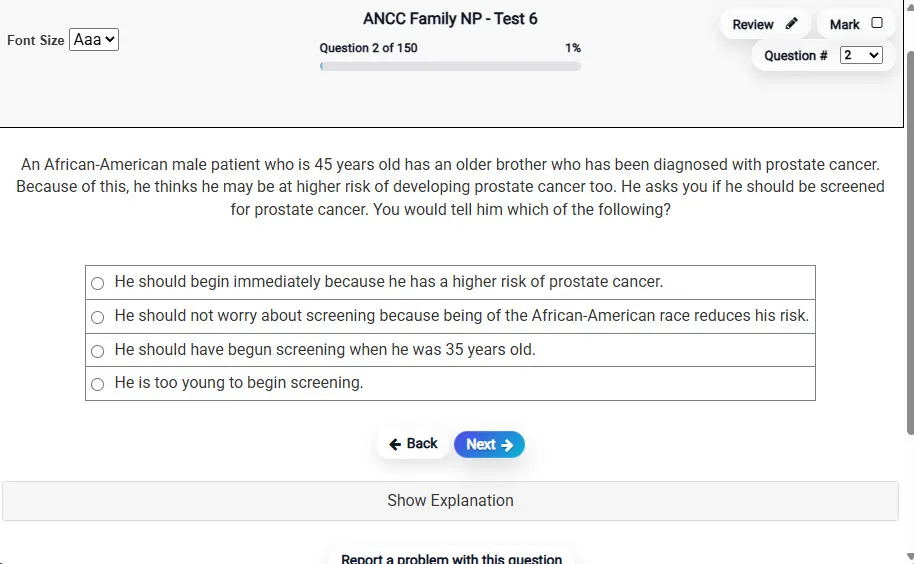
Answering a Question screen – Multiple-choice item view with navigation controls and progress tracker.
Answering a Question Multiple-choice item view with navigation controls and progress tracker.

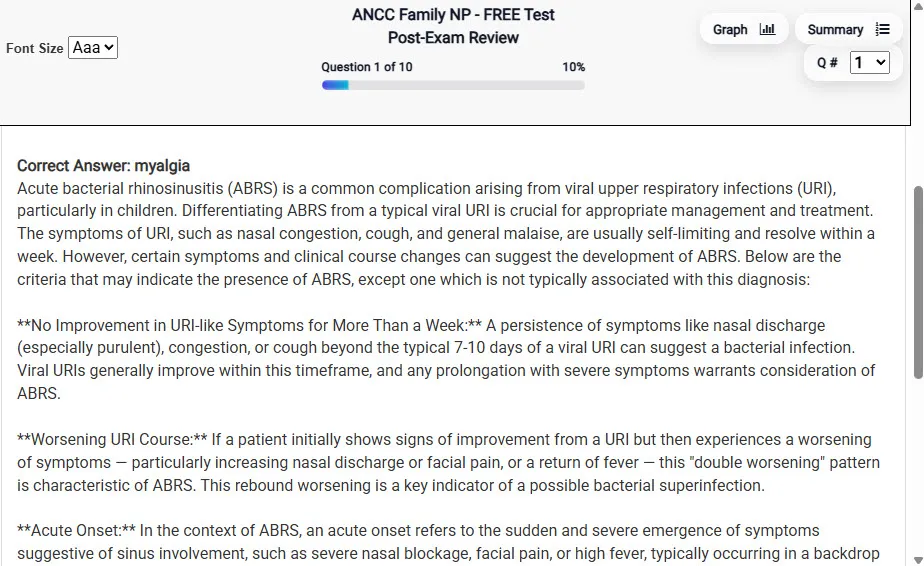
                           Detailed Explanation screen – 
                         Review mode showing chosen answer and rationale and references.
Detailed Explanation Review mode showing chosen answer and rationale and references.

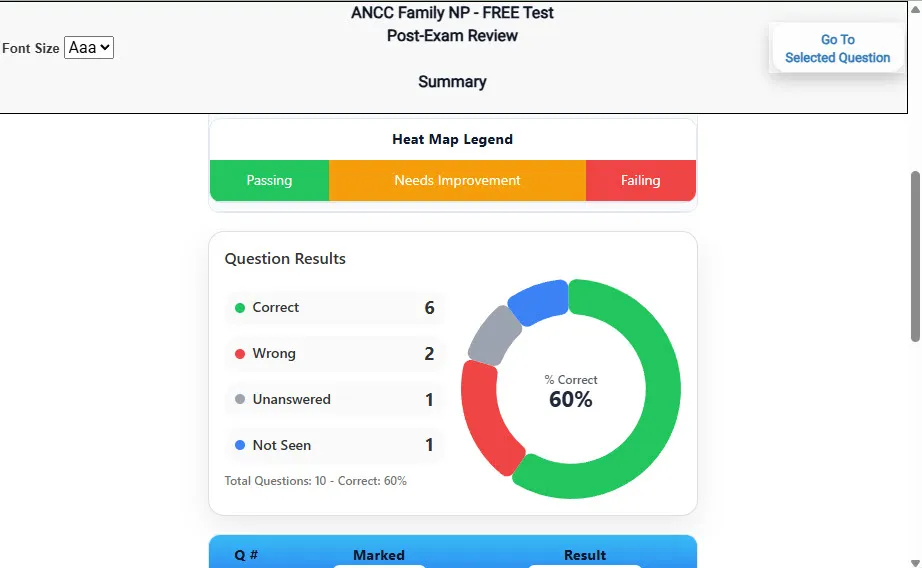
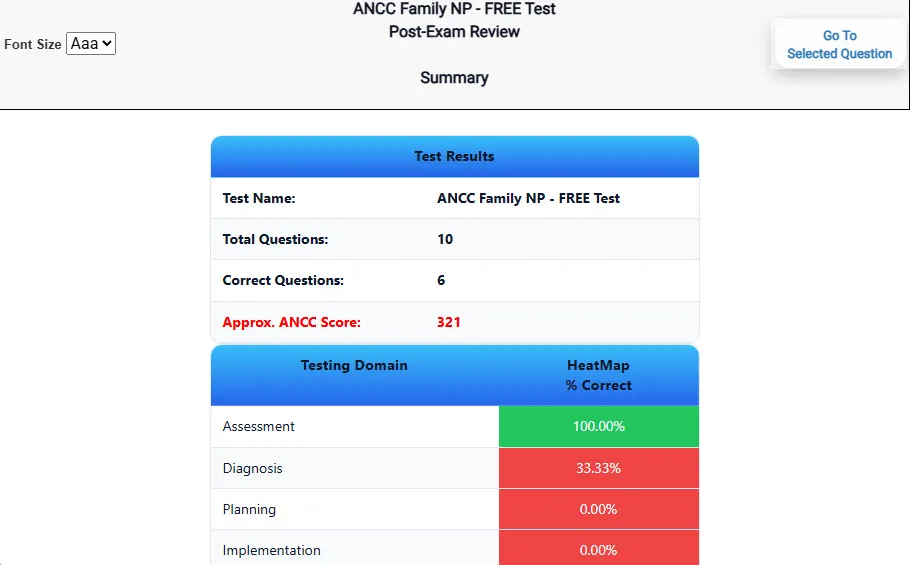
                           Review Summary 1 screen – 
                         Summary with counts for correct/wrong/unanswered and not seen items.
Review Summary 1 Summary with counts for correct/wrong/unanswered and not seen items.

                           Review Summary 2 screen – 
                         Advanced summary with category/domain breakdown and performance insights.
Review Summary 2 Advanced summary with category/domain breakdown and performance insights.

What Each Screen Shows

Answer Question Screen

  • Clean multiple-choice interface with progress bar.
  • Mark for review feature.
  • Matches real test pacing.

Detailed Explanation

  • Correct answer plus rationale.
  • Key concepts and guidelines highlighted.
  • Move between questions to fill knowledge gaps.

Review Summary 1

  • Overall results with total questions and scaled score.
  • Domain heatmap shows strengths and weaknesses.
  • Quick visual feedback on study priorities.

Review Summary 2

  • Chart of correct, wrong, unanswered, not seen.
  • Color-coded results for easy review.
  • Links back to missed items.

Top 10 Reasons to Use Exam Edge for your PECT Special Education PreK-8 Exam Prep

  1. Focused on the PECT Special Education PreK-8 Exam

    Our practice tests are built specifically for the PECT Special Ed PreK-8 exam — every question mirrors the real topics, format, and difficulty so you're studying exactly what matters.

  2. Real Exam Simulation

    We match the per-question time limits and pressure of the actual PECT exam, so test day feels familiar and stress-free.

  3. 20 Full Practice Tests & 1,640 Unique Questions

    You'll have more than enough material to master every PECT Special Ed PreK-8 concept — no repeats, no fluff.

  4. Lower Cost Than a Retake

    Ordering 5 practice exams costs less than retaking the PECT Special Education PreK-8 exam after a failure. One low fee could save you both time and money.

  5. Flexible Testing

    Need to step away mid-exam? Pick up right where you left off — with your remaining time intact.

  6. Instant Scoring & Feedback

    See your raw score and an estimated PECT Special Education PreK-8 score immediately after finishing each practice test.

  7. Detailed Explanations for Every Question

    Review correct and incorrect answers with clear, step-by-step explanations so you truly understand each topic.

  8. Trusted & Accredited

    We're fully accredited by the Better Business Bureau and uphold the highest standards of trust and transparency.

  9. Web-Based & Always Available

    No software to install. Access your PECT Special Ed PreK-8 practice exams 24/7 from any computer or mobile device.

  10. Expert Support When You Need It

    Need extra help? Our specialized tutors are highly qualified and ready to support your PECT exam prep.


Pass the PECT Special Education PreK-8 Exam with Realistic Practice Tests from Exam Edge

Preparing for your upcoming PECT Special Education PreK-8 (PSEK-8) Certification Exam can feel overwhelming — but the right practice makes all the difference. Exam Edge gives you the tools, structure, and confidence to pass on your first try. Our online practice exams are built to match the real PECT Special Ed PreK-8 exam in content, format, and difficulty.

  • 📝 20 PECT Special Education PreK-8 Practice Tests: Access 20 full-length exams with 82 questions each, covering every major PECT Special Education PreK-8 topic in depth.
  • Instant Online Access: Start practicing right away — no software, no waiting.
  • 🧠 Step-by-Step Explanations: Understand the reasoning behind every correct answer so you can master PECT Special Ed PreK-8 exam concepts.
  • 🔄 Retake Each Exam Up to 4 Times: Build knowledge through repetition and track your improvement over time.
  • 🌐 Web-Based & Available 24/7: Study anywhere, anytime, on any device.
  • 🧘 Boost Your Test-Day Confidence: Familiarity with the PECT format reduces anxiety and helps you perform under pressure.

These PECT Special Education PreK-8 practice exams are designed to simulate the real testing experience by matching question types, timing, and difficulty level. This approach helps you get comfortable not just with the exam content, but also with the testing environment, so you walk into your exam day focused and confident.


Exam Edge PECT Reviews


These practice tests have proven to be very beneficial. Not only are the tests helpful; the explanations are excellent and, to top it off, the customer service is wonderful!

Kara , Sharpsville, PA

I passed the PECT PREK-4 module 1 on the first try. I commend these sample tests for getting me prepared. They are great not only for practice but for content I didn't have with any other study guide. Highly recommended!

Christine , Wilkes Barre


PECT Special Education PreK-8 Aliases Test Name

Here is a list of alternative names used for this exam.

  • PECT Special Education PreK-8
  • PECT Special Education PreK-8 test
  • PECT Special Education PreK-8 Certification Test
  • PECT Special Ed PreK-8 test
  • PECT
  • PECT PSEK-8
  • PSEK-8 test
  • PECT Special Education PreK-8 (PSEK-8)
  • Special Education PreK-8 certification