This is the content of the pop-over!

Lightning Deal Alert – 12% Off Ends at Midnight!

Strike while the savings are hot! Use promo code FlashSale at checkout for 12% off any Exam Edge test or bundle. Hurry—the clock is ticking!

NC State General Curriculum (003) Practice Tests & Test Prep by Exam Edge


NC State General Curriculum  product image
(5.0)
Based on 32 Reviews

  • Real Exam Simulation: Timed questions and matching content build comfort for your NC State General Curriculum test day.
  • Instant, 24/7 Access: Web-based NC State General Curriculum practice exams with no software needed.
  • Clear Explanations: Step-by-step answers and explanations for your NC exam to strengthen understanding.
  • Boosted Confidence: Reduces anxiety and improves test-taking skills to ace your NC State General Curriculum (003).

Featured on

NC State General Curriculum Online Practice Test Bundles

BEST VALUE
20 practice tests

$174.00

$799.00

SAVE $625

Only $8.70 per test!

  • 100% Pass Guarantee
  • 20 online practice tests
  • 100 questions per test
  • Bonus: 100 Flash Cards + Study Guide
  • Instant access
  • Detailed Explanations
  • Practice tests never expire
  • Timed, untimed, or study guide mode
MOST POPULAR
10 practice tests

$99.50

$399.50

SAVE $300

Only $9.95 per test!

  • 10 online practice tests
  • 100 questions per test
  • Bonus: 100 Flash Cards + Study Guide
  • Instant access
  • Detailed Explanations
  • Practice tests never expire
  • Timed, untimed, or study guide mode
5 practice tests

$69.75

$199.75

SAVE $130

Only $13.95 per test!

  • 5 online practice tests
  • 100 questions per test
  • Bonus: 100 Flash Cards
  • Instant access
  • Detailed Explanations
  • Practice tests never expire
  • Timed, untimed, or study guide mode
1 practice test

$39.95

  • 1 online practice test
  • 100 questions per test
  • Instant access
  • Detailed Explanations
  • Practice tests never expire
  • Timed, untimed, or study guide mode
Quick Select
Tap to choose a bundle

** All Prices are in US Dollars (USD) **


NC State General Curriculum (003) Resources

Jump to the section you need most.

Understanding the exact breakdown of the NC State General Curriculum test will help you know what to expect and how to most effectively prepare. The NC State General Curriculum has 100 multiple-choice questions and 2 essay questions. The exam will be broken down into the sections below:

NC State General Curriculum Exam Blueprint
Domain Name % Number of
Questions
Multi-Subject subtest  
     Language Arts 30% 15
     History and Social Science 30% 15
     Science and Technology/Engineering 30% 15
     Integration of Knowledge and Understanding 10% 5
Mathematics Subtest  
     Numbers and Operations 41% 21
     Functions and Algebra 22% 11
     Geometry and Measurement 18% 9
     Statistics and Probability 09% 5
     Integration of Knowledge and Understanding 10% 5

NC State General Curriculum Study Tips by Domain

  • Expect broad, elementary-level coverage across math, science, and social studies with pedagogy embedded; red flag: spending too long on one section instead of pacing for a balanced score.
  • Prioritize questions that ask for the “best next step” in instruction using evidence of student thinking; common trap: choosing an activity that is fun but not aligned to the stated learning target.
  • Use elimination by checking standards-alignment and developmental appropriateness first; red flag: options that introduce formal notation/procedures before conceptual understanding is established.
  • In reading/writing items, anchor responses to the specific text or student work shown; common trap: picking a strategy (e.g., “graphic organizer”) without matching it to the diagnosed need (vocabulary vs. inference vs. main idea).
  • In science/engineering scenarios, favor safety, testable questions, and controlled variables; red flag: conclusions drawn from a single trial or without a clear comparison/control.
  • In history/social science items, distinguish primary vs. secondary sources and avoid presentism; common trap: selecting answers that impose modern values rather than interpreting evidence in historical context.
  • Prioritize evidence-based reading: require students to cite specific words/phrases from the text to justify an inference; red flag—responses that restate opinions without textual evidence.
  • Teach vocabulary through context, morphology (roots/affixes), and reference tools; common trap—overreliance on memorizing definitions without applying meaning in sentences.
  • Distinguish main idea/theme from supporting details and summary from retelling; priority rule—a valid summary is objective and includes only key ideas, not minor events.
  • Address writing process expectations (plan → draft → revise → edit → publish) with a focus on revision for ideas/organization before mechanics; red flag—editing punctuation when the thesis or structure is unclear.
  • Apply grammar and usage in context (subject–verb agreement, pronoun clarity, verb tense consistency, and sentence boundaries); common trap—“fixing” fragments/run-ons without correcting the underlying complete-thought structure.
  • Evaluate author’s purpose, point of view, and persuasive techniques (claims, reasons, evidence, and bias); red flag—confusing a claim with evidence or accepting anecdotes as sufficient support.
  • Distinguish primary vs. secondary sources and evaluate bias, audience, and purpose—red flag: treating a textbook summary as a primary source for the era being studied.
  • Use chronology, periodization, and cause-and-effect chains (short- and long-term)—common trap: assuming events are inevitable instead of identifying multiple contributing factors.
  • Read and interpret maps, charts, and graphs (scale, legend, projection, and patterns)—priority rule: always cite the data feature (title/axis/units) that supports your conclusion.
  • Connect civic ideals to governmental structures (rights, responsibilities, federalism, checks and balances)—red flag: confusing powers reserved to states vs. delegated to the federal government.
  • Apply basic economic reasoning (scarcity, opportunity cost, incentives, supply/demand, public vs. private goods)—common trap: mixing up opportunity cost with monetary cost only.
  • Analyze culture and historical context (migration, innovation, conflict, and reform movements) using evidence—contraindication: overgeneralizing from a single example instead of corroborating with multiple sources.
  • Apply the engineering design process (define problem → criteria/constraints → brainstorm → prototype → test → iterate) and cite constraints up front; red flag: jumping to a single solution without stating constraints.
  • Use NGSS-style practices (plan investigations, analyze/interpret data, construct explanations, argue from evidence) and ensure claims match data; common trap: concluding causation from a single correlation.
  • Design safe investigations with controls and repeated trials where feasible and identify variables correctly; red flag: changing more than one independent variable at a time.
  • Interpret models and simulations as approximations with limits and assumptions; common trap: treating a model as literal reality without noting what it omits.
  • Evaluate technology in terms of trade-offs (cost, risk, environmental impact, equity, reliability) and justify decisions with evidence; priority rule: document trade-offs rather than claiming a “perfect” technology.
  • Apply core physical/life/earth science concepts to engineering contexts (energy transfer, forces, cycles, structure-function) and check conservation/units; red flag: answers that violate conservation of energy or mix units without conversion.
  • Prioritize cross-domain evidence: when a task mixes reading, math, and science, state the domain goal first (e.g., “modeling to explain a phenomenon”) and then pick the skill; red flag: choosing an answer that is content-correct but misaligned to the stated objective.
  • Use multiple representations (table, graph, equation, diagram, words) and translate between them; common trap: interpreting slope as “y-value” or treating area under a graph as “height” without units.
  • Attend to units and scale across contexts (rates, density, conversions, map scales); priority rule: if units don’t match, the setup is wrong even if the arithmetic is right.
  • Evaluate sources and claims with data: check sample size, bias, and whether the conclusion matches the evidence; red flag: generalizing from a single example, anecdote, or non-representative sample.
  • Modeling and problem solving should include assumptions and constraints (e.g., constant rate, ignoring friction, domain restrictions); common trap: applying a formula outside its conditions (like linear growth when the situation is clearly exponential).
  • Choose and justify tools/strategies efficiently (estimation, mental math, diagramming, calculator use) and verify reasonableness; threshold cue: if the answer is an order of magnitude off, re-check the representation, units, and constraints before recomputing.
  • Know how to select an efficient solution path for multi-step problems (e.g., use equivalence and structure rather than brute computation)—red flag: answers that ignore order of operations or mis-handle negative signs.
  • Be fluent converting among representations (tables, graphs, verbal rules, and symbolic expressions)—common trap: mixing up slope with y-intercept when moving from a graph to an equation.
  • Use units, precision, and reasonableness checks on measurement and applied problems—priority rule: if the unit doesn’t make sense (e.g., square units vs linear), the setup is wrong.
  • Interpret data displays and probability statements in context—red flag: treating correlation as causation or assuming equally likely outcomes when the sample space is unequal.
  • Apply geometric properties and formulas with attention to conditions (parallel lines, similarity, right triangles)—common trap: using a theorem without verifying its prerequisites (e.g., assuming triangles are similar without angle/side evidence).
  • Justify conclusions with clear mathematical reasoning (definitions, properties, and counterexamples when needed)—priority rule: if a statement claims “always” or “never,” test edge cases (0, 1, negatives, and boundary values).
  • Use place value to compare/round whole numbers and decimals; red flag: rounding a decimal without checking the digit immediately to the right of the target place.
  • Show and interpret multiple representations of fractions (area models, number lines, sets) and equivalence; common trap: adding/subtracting fractions by adding denominators instead of finding a common denominator.
  • Apply operations with whole numbers and decimals, estimating first to sanity-check; priority rule: if the computed answer is far from the estimate, re-check alignment of decimal places.
  • Explain integer operations in context (temperature, elevation, financial gain/loss) and order of operations; red flag: treating subtraction of negatives as subtraction rather than addition.
  • Interpret ratios, rates, and percent (including percent increase/decrease) using unit rates; common trap: using the wrong “base” in percent problems (original vs. new).
  • Solve real-world problems involving factors, multiples, primes, and divisibility; threshold cue: use divisibility rules (e.g., 2, 3, 5, 9, 10) to quickly validate answers and catch impossible results.
  • Translate between representations (verbal, table, graph, equation) for linear and exponential functions; red flag: assuming a proportional relationship when the graph has a nonzero y-intercept.
  • Solve and interpret equations/inequalities (including absolute value and simple rational forms) and check for extraneous solutions; common trap: multiplying by a variable expression without considering it could be zero.
  • Use function notation and key features (domain/range, intercepts, intervals of increase/decrease, end behavior) to answer context questions; priority rule: state realistic domain restrictions (e.g., time ≥ 0) rather than all real numbers.
  • Compare linear, quadratic, and exponential models using rate of change and growth/decay factors; threshold cue: for exponentials, identify the multiplier b (growth if b>1, decay if 0<b<1) instead of treating b like a slope.
  • Manipulate expressions and factor/simplify (including binomials and difference of squares) to reveal structure; red flag: canceling terms across addition (e.g., canceling x in x+1 over x).
  • Build and solve systems of linear equations from word problems and interpret solutions (intersection meaning); common trap: mixing units or misassigning variables, leading to an equation that doesn’t match the stated constraints.
  • Use the right triangle toolkit efficiently: if a triangle is not explicitly right, don’t apply Pythagorean Theorem or trig ratios without first proving a right angle (common trap on NCSTATE-style items).
  • Distinguish area vs. perimeter vs. volume: units are a red flag—squared units for area, cubed for volume, and a missing unit cue often signals a setup error.
  • For circles, match formulas to what is asked: circumference (2πr) vs. area (πr2)—doubling the radius doubles circumference but quadruples area (common misconception).
  • On similarity and scale, apply ratios consistently: linear scale factor k makes areas scale by k2 and volumes by k3 (priority rule that prevents wrong answers).
  • Coordinate geometry: a slope of 0 means horizontal, undefined means vertical—misreading this is a frequent red flag when identifying perpendicular or parallel lines.
  • Measurement conversions and precision: convert before computing and follow the indicated rounding—rounding too early is a common trap that shifts the final value.
  • Choose the correct display for the variable type—bar charts for categorical, histograms/dotplots/boxplots for quantitative; red flag: using a histogram with category labels.
  • Interpret center and spread together (mean/median with SD/IQR) and justify median/IQR for skewed data; common trap: reporting the mean for a distribution with outliers.
  • Apply the Empirical Rule only to approximately normal distributions and use z-scores to compare across scales; red flag: assuming 68–95–99.7 on a skewed histogram.
  • Compute probabilities with complements and multiplication rules, and check independence/conditional probability assumptions; common trap: treating “given” as irrelevant in word problems.
  • Distinguish mutually exclusive from independent events and use Venn/two-way tables to verify; priority rule: if events can occur together, they are not mutually exclusive.
  • Evaluate sampling and study design claims—random sampling supports generalization, random assignment supports causation; red flag: concluding cause-and-effect from an observational study.
  • Integrate evidence across texts/data/observations to support a claim; red flag: answering from prior knowledge instead of citing what the source actually shows.
  • Use cross-domain models (e.g., tables, graphs, diagrams, equations) to represent the same situation; common trap: mixing units/scales (minutes vs. hours, cm vs. m) when translating representations.
  • Apply problem-solving steps (identify givens, choose strategy, check reasonableness) and verify with an alternate method; priority rule: if the result is unrealistic, re-check assumptions and operations before moving on.
  • Connect cause-and-effect and sequence across contexts (historical events, scientific processes, multi-step math); red flag: confusing correlation with causation when interpreting patterns.
  • Evaluate source reliability and bias (author purpose, date, context) when synthesizing conclusions; common trap: treating a single anecdote or outlier as representative evidence.
  • Use precise academic vocabulary and domain-specific language to explain reasoning; contraindication: vague explanations (“it just works”) often indicate missing justification and can lose rubric points.


Built to Fit Into Your Busy Life

Everything you need to prepare with confidence—without wasting a minute.

Three Study Modes

Timed, No Time Limit, or Explanation mode.

Actionable Analytics

Heatmaps and scaled scores highlight weak areas.

High-Yield Rationales

Concise explanations emphasize key concepts.

Realistic Interface

Matches the feel of the actual exam environment.

Accessible by Design

Clean layout reduces cognitive load.

Anytime, Anywhere

Web-based access 24/7 on any device.
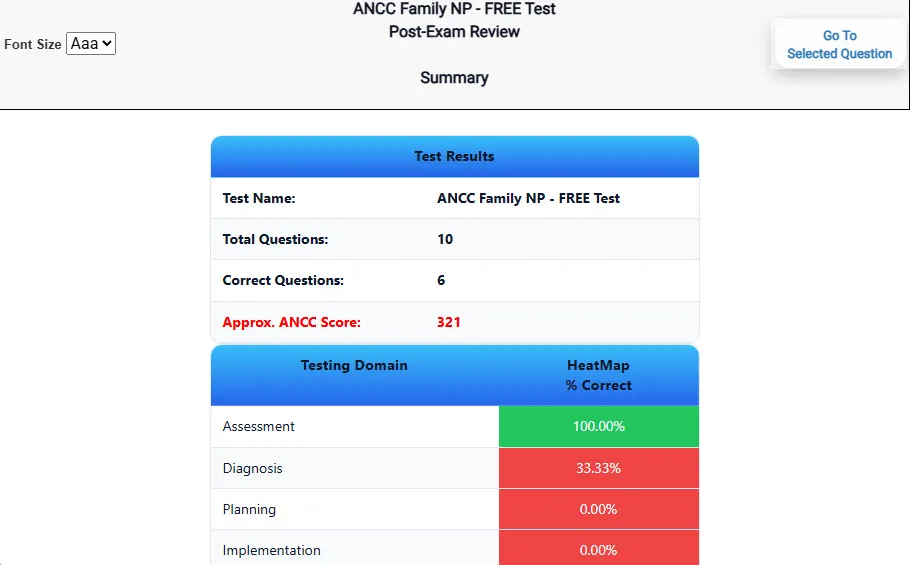
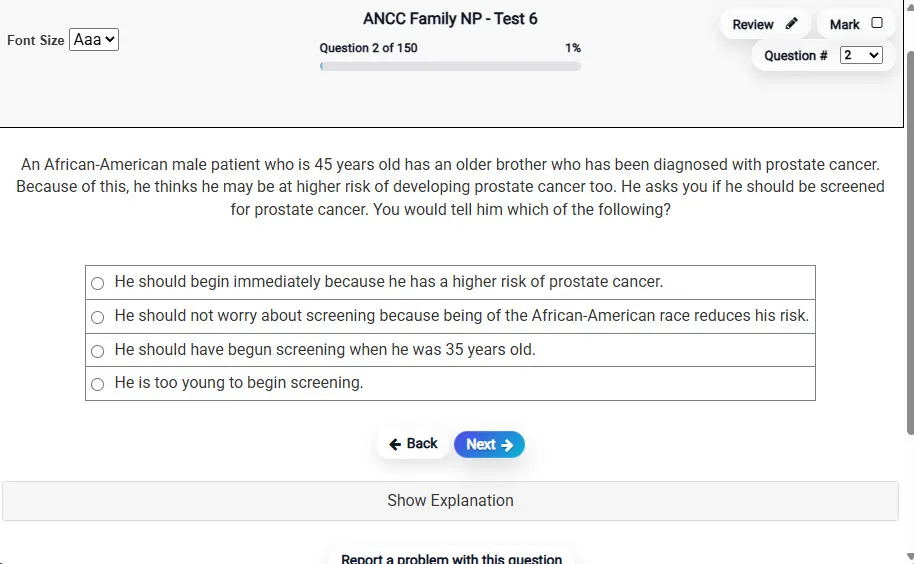
Answering a Question screen – Multiple-choice item view with navigation controls and progress tracker.
Answering a Question Multiple-choice item view with navigation controls and progress tracker.

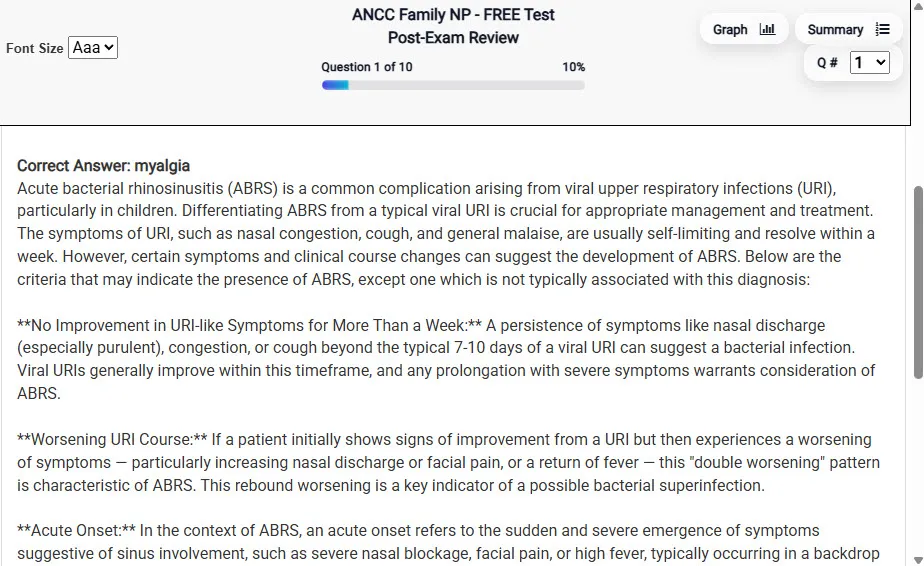
                           Detailed Explanation screen – 
                         Review mode showing chosen answer and rationale and references.
Detailed Explanation Review mode showing chosen answer and rationale and references.

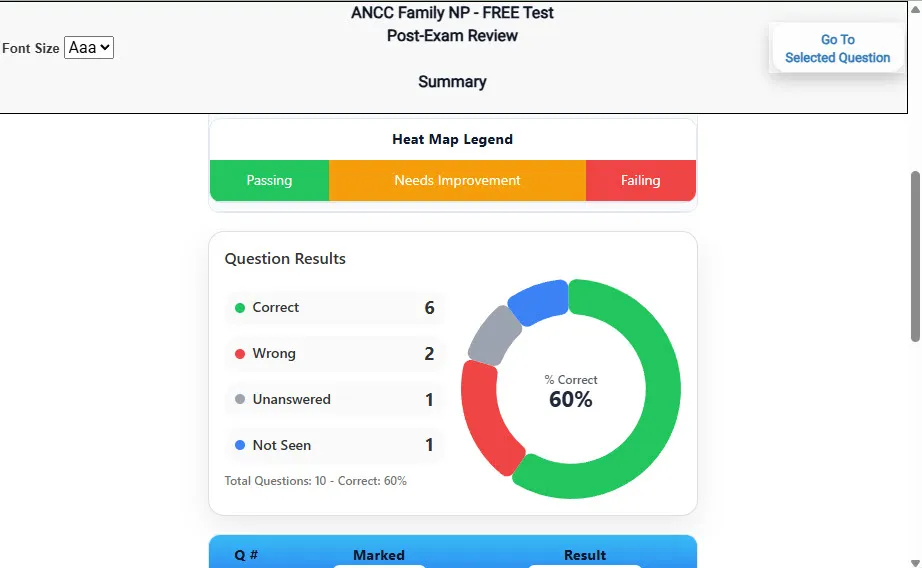
                           Review Summary 1 screen – 
                         Summary with counts for correct/wrong/unanswered and not seen items.
Review Summary 1 Summary with counts for correct/wrong/unanswered and not seen items.

                           Review Summary 2 screen – 
                         Advanced summary with category/domain breakdown and performance insights.
Review Summary 2 Advanced summary with category/domain breakdown and performance insights.

What Each Screen Shows

Answer Question Screen

  • Clean multiple-choice interface with progress bar.
  • Mark for review feature.
  • Matches real test pacing.

Detailed Explanation

  • Correct answer plus rationale.
  • Key concepts and guidelines highlighted.
  • Move between questions to fill knowledge gaps.

Review Summary 1

  • Overall results with total questions and scaled score.
  • Domain heatmap shows strengths and weaknesses.
  • Quick visual feedback on study priorities.

Review Summary 2

  • Chart of correct, wrong, unanswered, not seen.
  • Color-coded results for easy review.
  • Links back to missed items.

Top 10 Reasons to Use Exam Edge for your NC State General Curriculum Exam Prep

  1. Focused on the NC State General Curriculum Exam

    Our practice tests are built specifically for the NC State General Curriculum exam — every question mirrors the real topics, format, and difficulty so you're studying exactly what matters.

  2. Real Exam Simulation

    We match the per-question time limits and pressure of the actual NC exam, so test day feels familiar and stress-free.

  3. 20 Full Practice Tests & 2,000 Unique Questions

    You'll have more than enough material to master every NC State General Curriculum concept — no repeats, no fluff.

  4. Lower Cost Than a Retake

    Ordering 5 practice exams costs less than retaking the NC State General Curriculum exam after a failure. One low fee could save you both time and money.

  5. Flexible Testing

    Need to step away mid-exam? Pick up right where you left off — with your remaining time intact.

  6. Instant Scoring & Feedback

    See your raw score and an estimated NC State General Curriculum score immediately after finishing each practice test.

  7. Detailed Explanations for Every Question

    Review correct and incorrect answers with clear, step-by-step explanations so you truly understand each topic.

  8. Trusted & Accredited

    We're fully accredited by the Better Business Bureau and uphold the highest standards of trust and transparency.

  9. Web-Based & Always Available

    No software to install. Access your NC State General Curriculum practice exams 24/7 from any computer or mobile device.

  10. Expert Support When You Need It

    Need extra help? Our specialized tutors are highly qualified and ready to support your NC exam prep.


Pass the NC State General Curriculum Exam with Realistic Practice Tests from Exam Edge

Preparing for your upcoming NC State General Curriculum (003) Certification Exam can feel overwhelming — but the right practice makes all the difference. Exam Edge gives you the tools, structure, and confidence to pass on your first try. Our online practice exams are built to match the real NC State General Curriculum exam in content, format, and difficulty.

  • 📝 20 NC State General Curriculum Practice Tests: Access 20 full-length exams with 100 questions each, covering every major NC State General Curriculum topic in depth.
  • Instant Online Access: Start practicing right away — no software, no waiting.
  • 🧠 Step-by-Step Explanations: Understand the reasoning behind every correct answer so you can master NC State General Curriculum exam concepts.
  • 🔄 Retake Each Exam Up to 4 Times: Build knowledge through repetition and track your improvement over time.
  • 🌐 Web-Based & Available 24/7: Study anywhere, anytime, on any device.
  • 🧘 Boost Your Test-Day Confidence: Familiarity with the NC format reduces anxiety and helps you perform under pressure.

These NC State General Curriculum practice exams are designed to simulate the real testing experience by matching question types, timing, and difficulty level. This approach helps you get comfortable not just with the exam content, but also with the testing environment, so you walk into your exam day focused and confident.

Exam Edge NCSTATE Reviews


NC State General Curriculum Aliases Test Name

Here is a list of alternative names used for this exam.

  • NC State General Curriculum
  • NC State General Curriculum test
  • NC State General Curriculum Certification Test
  • NCSTATE
  • NCSTATE 003
  • 003 test
  • NC State General Curriculum (003)
  • NC State General Curriculum certification