This is the content of the pop-over!

NYSTCE CST Blind and Visually Impaired (117) Practice Tests & Test Prep by Exam Edge


NYSTCE CST Blind and Visually Impaired  product image
(4.5)
Based on 17 Reviews

  • Real Exam Simulation: Timed questions and matching content build comfort for your NYSTCE CST Blind and Visually Impaired test day.
  • Instant, 24/7 Access: Web-based NYSTCE CST Blind and Visually Impaired practice exams with no software needed.
  • Clear Explanations: Step-by-step answers and explanations for your NYSTCE exam to strengthen understanding.
  • Boosted Confidence: Reduces anxiety and improves test-taking skills to ace your NYSTCE CST Blind and Visually Impaired (117).

Featured on

NYSTCE CST Blind and Visually Impaired Online Practice Test Bundles

BEST VALUE
10 practice tests

$99.50

$399.50

SAVE $300

Only $9.95 per test!

  • 100% Pass Guarantee
  • 10 online practice tests
  • 60 questions per test
  • Bonus: 100 Flash Cards + Study Guide
  • Instant access
  • Detailed Explanations
  • Practice tests never expire
  • Timed, untimed, or study guide mode
5 practice tests

$69.75

$199.75

SAVE $130

Only $13.95 per test!

  • 5 online practice tests
  • 60 questions per test
  • Bonus: 100 Flash Cards + Study Guide
  • Instant access
  • Detailed Explanations
  • Practice tests never expire
  • Timed, untimed, or study guide mode
1 practice test

$39.95

  • 1 online practice test
  • 60 questions per test
  • Instant access
  • Detailed Explanations
  • Practice tests never expire
  • Timed, untimed, or study guide mode
Quick Select
Tap to choose a bundle

** All Prices are in US Dollars (USD) **


NYSTCE CST Blind and Visually Impaired (117) Resources

Jump to the section you need most.

Understanding the exact breakdown of the NYSTCE CST Blind and Visually Impaired test will help you know what to expect and how to most effectively prepare. The NYSTCE CST Blind and Visually Impaired has 60 multiple-choice questions and 1 essay questions. The exam will be broken down into the sections below:

NYSTCE CST Blind and Visually Impaired Exam Blueprint
Domain Name
Foundations of Blind and Visually Impaired Education  
Knowledge of Students Who Are Blind and Visually Impaired  
Assessment and Individual Program Planning  
Strategies for Planning and Managing the Learning Environment and for Providing Classroom Interventions  
Instructional Planning and Delivery to Promote Students' Academic Success  
Strategies for Teaching Language - Literacy Expanded Core Curriculum Skills  

NYSTCE CST Blind and Visually Impaired Study Tips by Domain

  • Know the IDEA/Part B framework as it applies to students with visual impairment—eligibility, IEP, LRE, and required team members; red flag: recommending a 1:1 aide or separate setting as the default rather than documenting supports based on data.
  • Differentiate access vs. accommodation vs. modification for NYSTCE-style scenarios; common trap: confusing accessible instructional materials (e.g., braille/large print/audio) as changing the learning standard.
  • Understand legal/ethical requirements for accessible instructional materials (AIM) and timely provision; priority rule: delays in braille/accessible formats can constitute denial of FAPE even when instruction is otherwise appropriate.
  • Apply core principles of braille and tactile literacy as a foundational right when print is not efficient; red flag: delaying braille instruction to “see if vision improves” without evidence from a learning media assessment.
  • Use foundational assessment concepts that drive instruction (functional vision assessment, learning media assessment, O&M, assistive technology evaluation); common trap: relying solely on clinical eye-report acuity and ignoring functional performance in real environments.
  • Recognize the role of the Expanded Core Curriculum (ECC) as essential content, not an add-on; priority rule: if the ECC need is documented, it must be reflected in IEP goals/services (e.g., O&M, AT, social interaction) rather than handled informally.
  • Differentiate ocular vs. cortical/cerebral visual impairment (CVI) and expect CVI to show variable visual responses depending on clutter, lighting, fatigue, and sensory load—red flag: assuming stable acuity/field predicts functional vision across tasks.
  • Interpret common functional vision indicators (distance viewing, tracking, field preference, contrast sensitivity, light sensitivity) to predict classroom access needs—trap: choosing print size solely from a clinical acuity number rather than performance in typical materials.
  • Recognize how etiology can drive educational implications (e.g., retinopathy of prematurity, albinism, optic nerve hypoplasia, glaucoma, cataracts)—priority rule: always link the diagnosis to specific access barriers (glare, nystagmus, field loss, fluctuating vision) and accommodations.
  • Account for coexisting conditions common in this population (hearing loss, motor challenges, developmental delays, autism, medical fragility) when planning communication and mobility supports—red flag: attributing slow response or behavior to “noncompliance” when it may be access or processing.
  • Identify signs of incidental learning gaps and concept development needs (object permanence, spatial concepts, time/quantity, social cues) and plan explicit instruction—trap: overreliance on verbal explanation without hands-on or tactile experiences.
  • Understand psychosocial and self-determination factors (learned helplessness, isolation, bullying risk, overprompting) that affect performance—priority rule: fade adult support systematically and require student-led strategies (e.g., requesting clarification, managing devices) as a measurable goal.
  • Use multiple data sources to determine eligibility and needs (e.g., functional vision assessment, learning media assessment, ECC assessment) — red flag: relying only on eye reports/acuity without documenting functional implications for access.
  • Differentiate academic assessments from access assessments by evaluating how the student reads/writes (braille, print, audio, AAC/AT) — common trap: selecting braille or large print without an LMA and data on reading efficiency/endurance.
  • Plan assessments with appropriate accommodations and accessibility features (extended time, scribe, tactile graphics, alternate formats) — priority rule: accommodations must match routine instruction or they risk invalidating results.
  • Translate assessment results into measurable IEP goals and services that include ECC needs — red flag: goals that describe activities (e.g., “use CCTV”) rather than observable performance criteria and conditions.
  • Specify assistive technology and materials in the IEP with format, timing, and responsible staff (braille/tactile, digital, magnification) — common trap: listing “AT as needed” without device, training, and implementation plan.
  • Use progress-monitoring data to revise instruction and IEP components on a defined schedule — threshold cue: if data show stagnation across multiple probes/marking periods, adjust intensity, methodology, or access supports rather than waiting for annual review.
  • Apply universal design plus individualized access (e.g., consistent furniture placement, tactile/visual markers, clear travel paths); red flag: “decluttering” that quietly moves landmarks and increases disorientation.
  • Plan proactive behavior supports using function-based interventions and explicit teaching of replacement skills; common trap: treating refusal/withdrawal as “noncompliance” when the antecedent is inaccessible materials or unsafe mobility demands.
  • Manage environmental factors (lighting, glare, contrast, noise, seating angles) to optimize residual vision and auditory access; priority rule: control glare before increasing magnification because glare can negate device benefit.
  • Embed assistive technology routines (charging, backups, file organization, accessible formats) and teach troubleshooting; red flag: relying on a single device/app with no low-tech backup (braille, large print, tactile graphics) for testing or power/network failures.
  • Coordinate safety and emergency procedures (drills, evacuation routes, substitute plans) with O&M and building staff; threshold: a new route or changed layout requires re-teaching and supervised practice before independent travel is expected.
  • Deliver classroom interventions using systematic instruction (prompting hierarchies, fading, data-based decisions) while protecting dignity; common trap: overprompting or physical guidance without consent — use least intrusive prompts and document fade plans.
  • Plan instruction from present levels (PLAAFP) to measurable IEP goals with clear progress monitoring; red flag: goals that don’t specify conditions/criteria (e.g., “independently, 4/5 trials”) are hard to defend on NYSTCE scenarios.
  • Select accessible instructional materials in the correct format (braille, large print, tactile graphics, audio, digital) and verify functionality before the lesson; common trap: assuming a “read aloud” is an equivalent substitute for print/braille access.
  • Embed explicit instruction for prerequisite skills (concept development, tactile efficiency, auditory skills) before higher-level tasks; priority rule: if the student cannot access the information, reteaching content won’t fix the barrier.
  • Use systematic instruction (model–guided practice–independent practice) with error correction and data-based fading of prompts; red flag: overprompting that creates prompt dependence and reduces independence.
  • Differentiate delivery using accommodations/modifications aligned to assessment requirements (extended time, separate location, assistive tech) without changing the construct; common trap: modifying the task so much that it measures something different than intended.
  • Coordinate with related services (orientation & mobility, OT/PT, speech, TVI consult) to generalize skills across settings; priority cue: plan for carryover beyond the resource room or skills won’t maintain.
  • Prioritize the Expanded Core Curriculum (ECC) alongside academics—explicitly teach compensatory skills, orientation & mobility, and assistive technology when the student can’t access incidental learning (red flag: assuming skills will be “picked up” from peers).
  • Select literacy medium(s) based on current and projected efficiency (braille, print, auditory, tactile symbols) and document the rationale in instruction (common trap: using large print only when tactile needs indicate braille instruction should begin).
  • Teach braille/print reading with systematic instruction in phonics, fluency, and comprehension using accessible materials (priority rule: ensure the student has the same content at the same time—delays are an access violation).
  • Build writing skills with explicit instruction in keyboarding, braillewriter/Slate & stylus, formatting, and editing using accessible tools (red flag: grading content when the student hasn’t been taught the required access method or software commands).
  • Implement assistive technology instruction as a curriculum (screen reader, magnification, refreshable braille, OCR) with measurable performance criteria (common trap: giving devices without teaching settings, shortcuts, and troubleshooting routines).
  • Address social interaction, independent living, and self-determination through direct teaching, role-play, and real-world practice tied to IEP goals (contraindication: over-assistance that reduces autonomy—cue the least-to-most prompting hierarchy).


Built to Fit Into Your Busy Life

Everything you need to prepare with confidence—without wasting a minute.

Three Study Modes

Timed, No Time Limit, or Explanation mode.

Actionable Analytics

Heatmaps and scaled scores highlight weak areas.

High-Yield Rationales

Concise explanations emphasize key concepts.

Realistic Interface

Matches the feel of the actual exam environment.

Accessible by Design

Clean layout reduces cognitive load.

Anytime, Anywhere

Web-based access 24/7 on any device.
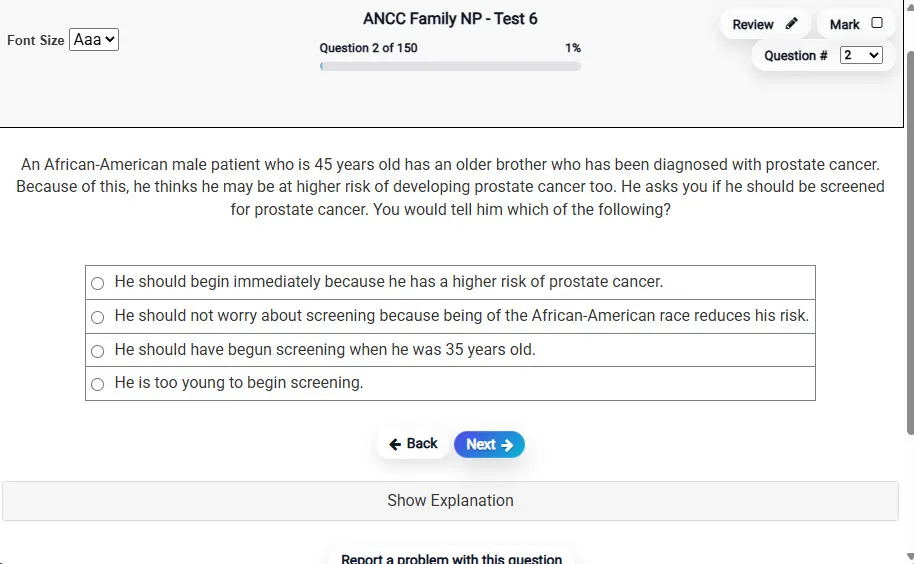
Answering a Question screen – Multiple-choice item view with navigation controls and progress tracker.
Answering a Question Multiple-choice item view with navigation controls and progress tracker.

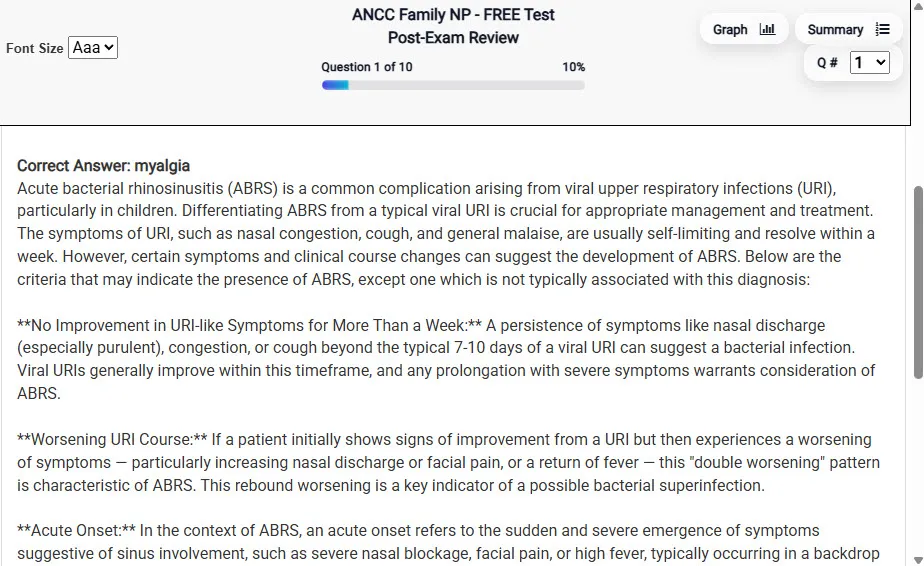
                           Detailed Explanation screen – 
                         Review mode showing chosen answer and rationale and references.
Detailed Explanation Review mode showing chosen answer and rationale and references.

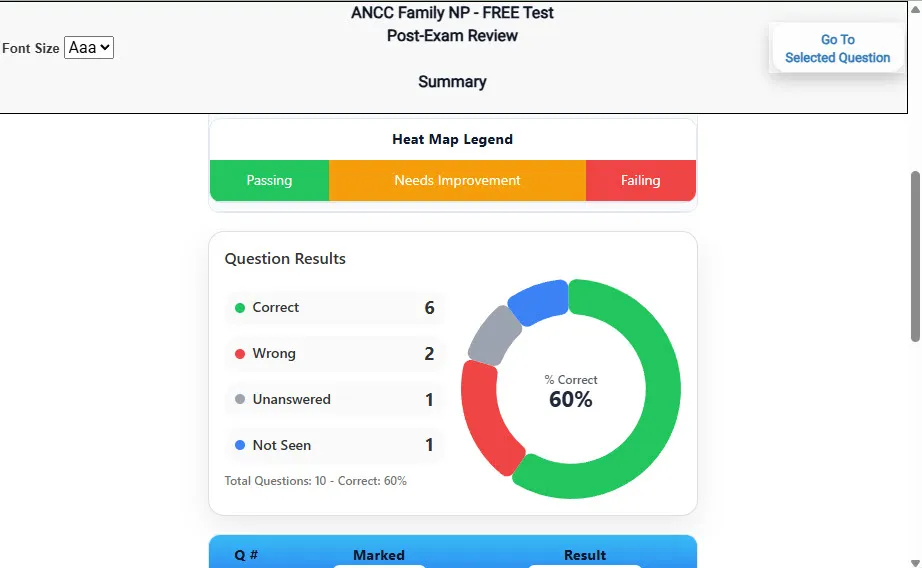
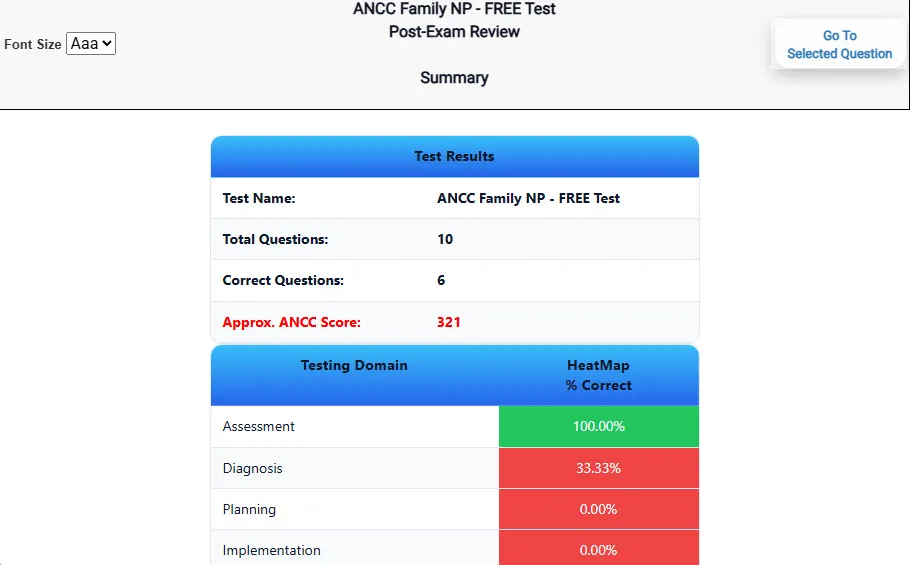
                           Review Summary 1 screen – 
                         Summary with counts for correct/wrong/unanswered and not seen items.
Review Summary 1 Summary with counts for correct/wrong/unanswered and not seen items.

                           Review Summary 2 screen – 
                         Advanced summary with category/domain breakdown and performance insights.
Review Summary 2 Advanced summary with category/domain breakdown and performance insights.

What Each Screen Shows

Answer Question Screen

  • Clean multiple-choice interface with progress bar.
  • Mark for review feature.
  • Matches real test pacing.

Detailed Explanation

  • Correct answer plus rationale.
  • Key concepts and guidelines highlighted.
  • Move between questions to fill knowledge gaps.

Review Summary 1

  • Overall results with total questions and scaled score.
  • Domain heatmap shows strengths and weaknesses.
  • Quick visual feedback on study priorities.

Review Summary 2

  • Chart of correct, wrong, unanswered, not seen.
  • Color-coded results for easy review.
  • Links back to missed items.

Top 10 Reasons to Use Exam Edge for your NYSTCE CST Blind and Visually Impaired Exam Prep

  1. Focused on the NYSTCE CST Blind and Visually Impaired Exam

    Our practice tests are built specifically for the NYSTCE CST Blind and Visually Impaired exam — every question mirrors the real topics, format, and difficulty so you're studying exactly what matters.

  2. Real Exam Simulation

    We match the per-question time limits and pressure of the actual NYSTCE exam, so test day feels familiar and stress-free.

  3. 10 Full Practice Tests & 600 Unique Questions

    You'll have more than enough material to master every NYSTCE CST Blind and Visually Impaired concept — no repeats, no fluff.

  4. Lower Cost Than a Retake

    Ordering 5 practice exams costs less than retaking the NYSTCE CST Blind and Visually Impaired exam after a failure. One low fee could save you both time and money.

  5. Flexible Testing

    Need to step away mid-exam? Pick up right where you left off — with your remaining time intact.

  6. Instant Scoring & Feedback

    See your raw score and an estimated NYSTCE CST Blind and Visually Impaired score immediately after finishing each practice test.

  7. Detailed Explanations for Every Question

    Review correct and incorrect answers with clear, step-by-step explanations so you truly understand each topic.

  8. Trusted & Accredited

    We're fully accredited by the Better Business Bureau and uphold the highest standards of trust and transparency.

  9. Web-Based & Always Available

    No software to install. Access your NYSTCE CST Blind and Visually Impaired practice exams 24/7 from any computer or mobile device.

  10. Expert Support When You Need It

    Need extra help? Our specialized tutors are highly qualified and ready to support your NYSTCE exam prep.


Pass the NYSTCE CST Blind and Visually Impaired Exam with Realistic Practice Tests from Exam Edge

Preparing for your upcoming NYSTCE CST Blind and Visually Impaired (117) Certification Exam can feel overwhelming — but the right practice makes all the difference. Exam Edge gives you the tools, structure, and confidence to pass on your first try. Our online practice exams are built to match the real NYSTCE CST Blind and Visually Impaired exam in content, format, and difficulty.

  • 📝 10 NYSTCE CST Blind and Visually Impaired Practice Tests: Access 10 full-length exams with 60 questions each, covering every major NYSTCE CST Blind and Visually Impaired topic in depth.
  • Instant Online Access: Start practicing right away — no software, no waiting.
  • 🧠 Step-by-Step Explanations: Understand the reasoning behind every correct answer so you can master NYSTCE CST Blind and Visually Impaired exam concepts.
  • 🔄 Retake Each Exam Up to 4 Times: Build knowledge through repetition and track your improvement over time.
  • 🌐 Web-Based & Available 24/7: Study anywhere, anytime, on any device.
  • 🧘 Boost Your Test-Day Confidence: Familiarity with the NYSTCE format reduces anxiety and helps you perform under pressure.

These NYSTCE CST Blind and Visually Impaired practice exams are designed to simulate the real testing experience by matching question types, timing, and difficulty level. This approach helps you get comfortable not just with the exam content, but also with the testing environment, so you walk into your exam day focused and confident.


Exam Edge NYSTCE Reviews


Not a user friendly experience

Amelia , Rochester, New York

Didn't really reflect the questions that were on the test for the most part. Also, they totally got the format of the constructed response question wrong, which never changes. Overall OK if you have nothing else, but definitely not worth the price they charge in my opinion.

Randy , Queens, New York

It was a good test run. Now I know what to expect and what I need to study.

Timothy , Eden, New York

The experience was very practical and I did well.

Trina , Silver Spring , MD

Very easy to navigate.

Collene , Silver Spring , MD

Exam Edge was terrific. Even better than I hoped. Just completing and reviewing the tests are a great learning experience. I can't wait to take the certification test. Tom S.

Thomas , Port Washington, NY


NYSTCE CST Blind and Visually Impaired Aliases Test Name

Here is a list of alternative names used for this exam.

  • NYSTCE CST Blind and Visually Impaired
  • NYSTCE CST Blind and Visually Impaired test
  • NYSTCE CST Blind and Visually Impaired Certification Test
  • NYSTCE
  • NYSTCE 117
  • 117 test
  • NYSTCE CST Blind and Visually Impaired (117)
  • CST Blind and Visually Impaired certification