This is the content of the pop-over!

Safety Net Blind and Visually Impaired CST (962) Practice Tests & Test Prep by Exam Edge


NYSTCE Safety Net Blind and Visually Impaired CST  product image
(4.5)
Based on 17 Reviews

  • Real Exam Simulation: Timed questions and matching content build comfort for your Safety Net Blind and Visually Impaired CST test day.
  • Instant, 24/7 Access: Web-based NYSTCE Safety Net Blind and Visually Impaired CST practice exams with no software needed.
  • Clear Explanations: Step-by-step answers and explanations for your NYSTCE exam to strengthen understanding.
  • Boosted Confidence: Reduces anxiety and improves test-taking skills to ace your NYSTCE Safety Net Blind and Visually Impaired CST (962).

Featured on

NYSTCE Safety Net Blind and Visually Impaired CST Online Practice Test Bundles

BEST VALUE
5 practice tests

$69.75

$199.75

SAVE $130

Only $13.95 per test!

  • 100% Pass Guarantee
  • 5 online practice tests
  • 90 questions per test
  • Bonus: 100 Flash Cards + Study Guide
  • Instant access
  • Detailed Explanations
  • Practice tests never expire
  • Timed, untimed, or study guide mode
1 practice test

$39.95

  • 1 online practice test
  • 90 questions per test
  • Instant access
  • Detailed Explanations
  • Practice tests never expire
  • Timed, untimed, or study guide mode
Quick Select
Tap to choose a bundle

** All Prices are in US Dollars (USD) **


Safety Net Blind and Visually Impaired CST (962) Resources

Jump to the section you need most.

Understanding the exact breakdown of the NYSTCE Safety Net Blind and Visually Impaired CST test will help you know what to expect and how to most effectively prepare. The NYSTCE Safety Net Blind and Visually Impaired CST has 90 multiple-choice questions and 1 essay questions. The exam will be broken down into the sections below:

NYSTCE Safety Net Blind and Visually Impaired CST Exam Blueprint
Domain Name % Number of
Questions
Understanding Blindness and Visual Impairments (B/VI) 18% 20
Assessing Students and Developing Individualized Education Programs (IEPs) 18% 20
Promoting Student Development and Learning 24% 27
Promoting Students' Communication and Literacy Skills 10% 11
Professional Practice 10% 11

NYSTCE Safety Net Blind and Visually Impaired CST Study Tips by Domain

  • Differentiate ocular vs. cortical/cerebral visual impairment (CVI) and anticipate fluctuating visual attention in CVI; red flag: inconsistent visual responses are often misread as “noncompliance.”
  • Interpret functional vision information (distance, lighting, contrast, fatigue) rather than relying on acuity alone; common trap: assuming “20/200” predicts classroom performance without context.
  • Match environmental supports to common low-vision needs (glare control, high-contrast materials, positioning, task lighting); priority rule: change the environment before adding more visual complexity.
  • Know key eye conditions relevant to educational impact (e.g., retinopathy of prematurity, albinism, glaucoma, cataracts, optic nerve hypoplasia) and typical visual behaviors; contraindication: avoid forcing prolonged near tasks when nystagmus/photophobia increases with strain.
  • Account for the interaction of vision with other disabilities (e.g., deafblindness, motor/processing challenges) when interpreting access skills; red flag: “can see it” in one setting does not equal reliable access across routines.
  • Apply safety and independence considerations tied to visual field loss and depth perception; common trap: underestimating travel risks for students with good acuity but significant peripheral field loss.
  • Use multiple measures in the functional vision assessment (FVA) and learning media assessment (LMA)—e.g., near/distance tasks, lighting/glare, and material formats—and treat any “one-time” result as a red flag for unreliable baseline.
  • Write IEP present levels that translate assessment data into observable needs (e.g., reading efficiency, access to visuals, travel safety) and avoid the common trap of listing diagnoses or eye-report terms without functional impact.
  • Ensure goals are measurable and tied to access skills (e.g., Braille, assistive technology, auditory/visual efficiency, O&M-related classroom routines) with a clear criterion and timeframe; a red flag is a goal that can’t be measured without guessing.
  • Align accommodations and modifications to documented assessment findings (e.g., tactile graphics, enlarged materials, audio, preferential lighting/seat placement) and treat “more time” as insufficient if the barrier is format or access, not speed.
  • Specify specialized instruction and related services with frequency, duration, location, and provider (e.g., TVI/O&M) and watch for the compliance trap of vague entries like “as needed” or missing service minutes.
  • Plan assessment and progress monitoring that matches the student’s access mode (Braille/large print/audio/AT) and consider alternate access for state/district testing; a red flag is testing in a format the student doesn’t routinely use for instruction.
  • Use the Expanded Core Curriculum (ECC) to plan instruction (e.g., orientation & mobility, assistive tech, social interaction) and document measurable outcomes; red flag: focusing only on braille/academics while ECC needs drive access and independence.
  • Differentiate sensory access by selecting appropriate modalities (tactual, auditory, residual vision) and controlling lighting/contrast/glare; common trap: assuming “bigger print” solves access when glare or fatigue is the primary barrier.
  • Teach concept development through direct, hands-on experiences and systematic vocabulary building; priority rule: pre-teach key concepts before group lessons when visual incidental learning is limited.
  • Implement safe, efficient mobility routines (protective techniques, trailing, cane skills as appropriate) and coordinate with O&M instruction; red flag: rearranging classroom furniture without warning or consistent pathways.
  • Promote self-determination and self-advocacy by teaching students to request accommodations (e.g., preferred seating, tactile graphics, AT) and explain their needs; common trap: adults over-assisting, which undermines independence and skill generalization.
  • Support social-emotional learning by explicitly teaching nonverbal/social cues, peer interaction strategies, and appropriate personal space; contraindication: relying on “watch and learn” modeling when the student cannot reliably access visual social information.
  • Prioritize a literacy medium decision (braille, print, dual media, audio) based on functional reading and writing data, not eye report alone—red flag: assuming a student with usable vision doesn’t need braille instruction.
  • Teach braille code skills systematically (e.g., contractions, formatting, Nemeth/music as needed) with daily practice—common trap: focusing only on letter recognition and neglecting fluency, proofreading, and writing mechanics.
  • Explicitly build tactile efficiency (hand positioning, tracking, light touch) and reading stamina—contraindication: allowing persistent “one-finger pecking” without intervention, which can cap speed and comprehension.
  • Ensure access to grade-level content via accessible formats (braille/large print/digital with screen reader, tactile graphics) and pre-teach critical visuals—priority rule: materials must be ready at the same time as peers.
  • Integrate assistive technology for reading/writing (refreshable braille display, screen reader commands, magnification, OCR) and teach troubleshooting routines—red flag: providing devices without explicit instruction in efficient keystrokes and file management.
  • Assess comprehension and writing using accommodations that don’t change the construct (e.g., braille response, dictation with editing expectations) and document them consistently—common trap: over-scribing that removes the student’s responsibility for organization and conventions.
  • Maintain strict confidentiality under FERPA/IDEA—share student information only with authorized staff and never via personal email/text; red flag: discussing a student’s disability in public areas or with non-team members.
  • Document services and progress monitoring consistently because NYSTCE emphasizes accountability; common trap: vague notes like “worked on Braille” instead of measurable data tied to IEP goals.
  • Use culturally responsive, family-centered collaboration in IEP processes and provide interpreters when needed; red flag: relying on a family member (especially a sibling) to translate sensitive special education information.
  • Coordinate effectively with the multidisciplinary team (TVI, O&M, general educators, related services) and clarify roles; common trap: independently changing accommodations or assistive tech without team agreement and data.
  • Prioritize student safety and dignity during instruction and mobility-related routines; contraindication: using physical guidance without consent/training or ignoring environmental hazards (e.g., unsecured cords, poorly marked steps).
  • Engage in ongoing professional learning aligned to evidence-based practice (e.g., literacy media, assistive technology, low-vision supports) and reflect to adjust instruction; red flag: continuing an intervention with no progress data for multiple collection points.


Built to Fit Into Your Busy Life

Everything you need to prepare with confidence—without wasting a minute.

Three Study Modes

Timed, No Time Limit, or Explanation mode.

Actionable Analytics

Heatmaps and scaled scores highlight weak areas.

High-Yield Rationales

Concise explanations emphasize key concepts.

Realistic Interface

Matches the feel of the actual exam environment.

Accessible by Design

Clean layout reduces cognitive load.

Anytime, Anywhere

Web-based access 24/7 on any device.
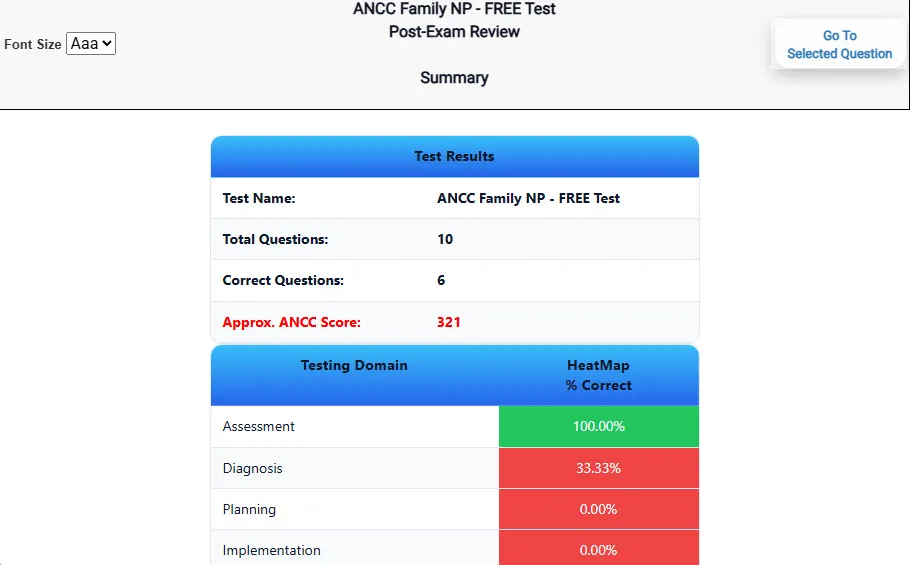
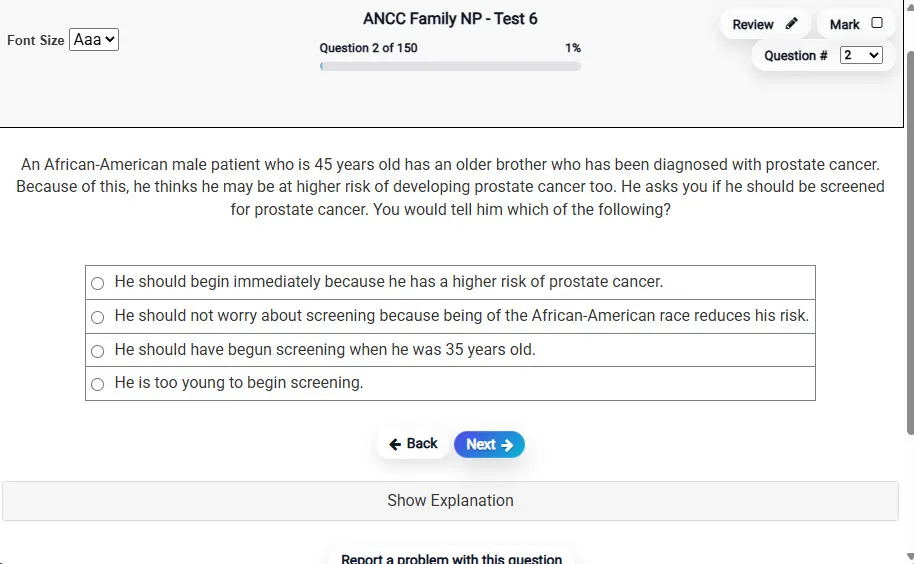
Answering a Question screen – Multiple-choice item view with navigation controls and progress tracker.
Answering a Question Multiple-choice item view with navigation controls and progress tracker.

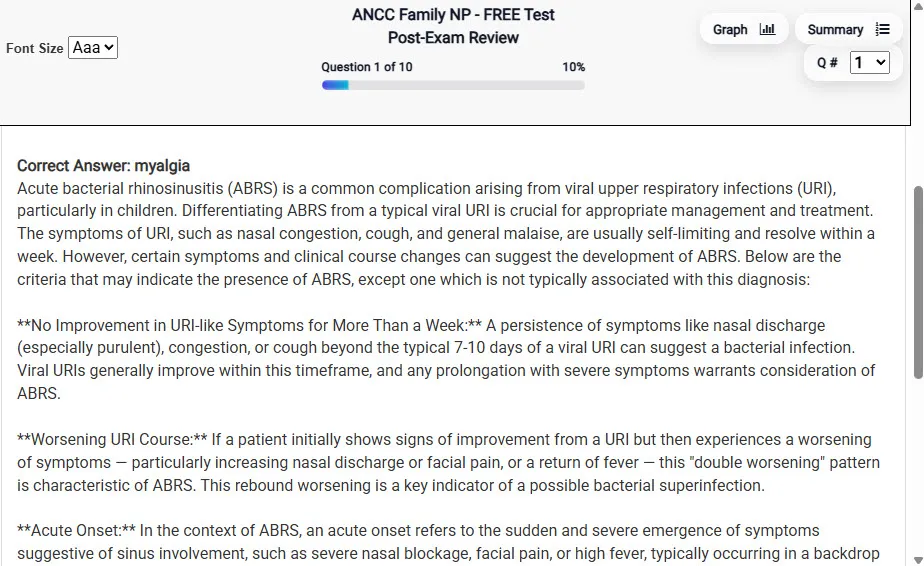
                           Detailed Explanation screen – 
                         Review mode showing chosen answer and rationale and references.
Detailed Explanation Review mode showing chosen answer and rationale and references.

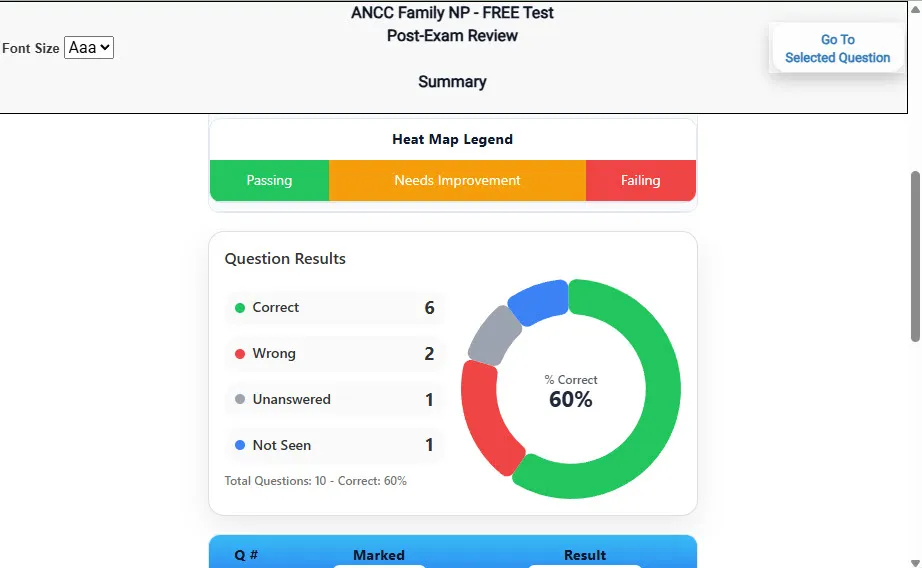
                           Review Summary 1 screen – 
                         Summary with counts for correct/wrong/unanswered and not seen items.
Review Summary 1 Summary with counts for correct/wrong/unanswered and not seen items.

                           Review Summary 2 screen – 
                         Advanced summary with category/domain breakdown and performance insights.
Review Summary 2 Advanced summary with category/domain breakdown and performance insights.

What Each Screen Shows

Answer Question Screen

  • Clean multiple-choice interface with progress bar.
  • Mark for review feature.
  • Matches real test pacing.

Detailed Explanation

  • Correct answer plus rationale.
  • Key concepts and guidelines highlighted.
  • Move between questions to fill knowledge gaps.

Review Summary 1

  • Overall results with total questions and scaled score.
  • Domain heatmap shows strengths and weaknesses.
  • Quick visual feedback on study priorities.

Review Summary 2

  • Chart of correct, wrong, unanswered, not seen.
  • Color-coded results for easy review.
  • Links back to missed items.

Top 10 Reasons to Use Exam Edge for your NYSTCE Safety Net Blind and Visually Impaired CST Exam Prep

  1. Focused on the NYSTCE Safety Net Blind and Visually Impaired CST Exam

    Our practice tests are built specifically for the Safety Net Blind and Visually Impaired CST exam — every question mirrors the real topics, format, and difficulty so you're studying exactly what matters.

  2. Real Exam Simulation

    We match the per-question time limits and pressure of the actual NYSTCE exam, so test day feels familiar and stress-free.

  3. 5 Full Practice Tests & 450 Unique Questions

    You'll have more than enough material to master every Safety Net Blind and Visually Impaired CST concept — no repeats, no fluff.

  4. Lower Cost Than a Retake

    Ordering 5 practice exams costs less than retaking the NYSTCE Safety Net Blind and Visually Impaired CST exam after a failure. One low fee could save you both time and money.

  5. Flexible Testing

    Need to step away mid-exam? Pick up right where you left off — with your remaining time intact.

  6. Instant Scoring & Feedback

    See your raw score and an estimated NYSTCE Safety Net Blind and Visually Impaired CST score immediately after finishing each practice test.

  7. Detailed Explanations for Every Question

    Review correct and incorrect answers with clear, step-by-step explanations so you truly understand each topic.

  8. Trusted & Accredited

    We're fully accredited by the Better Business Bureau and uphold the highest standards of trust and transparency.

  9. Web-Based & Always Available

    No software to install. Access your Safety Net Blind and Visually Impaired CST practice exams 24/7 from any computer or mobile device.

  10. Expert Support When You Need It

    Need extra help? Our specialized tutors are highly qualified and ready to support your NYSTCE exam prep.


Pass the NYSTCE Safety Net Blind and Visually Impaired CST Exam with Realistic Practice Tests from Exam Edge

Preparing for your upcoming NYSTCE Safety Net Blind and Visually Impaired CST (962) Certification Exam can feel overwhelming — but the right practice makes all the difference. Exam Edge gives you the tools, structure, and confidence to pass on your first try. Our online practice exams are built to match the real Safety Net Blind and Visually Impaired CST exam in content, format, and difficulty.

  • 📝 5 NYSTCE Safety Net Blind and Visually Impaired CST Practice Tests: Access 5 full-length exams with 90 questions each, covering every major NYSTCE Safety Net Blind and Visually Impaired CST topic in depth.
  • Instant Online Access: Start practicing right away — no software, no waiting.
  • 🧠 Step-by-Step Explanations: Understand the reasoning behind every correct answer so you can master Safety Net Blind and Visually Impaired CST exam concepts.
  • 🔄 Retake Each Exam Up to 4 Times: Build knowledge through repetition and track your improvement over time.
  • 🌐 Web-Based & Available 24/7: Study anywhere, anytime, on any device.
  • 🧘 Boost Your Test-Day Confidence: Familiarity with the NYSTCE format reduces anxiety and helps you perform under pressure.

These NYSTCE Safety Net Blind and Visually Impaired CST practice exams are designed to simulate the real testing experience by matching question types, timing, and difficulty level. This approach helps you get comfortable not just with the exam content, but also with the testing environment, so you walk into your exam day focused and confident.


Exam Edge NYSTCE Reviews


Not a user friendly experience

Amelia , Rochester, New York

Didn't really reflect the questions that were on the test for the most part. Also, they totally got the format of the constructed response question wrong, which never changes. Overall OK if you have nothing else, but definitely not worth the price they charge in my opinion.

Randy , Queens, New York

It was a good test run. Now I know what to expect and what I need to study.

Timothy , Eden, New York

The experience was very practical and I did well.

Trina , Silver Spring , MD

Very easy to navigate.

Collene , Silver Spring , MD

Exam Edge was terrific. Even better than I hoped. Just completing and reviewing the tests are a great learning experience. I can't wait to take the certification test. Tom S.

Thomas , Port Washington, NY


NYSTCE Safety Net Blind and Visually Impaired CST Aliases Test Name

Here is a list of alternative names used for this exam.

  • NYSTCE Safety Net Blind and Visually Impaired CST
  • NYSTCE Safety Net Blind and Visually Impaired CST test
  • NYSTCE Safety Net Blind and Visually Impaired CST Certification Test
  • Safety Net Blind and Visually Impaired CST test
  • NYSTCE
  • NYSTCE 962
  • 962 test
  • NYSTCE Safety Net Blind and Visually Impaired CST (962)
  • Safety Net Blind and Visually Impaired CST certification