This is the content of the pop-over!

Safety Net Library Media Specialist CST (974) Practice Tests & Test Prep by Exam Edge


NYSTCE Safety Net Library Media Specialist CST   product image
(4.7)
Based on 29 Reviews

  • Real Exam Simulation: Timed questions and matching content build comfort for your Safety Net Library Media Specialist CST test day.
  • Instant, 24/7 Access: Web-based NYSTCE Safety Net Library Media Specialist CST practice exams with no software needed.
  • Clear Explanations: Step-by-step answers and explanations for your NYSTCE exam to strengthen understanding.
  • Boosted Confidence: Reduces anxiety and improves test-taking skills to ace your NYSTCE Safety Net Library Media Specialist CST (974).

Featured on

NYSTCE Safety Net Library Media Specialist CST Online Practice Test Bundles

BEST VALUE
20 practice tests

$174.00

$799.00

SAVE $625

Only $8.70 per test!

  • 100% Pass Guarantee
  • 20 online practice tests
  • 90 questions per test
  • Bonus: 100 Flash Cards + Study Guide
  • Instant access
  • Detailed Explanations
  • Practice tests never expire
  • Timed, untimed, or study guide mode
MOST POPULAR
10 practice tests

$99.50

$399.50

SAVE $300

Only $9.95 per test!

  • 10 online practice tests
  • 90 questions per test
  • Bonus: 100 Flash Cards + Study Guide
  • Instant access
  • Detailed Explanations
  • Practice tests never expire
  • Timed, untimed, or study guide mode
5 practice tests

$69.75

$199.75

SAVE $130

Only $13.95 per test!

  • 5 online practice tests
  • 90 questions per test
  • Bonus: 100 Flash Cards
  • Instant access
  • Detailed Explanations
  • Practice tests never expire
  • Timed, untimed, or study guide mode
1 practice test

$39.95

  • 1 online practice test
  • 90 questions per test
  • Instant access
  • Detailed Explanations
  • Practice tests never expire
  • Timed, untimed, or study guide mode
Quick Select
Tap to choose a bundle

** All Prices are in US Dollars (USD) **


Safety Net Library Media Specialist CST (974) Resources

Jump to the section you need most.

Understanding the exact breakdown of the NYSTCE Safety Net Library Media Specialist CST test will help you know what to expect and how to most effectively prepare. The NYSTCE Safety Net Library Media Specialist CST has 90 multiple-choice questions and 1 essay questions. The exam will be broken down into the sections below:

NYSTCE Safety Net Library Media Specialist CST Exam Blueprint
Domain Name % Number of
Questions
The Library Media Program 20% 18
Library Media Resources 20% 18
Information Literacy Skills 25% 23
Program Administration and Leadership 25% 23
Information Literacy Skills: 10% 9

NYSTCE Safety Net Library Media Specialist CST Study Tips by Domain

  • Align the library media program with New York State learning standards and district goals, documenting how instruction and services support curriculum outcomes—red flag: a collection- or activity-driven program without evidence of impact on student learning.
  • Use collaborative planning with teachers to embed inquiry, information literacy, and reading into units (co-plan/co-teach/co-assess)—common trap: providing one-shot lessons without shared objectives or assessment criteria.
  • Maintain an equitable access model (flexible scheduling, inclusive services, accessible formats, and assistive technology)—priority rule: remove barriers for students with disabilities and multilingual learners rather than offering “as available” support.
  • Implement clear, consistently enforced policies for circulation, internet use, privacy, and intellectual freedom consistent with district/state guidance—red flag: restricting materials based on viewpoint or failing to follow a formal reconsideration process.
  • Integrate digital citizenship (copyright/fair use, citation, misinformation evaluation, data privacy) into instruction and library routines—common trap: assuming students know what constitutes plagiarism or lawful reuse without explicit teaching and practice.
  • Use data to evaluate and improve the program (usage, collaboration rates, learning evidence, stakeholder feedback) and communicate results to administrators—threshold cue: if goals aren’t measurable, they can’t support advocacy for staffing, time, or budget.
  • Build a balanced, curriculum-aligned collection across formats (print, digital, audiovisual, databases) and reading levels; red flag: purchasing popular items without mapping to standards, languages, and student needs.
  • Apply clear selection criteria (authority, accuracy, relevance, currency, bias) and document them in policy; common trap: treating a polished website as reliable without evaluating author credentials and update date.
  • Use professional review sources and usage data to guide acquisitions and weeding; priority rule: deselect materials that are outdated, inaccurate, poor condition, or no longer support instruction.
  • Ensure equitable access through accessible formats (captioning, read-aloud, large print, multilingual resources) and ADA-aligned platforms; red flag: adopting e-resources that are not screen-reader compatible.
  • Manage licensing and copyright for digital resources (terms of use, simultaneous users, off-campus authentication) and teach ethical use; common trap: assuming “educational use” automatically permits copying or streaming.
  • Organize resources for efficient discovery using consistent cataloging/metadata, classification, and subject headings; red flag: inconsistent call numbers or tags that cause students to miss relevant materials in searches.
  • Teach students to define an information need by turning a topic into a focused question and a keyword list; red flag: skipping this step leads to “Google-and-go” retrieval and off-topic sources.
  • Model strategic searching across catalogs, databases, and the open web using Boolean, phrase searching, and limiters (date, peer-reviewed, reading level); common trap: students treat the first page of results as comprehensive evidence.
  • Require evaluation of authority, accuracy, bias, purpose, and currency with explicit criteria; priority rule: prefer sources with transparent authorship and evidence over anonymous or sensational content.
  • Teach ethical use of information—paraphrase vs. quotation, consistent citation, and awareness of plagiarism and copyright/fair use; red flag: copy-paste “patchwriting” without attribution even when intent seems academic.
  • Guide synthesis by comparing claims across multiple sources, noting agreements/conflicts, and separating fact from opinion; common trap: summarizing one source instead of integrating evidence from several.
  • Assess and reflect on the research process using checkpoints (question quality, search strategy, source quality, citation accuracy); priority rule: intervene early when students cannot name their search terms or why a source is credible.
  • Build and manage a standards-aligned library media program plan with measurable goals tied to school improvement priorities; red flag: activities that are popular but have no documented outcomes or alignment to curriculum.
  • Use data (circulation, database usage, instruction logs, student performance artifacts) to justify budgets and staffing; common trap: relying on anecdotes instead of trend data when advocating for resources.
  • Apply ethical and legal responsibilities (copyright, licensing, fair use, privacy/confidentiality) consistently; priority rule: if access or sharing could violate a license or student privacy, stop and seek guidance/document permission.
  • Implement clear policies and procedures for selection, reconsideration, and weeding using written criteria; red flag: removing or retaining materials based on personal preference rather than policy and professional reviews.
  • Lead collaborative professional learning with teachers on inquiry, information evaluation, and digital citizenship; common trap: offering one-off trainings without follow-up coaching or evidence of classroom transfer.
  • Ensure equitable access through inclusive scheduling, adaptive technologies, and barrier-free services; threshold cue: if any subgroup has reduced access (time, tech, language, disability), treat it as a compliance and equity priority to correct.
  • Teach students to define an information need before searching (topic, scope, keywords, synonyms); red flag: research questions that are too broad to be answered with available time or sources.
  • Use a structured search plan (controlled vocabulary, Boolean operators, filters, and iterative refining); common trap: relying on the first page of results instead of adjusting terms and limits.
  • Evaluate sources for authority, accuracy, bias, currency, and relevance across formats; priority rule: treat .edu/.org as a cue to investigate, not proof of credibility.
  • Guide students in ethical and legal use of information (copyright, fair use, licensing, privacy, and citation); red flag: copy-paste “patchwriting” that looks like paraphrase but lacks attribution.
  • Support synthesis and knowledge construction by requiring evidence-based claims and multiple perspectives; common trap: “reporting” disconnected facts without explaining significance or relationships.
  • Assess information literacy with clear performance criteria (process, product, and reflection) and targeted feedback; threshold cue: require at least two independent, high-quality sources before finalizing conclusions.


Built to Fit Into Your Busy Life

Everything you need to prepare with confidence—without wasting a minute.

Three Study Modes

Timed, No Time Limit, or Explanation mode.

Actionable Analytics

Heatmaps and scaled scores highlight weak areas.

High-Yield Rationales

Concise explanations emphasize key concepts.

Realistic Interface

Matches the feel of the actual exam environment.

Accessible by Design

Clean layout reduces cognitive load.

Anytime, Anywhere

Web-based access 24/7 on any device.
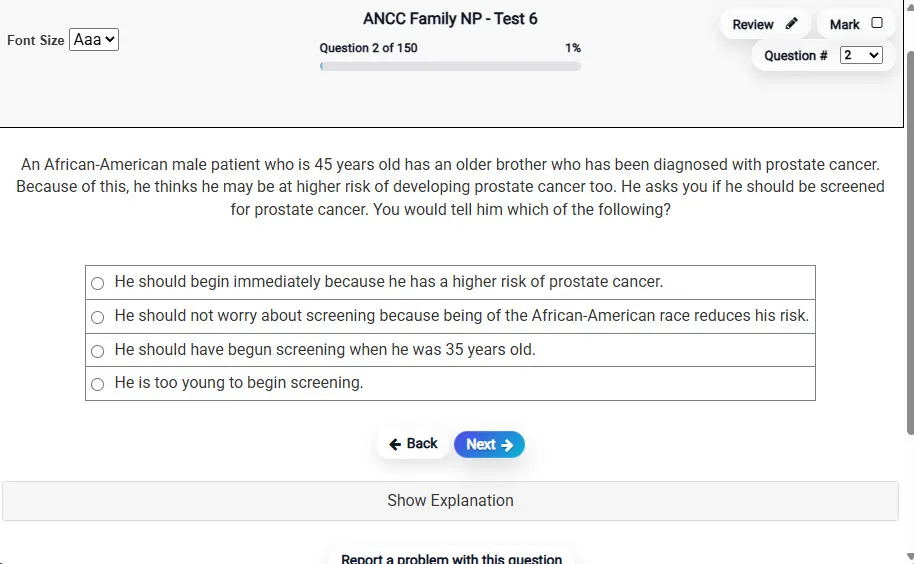
Answering a Question screen – Multiple-choice item view with navigation controls and progress tracker.
Answering a Question Multiple-choice item view with navigation controls and progress tracker.

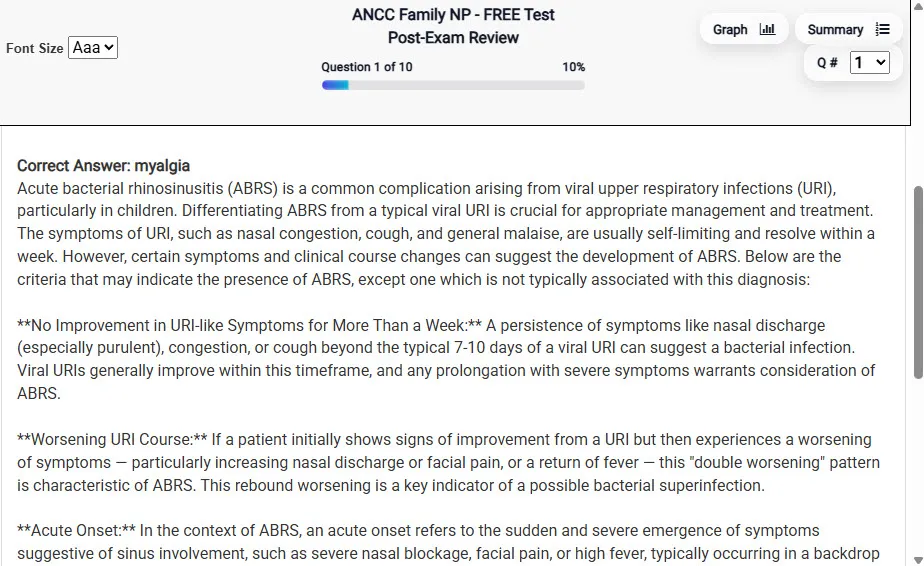
                           Detailed Explanation screen – 
                         Review mode showing chosen answer and rationale and references.
Detailed Explanation Review mode showing chosen answer and rationale and references.

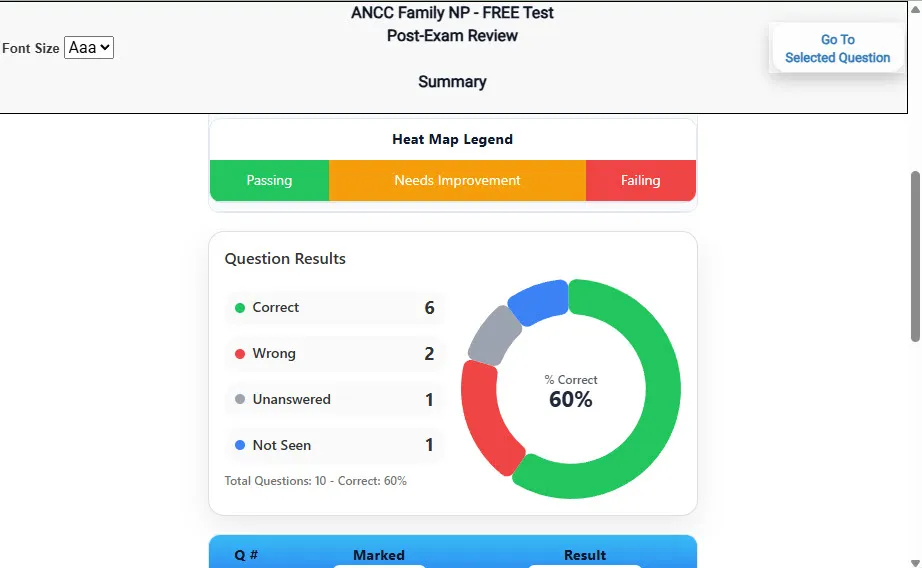
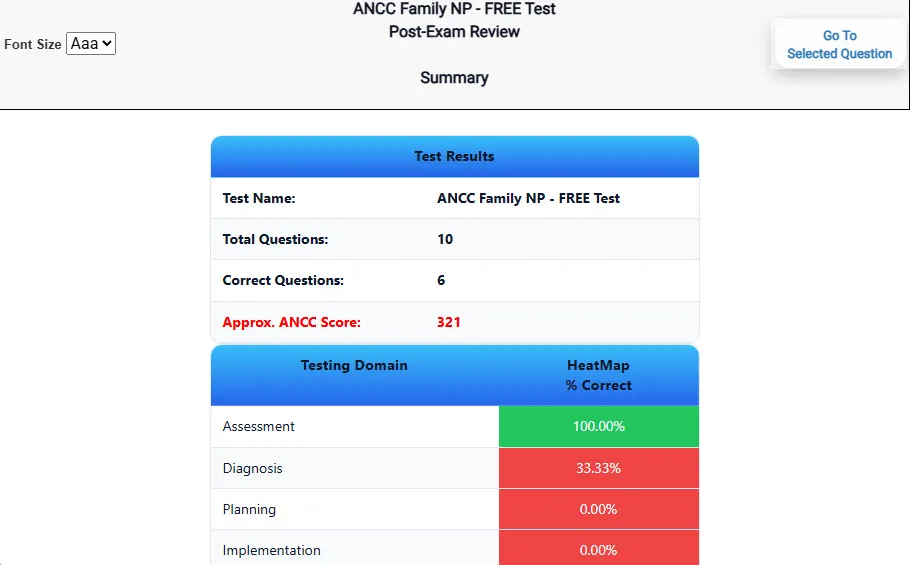
                           Review Summary 1 screen – 
                         Summary with counts for correct/wrong/unanswered and not seen items.
Review Summary 1 Summary with counts for correct/wrong/unanswered and not seen items.

                           Review Summary 2 screen – 
                         Advanced summary with category/domain breakdown and performance insights.
Review Summary 2 Advanced summary with category/domain breakdown and performance insights.

What Each Screen Shows

Answer Question Screen

  • Clean multiple-choice interface with progress bar.
  • Mark for review feature.
  • Matches real test pacing.

Detailed Explanation

  • Correct answer plus rationale.
  • Key concepts and guidelines highlighted.
  • Move between questions to fill knowledge gaps.

Review Summary 1

  • Overall results with total questions and scaled score.
  • Domain heatmap shows strengths and weaknesses.
  • Quick visual feedback on study priorities.

Review Summary 2

  • Chart of correct, wrong, unanswered, not seen.
  • Color-coded results for easy review.
  • Links back to missed items.

Top 10 Reasons to Use Exam Edge for your NYSTCE Safety Net Library Media Specialist CST Exam Prep

  1. Focused on the NYSTCE Safety Net Library Media Specialist CST Exam

    Our practice tests are built specifically for the Safety Net Library Media Specialist CST exam — every question mirrors the real topics, format, and difficulty so you're studying exactly what matters.

  2. Real Exam Simulation

    We match the per-question time limits and pressure of the actual NYSTCE exam, so test day feels familiar and stress-free.

  3. 20 Full Practice Tests & 1,800 Unique Questions

    You'll have more than enough material to master every Safety Net Library Media Specialist CST concept — no repeats, no fluff.

  4. Lower Cost Than a Retake

    Ordering 5 practice exams costs less than retaking the NYSTCE Safety Net Library Media Specialist CST exam after a failure. One low fee could save you both time and money.

  5. Flexible Testing

    Need to step away mid-exam? Pick up right where you left off — with your remaining time intact.

  6. Instant Scoring & Feedback

    See your raw score and an estimated NYSTCE Safety Net Library Media Specialist CST score immediately after finishing each practice test.

  7. Detailed Explanations for Every Question

    Review correct and incorrect answers with clear, step-by-step explanations so you truly understand each topic.

  8. Trusted & Accredited

    We're fully accredited by the Better Business Bureau and uphold the highest standards of trust and transparency.

  9. Web-Based & Always Available

    No software to install. Access your Safety Net Library Media Specialist CST practice exams 24/7 from any computer or mobile device.

  10. Expert Support When You Need It

    Need extra help? Our specialized tutors are highly qualified and ready to support your NYSTCE exam prep.


Pass the NYSTCE Safety Net Library Media Specialist CST Exam with Realistic Practice Tests from Exam Edge

Preparing for your upcoming NYSTCE Safety Net Library Media Specialist CST (974) Certification Exam can feel overwhelming — but the right practice makes all the difference. Exam Edge gives you the tools, structure, and confidence to pass on your first try. Our online practice exams are built to match the real Safety Net Library Media Specialist CST exam in content, format, and difficulty.

  • 📝 20 NYSTCE Safety Net Library Media Specialist CST Practice Tests: Access 20 full-length exams with 90 questions each, covering every major NYSTCE Safety Net Library Media Specialist CST topic in depth.
  • Instant Online Access: Start practicing right away — no software, no waiting.
  • 🧠 Step-by-Step Explanations: Understand the reasoning behind every correct answer so you can master Safety Net Library Media Specialist CST exam concepts.
  • 🔄 Retake Each Exam Up to 4 Times: Build knowledge through repetition and track your improvement over time.
  • 🌐 Web-Based & Available 24/7: Study anywhere, anytime, on any device.
  • 🧘 Boost Your Test-Day Confidence: Familiarity with the NYSTCE format reduces anxiety and helps you perform under pressure.

These NYSTCE Safety Net Library Media Specialist CST practice exams are designed to simulate the real testing experience by matching question types, timing, and difficulty level. This approach helps you get comfortable not just with the exam content, but also with the testing environment, so you walk into your exam day focused and confident.


Exam Edge NYSTCE Reviews


Not a user friendly experience

Amelia , Rochester, New York

Didn't really reflect the questions that were on the test for the most part. Also, they totally got the format of the constructed response question wrong, which never changes. Overall OK if you have nothing else, but definitely not worth the price they charge in my opinion.

Randy , Queens, New York

It was a good test run. Now I know what to expect and what I need to study.

Timothy , Eden, New York

The experience was very practical and I did well.

Trina , Silver Spring , MD

Very easy to navigate.

Collene , Silver Spring , MD

Exam Edge was terrific. Even better than I hoped. Just completing and reviewing the tests are a great learning experience. I can't wait to take the certification test. Tom S.

Thomas , Port Washington, NY


NYSTCE Safety Net Library Media Specialist CST Aliases Test Name

Here is a list of alternative names used for this exam.

  • NYSTCE Safety Net Library Media Specialist CST
  • NYSTCE Safety Net Library Media Specialist CST test
  • NYSTCE Safety Net Library Media Specialist CST Certification Test
  • Safety Net Library Media Specialist CST test
  • NYSTCE
  • NYSTCE 974
  • 974 test
  • NYSTCE Safety Net Library Media Specialist CST (974)
  • Safety Net Library Media Specialist CST certification