This is the content of the pop-over!

Safety Net Students with Disabilities CST (960) Practice Tests & Test Prep by Exam Edge


NYSTCE Safety Net Students with Disabilities CST   product image
(4.7)
Based on 29 Reviews

  • Real Exam Simulation: Timed questions and matching content build comfort for your Safety Net Students with Disabilities CST test day.
  • Instant, 24/7 Access: Web-based NYSTCE Safety Net Students with Disabilities CST practice exams with no software needed.
  • Clear Explanations: Step-by-step answers and explanations for your NYSTCE exam to strengthen understanding.
  • Boosted Confidence: Reduces anxiety and improves test-taking skills to ace your NYSTCE Safety Net Students with Disabilities CST (960).

Featured on

NYSTCE Safety Net Students with Disabilities CST Online Practice Test Bundles

BEST VALUE
20 practice tests

$174.00

$799.00

SAVE $625

Only $8.70 per test!

  • 100% Pass Guarantee
  • 20 online practice tests
  • 90 questions + 1 essay per test
  • Bonus: 100 Flash Cards + Study Guide
  • Instant access
  • Detailed Explanations
  • Practice tests never expire
  • Timed, untimed, or study guide mode
MOST POPULAR
10 practice tests

$99.50

$399.50

SAVE $300

Only $9.95 per test!

  • 10 online practice tests
  • 90 questions + 1 essay per test
  • Bonus: 100 Flash Cards + Study Guide
  • Instant access
  • Detailed Explanations
  • Practice tests never expire
  • Timed, untimed, or study guide mode
5 practice tests

$69.75

$199.75

SAVE $130

Only $13.95 per test!

  • 5 online practice tests
  • 90 questions + 1 essay per test
  • Bonus: 100 Flash Cards
  • Instant access
  • Detailed Explanations
  • Practice tests never expire
  • Timed, untimed, or study guide mode
1 practice test

$39.95

  • 1 online practice test
  • 90 questions + 1 essay per test
  • Instant access
  • Detailed Explanations
  • Practice tests never expire
  • Timed, untimed, or study guide mode
Quick Select
Tap to choose a bundle

** All Prices are in US Dollars (USD) **


Safety Net Students with Disabilities CST (960) Resources

Jump to the section you need most.

Understanding the exact breakdown of the NYSTCE Safety Net Students with Disabilities CST test will help you know what to expect and how to most effectively prepare. The NYSTCE Safety Net Students with Disabilities CST has 90 multiple-choice questions . The exam will be broken down into the sections below:

NYSTCE Safety Net Students with Disabilities CST Exam Blueprint
Domain Name % Number of
Questions
Understanding and Evaluating Students with Disabilities 27% 24
Promoting Student Learning and Development in a Collaborative Learning Community 42% 38
Working in a Collaborative Professional Environment 21% 19
Promoting Student Learning and Development in a Collaborative Learning Community: Constructed- Response Assignment 10% 9

NYSTCE Safety Net Students with Disabilities CST Study Tips by Domain

  • Differentiate disability categories (e.g., learning disability vs. intellectual disability vs. emotional disturbance) by the pattern of impact on achievement, adaptive behavior, and regulation—red flag: labeling based on a single behavior or one test score.
  • Interpret evaluation data using multiple sources (records, interviews, observations, standardized tests) and look for convergence across settings—common trap: over-weighting a clinical score that conflicts with classroom performance.
  • Apply NYS/IDEA concepts of eligibility: determine whether the disability adversely affects educational performance and requires specially designed instruction—priority rule: do not confuse “medical diagnosis” with “special education eligibility.”
  • Use progress-monitoring and curriculum-based measures to evaluate response to intervention and instructional needs—red flag: making high-stakes placement decisions without data showing insufficient progress over time.
  • Ensure assessments are valid, reliable, and nondiscriminatory for culturally and linguistically diverse learners—common trap: interpreting language acquisition issues as a disability without appropriate language proficiency data.
  • Follow evaluation and confidentiality requirements (informed consent, timelines, FERPA/IDEA protections) and document decisions clearly—contraindication: discussing student disability information with staff who lack a legitimate educational interest.
  • Use Universal Design for Learning (UDL) to plan multiple means of representation, action/expression, and engagement; red flag: one assignment format for all students when IEPs require alternatives.
  • Write measurable, standards-aligned objectives that include condition, behavior, and criterion; common trap: goals like “will improve” without a clear performance threshold (e.g., 80% across 3 trials).
  • Implement positive, proactive behavior supports (explicit routines, reinforcement, teaching replacement skills) before punitive responses; red flag: relying on repeated suspensions or removal without data-based intervention.
  • Differentiate instruction using scaffolded supports (modeling, guided practice, visuals, chunking) and gradual release; priority rule: fade prompts to avoid learned helplessness and prompt dependence.
  • Use ongoing formative assessment (work samples, progress monitoring, exit tickets) to adjust instruction; common trap: waiting for end-of-unit tests before changing strategies despite stagnant data.
  • Create an inclusive classroom culture that promotes peer collaboration (structured roles, cooperative groups, peer-mediated supports); red flag: unstructured group work that isolates students with disabilities or leads to unequal participation.
  • Follow NYSED/IDEA role boundaries in team settings (e.g., teacher vs. related service provider vs. administrator) and document decisions in meeting notes—red flag: making unilateral placement or service decisions outside the IEP team.
  • Use family-centered communication (interpreters, accessible formats, culturally responsive outreach) and track attempts to contact—common trap: treating lack of response as consent for evaluation, services, or changes.
  • Maintain confidentiality under FERPA/IDEA by sharing only need-to-know information and using secure channels—red flag: discussing a student’s disability in hallways, emails to broad lists, or unsecured apps.
  • Prepare for CSE/IEP meetings with data (progress monitoring, behavior data, work samples) and align recommendations to present levels and measurable goals—priority rule: services must link to documented needs, not convenience or staffing.
  • Coordinate with general education to implement accommodations and modifications consistently across settings—common trap: providing an accommodation only during testing but not during daily instruction when the IEP requires both.
  • Use structured problem-solving (e.g., define concern, hypothesize, plan supports, monitor) when collaborating on behavior and academics—red flag: escalating to punitive responses without a documented support plan and data review.
  • Start with a brief student profile that names the disability-related needs and current performance data; red flag: proposing supports without citing at least one concrete baseline (e.g., reading level, behavior frequency, work-sample patterns).
  • Write 1–2 measurable goals/objectives aligned to the stated needs and the general education curriculum; common trap: vague outcomes like “will improve” without criteria, conditions, and a timeframe.
  • Select evidence-based instructional strategies with explicit steps (modeling, guided practice, feedback, and opportunities to respond); priority rule: include how you will scaffold and then fade prompts to build independence.
  • Specify accommodations/modifications and assistive technology that match the barrier (access vs. skill deficit); red flag: listing test accommodations that change the construct being measured (e.g., reading aloud passages on a reading-comprehension measure) without justification.
  • Include a behavior/SEL component when relevant using antecedent–behavior–consequence thinking and a reinforcement plan; common trap: relying on punitive consequences without teaching a replacement behavior.
  • Close with progress-monitoring details (tool, frequency, decision rule) and collaboration/communication steps with family and team; threshold cue: state what data point triggers an instructional change (e.g., no growth across 3 data checks → adjust strategy).


Built to Fit Into Your Busy Life

Everything you need to prepare with confidence—without wasting a minute.

Three Study Modes

Timed, No Time Limit, or Explanation mode.

Actionable Analytics

Heatmaps and scaled scores highlight weak areas.

High-Yield Rationales

Concise explanations emphasize key concepts.

Realistic Interface

Matches the feel of the actual exam environment.

Accessible by Design

Clean layout reduces cognitive load.

Anytime, Anywhere

Web-based access 24/7 on any device.
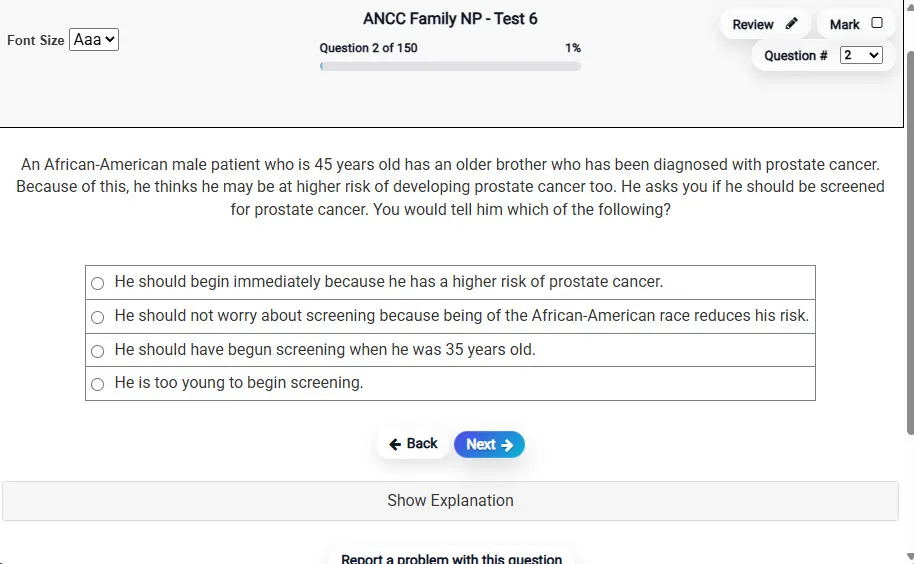
Answering a Question screen – Multiple-choice item view with navigation controls and progress tracker.
Answering a Question Multiple-choice item view with navigation controls and progress tracker.

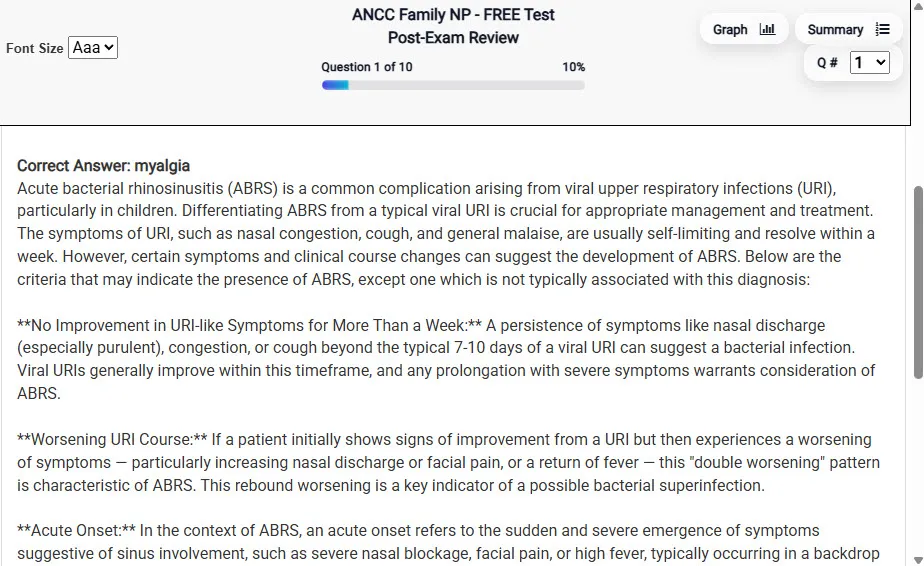
                           Detailed Explanation screen – 
                         Review mode showing chosen answer and rationale and references.
Detailed Explanation Review mode showing chosen answer and rationale and references.

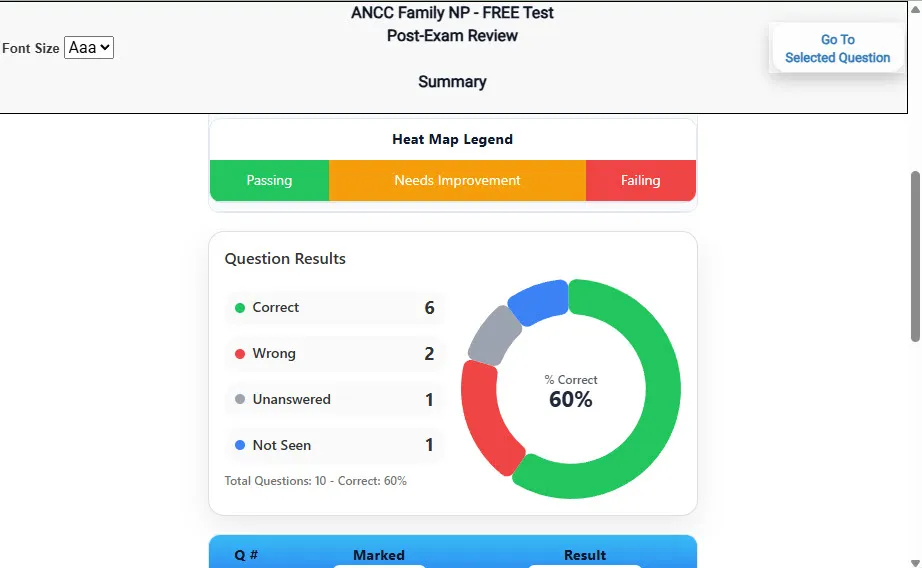
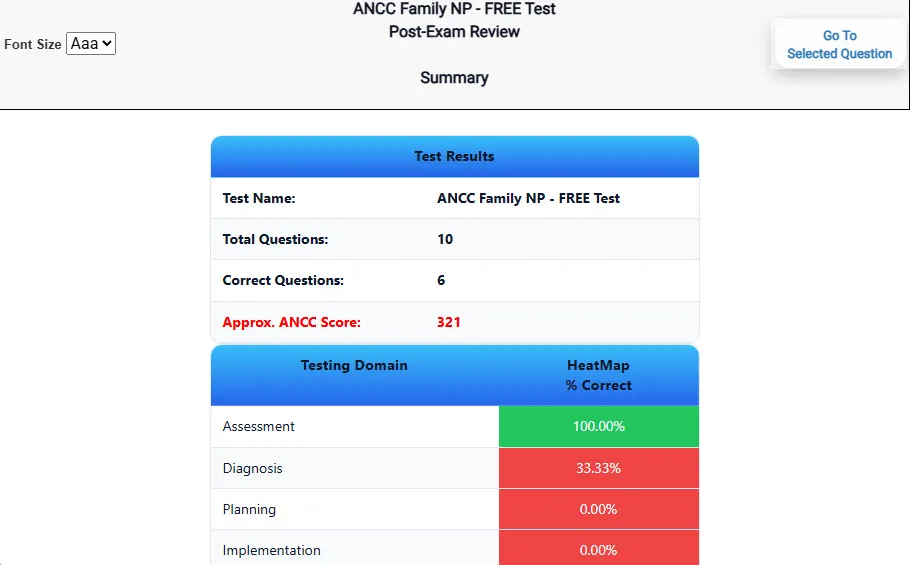
                           Review Summary 1 screen – 
                         Summary with counts for correct/wrong/unanswered and not seen items.
Review Summary 1 Summary with counts for correct/wrong/unanswered and not seen items.

                           Review Summary 2 screen – 
                         Advanced summary with category/domain breakdown and performance insights.
Review Summary 2 Advanced summary with category/domain breakdown and performance insights.

What Each Screen Shows

Answer Question Screen

  • Clean multiple-choice interface with progress bar.
  • Mark for review feature.
  • Matches real test pacing.

Detailed Explanation

  • Correct answer plus rationale.
  • Key concepts and guidelines highlighted.
  • Move between questions to fill knowledge gaps.

Review Summary 1

  • Overall results with total questions and scaled score.
  • Domain heatmap shows strengths and weaknesses.
  • Quick visual feedback on study priorities.

Review Summary 2

  • Chart of correct, wrong, unanswered, not seen.
  • Color-coded results for easy review.
  • Links back to missed items.

Top 10 Reasons to Use Exam Edge for your NYSTCE Safety Net Students with Disabilities CST Exam Prep

  1. Focused on the NYSTCE Safety Net Students with Disabilities CST Exam

    Our practice tests are built specifically for the Safety Net Students with Disabilities CST exam — every question mirrors the real topics, format, and difficulty so you're studying exactly what matters.

  2. Real Exam Simulation

    We match the per-question time limits and pressure of the actual NYSTCE exam, so test day feels familiar and stress-free.

  3. 20 Full Practice Tests & 1,820 Unique Questions

    You'll have more than enough material to master every Safety Net Students with Disabilities CST concept — no repeats, no fluff.

  4. Lower Cost Than a Retake

    Ordering 5 practice exams costs less than retaking the NYSTCE Safety Net Students with Disabilities CST exam after a failure. One low fee could save you both time and money.

  5. Flexible Testing

    Need to step away mid-exam? Pick up right where you left off — with your remaining time intact.

  6. Instant Scoring & Feedback

    See your raw score and an estimated NYSTCE Safety Net Students with Disabilities CST score immediately after finishing each practice test.

  7. Detailed Explanations for Every Question

    Review correct and incorrect answers with clear, step-by-step explanations so you truly understand each topic.

  8. Trusted & Accredited

    We're fully accredited by the Better Business Bureau and uphold the highest standards of trust and transparency.

  9. Web-Based & Always Available

    No software to install. Access your Safety Net Students with Disabilities CST practice exams 24/7 from any computer or mobile device.

  10. Expert Support When You Need It

    Need extra help? Our specialized tutors are highly qualified and ready to support your NYSTCE exam prep.


Pass the NYSTCE Safety Net Students with Disabilities CST Exam with Realistic Practice Tests from Exam Edge

Preparing for your upcoming NYSTCE Safety Net Students with Disabilities CST (960) Certification Exam can feel overwhelming — but the right practice makes all the difference. Exam Edge gives you the tools, structure, and confidence to pass on your first try. Our online practice exams are built to match the real Safety Net Students with Disabilities CST exam in content, format, and difficulty.

  • 📝 20 NYSTCE Safety Net Students with Disabilities CST Practice Tests: Access 20 full-length exams with 91 questions each, covering every major NYSTCE Safety Net Students with Disabilities CST topic in depth.
  • Instant Online Access: Start practicing right away — no software, no waiting.
  • 🧠 Step-by-Step Explanations: Understand the reasoning behind every correct answer so you can master Safety Net Students with Disabilities CST exam concepts.
  • 🔄 Retake Each Exam Up to 4 Times: Build knowledge through repetition and track your improvement over time.
  • 🌐 Web-Based & Available 24/7: Study anywhere, anytime, on any device.
  • 🧘 Boost Your Test-Day Confidence: Familiarity with the NYSTCE format reduces anxiety and helps you perform under pressure.

These NYSTCE Safety Net Students with Disabilities CST practice exams are designed to simulate the real testing experience by matching question types, timing, and difficulty level. This approach helps you get comfortable not just with the exam content, but also with the testing environment, so you walk into your exam day focused and confident.


Exam Edge NYSTCE Reviews


Not a user friendly experience

Amelia , Rochester, New York

Didn't really reflect the questions that were on the test for the most part. Also, they totally got the format of the constructed response question wrong, which never changes. Overall OK if you have nothing else, but definitely not worth the price they charge in my opinion.

Randy , Queens, New York

It was a good test run. Now I know what to expect and what I need to study.

Timothy , Eden, New York

The experience was very practical and I did well.

Trina , Silver Spring , MD

Very easy to navigate.

Collene , Silver Spring , MD

Exam Edge was terrific. Even better than I hoped. Just completing and reviewing the tests are a great learning experience. I can't wait to take the certification test. Tom S.

Thomas , Port Washington, NY


NYSTCE Safety Net Students with Disabilities CST Aliases Test Name

Here is a list of alternative names used for this exam.

  • NYSTCE Safety Net Students with Disabilities CST
  • NYSTCE Safety Net Students with Disabilities CST test
  • NYSTCE Safety Net Students with Disabilities CST Certification Test
  • Safety Net Students with Disabilities CST test
  • NYSTCE
  • NYSTCE 960
  • 960 test
  • NYSTCE Safety Net Students with Disabilities CST (960)
  • Safety Net Students with Disabilities CST certification