This is the content of the pop-over!

NYSTCE CST Library Media Specialist (074) Practice Tests & Test Prep by Exam Edge


NYSTCE CST Library Media Specialist  product image
(4.5)
Based on 17 Reviews

  • Real Exam Simulation: Timed questions and matching content build comfort for your NYSTCE CST Library Media Specialist test day.
  • Instant, 24/7 Access: Web-based NYSTCE CST Library Media Specialist practice exams with no software needed.
  • Clear Explanations: Step-by-step answers and explanations for your NYSTCE exam to strengthen understanding.
  • Boosted Confidence: Reduces anxiety and improves test-taking skills to ace your NYSTCE CST Library Media Specialist (074).

Featured on

NYSTCE CST Library Media Specialist Online Practice Test Bundles

BEST VALUE
20 practice tests

$174.00

$799.00

SAVE $625

Only $8.70 per test!

  • 100% Pass Guarantee
  • 20 online practice tests
  • 90 questions per test
  • Bonus: 100 Flash Cards + Study Guide
  • Instant access
  • Detailed Explanations
  • Practice tests never expire
  • Timed, untimed, or study guide mode
MOST POPULAR
10 practice tests

$99.50

$399.50

SAVE $300

Only $9.95 per test!

  • 10 online practice tests
  • 90 questions per test
  • Bonus: 100 Flash Cards + Study Guide
  • Instant access
  • Detailed Explanations
  • Practice tests never expire
  • Timed, untimed, or study guide mode
5 practice tests

$69.75

$199.75

SAVE $130

Only $13.95 per test!

  • 5 online practice tests
  • 90 questions per test
  • Bonus: 100 Flash Cards
  • Instant access
  • Detailed Explanations
  • Practice tests never expire
  • Timed, untimed, or study guide mode
1 practice test

$39.95

  • 1 online practice test
  • 90 questions per test
  • Instant access
  • Detailed Explanations
  • Practice tests never expire
  • Timed, untimed, or study guide mode
Quick Select
Tap to choose a bundle

** All Prices are in US Dollars (USD) **


NYSTCE CST Library Media Specialist (074) Resources

Jump to the section you need most.

Understanding the exact breakdown of the NYSTCE CST Library Media Specialist test will help you know what to expect and how to most effectively prepare. The NYSTCE CST Library Media Specialist has 90 multiple-choice questions and 1 essay questions. The exam will be broken down into the sections below:

NYSTCE CST Library Media Specialist Exam Blueprint
Domain Name % Number of
Questions
The School Library Media Program 07% 6
Roles and Responsibilities of the Library Media Specialist 10% 9
Information - Technology Literary Resources 12% 11
Collection Development and Resource Management 10% 9
Skills for Multiple Literacies 10% 9
Individual and Collaborative Learning and Inquiry 11% 10
Social Responsibility and Legal and Ethical Issues 7% 6
Administration of the School Library Media Program 13% 12
Analysis - Synthesis Application ()Constructed-Response) - Not Included 20% 18

NYSTCE CST Library Media Specialist Study Tips by Domain

  • Align the library media program to NYS Learning Standards and district goals using a written plan with measurable outcomes; red flag: activities that are popular but cannot be tied to a documented instructional objective.
  • Build an instructional partnership model with co-planned, co-taught lessons and shared assessment; common trap: being used primarily for “coverage” or prep periods instead of standards-based instruction.
  • Use data (circulation, database use, lesson participation, achievement indicators) to drive decisions and report impact; priority rule: choose at least one metric that can be trended across marking periods.
  • Ensure equitable access through scheduling, open access policies, and targeted supports (ELLs, students with disabilities, underserved groups); red flag: fixed schedules that routinely block students from using the library at point of need.
  • Integrate inquiry, information literacy, and reading engagement across grades with a documented scope-and-sequence; common trap: isolated one-off lessons without vertical progression.
  • Maintain safe, inclusive, and instruction-ready spaces (physical and virtual) with clear procedures for behavior, technology use, and resource sharing; contraindication: policies that restrict access more than necessary for safety or compliance.
  • Align library goals to New York learning standards and district initiatives, documenting how services support instruction; red flag: running “activity” programs with no evidence of instructional impact.
  • Serve as an instructional partner by co-planning, co-teaching, and co-assessing inquiry and research lessons with teachers; common trap: being used only as “prep coverage” instead of integrated instruction.
  • Act as an information specialist by curating credible, age-appropriate resources and teaching evaluation of sources; priority rule: verify authority, bias, currency, and relevance before recommending a resource.
  • Provide leadership in technology integration and digital literacy, selecting tools that improve learning outcomes; red flag: adopting new platforms without accessibility, privacy, and training considerations.
  • Manage equitable access to resources and services for all students (ELLs, students with disabilities, and diverse needs); common trap: offering “one-size-fits-all” instruction without accommodations or multiple formats.
  • Communicate and advocate through data (usage, instruction minutes, collaboration logs, learning artifacts) to administrators and stakeholders; threshold cue: if you can’t show trends over time, your advocacy lacks test-ready evidence.
  • Match information needs to the most efficient resource type (e.g., database vs. open web vs. reference); red flag: defaulting to Google when age-appropriate subscription tools provide better authority and filtering.
  • Teach advanced search strategies (controlled vocabulary, Boolean, truncation, filters) and require students to document search paths; common trap: equating “keyword searched” with “research completed” without refining and evaluating results.
  • Evaluate sources using multiple criteria (authority, accuracy, bias, currency, relevance) and highlight sponsorship/ads; red flag: students citing AI-generated or sponsored content without verifying against a second credible source.
  • Integrate literary resources strategically (read-alikes, text complexity, genre studies, diverse formats like audiobooks/graphic novels) to meet learner needs; priority rule: ensure representation and avoid tokenism when building thematic text sets.
  • Use technology tools to support access and comprehension (catalog features, databases, citation tools, translation/TTS where appropriate) while teaching limitations; common trap: letting citation generators run unchecked—students must review for missing fields and formatting errors.
  • Teach ethical use of information and media (copyright, fair use, Creative Commons, paraphrasing vs. quoting) with clear expectations; red flag: copy-paste “patchwriting” that looks paraphrased but keeps original sentence structure.
  • Use a written selection policy aligned to curriculum and learner needs, and document challenges with a formal reconsideration process—red flag: adding/removing items based on one complaint without policy steps.
  • Apply balanced collection criteria (accuracy, authority, relevance, reading level, diversity of perspectives, and timeliness)—common trap: overbuying trendy titles while core, high-circulating curriculum areas remain thin.
  • Plan for multiple formats (print, digital, databases, audiobooks, assistive tech) and ensure licensing matches intended use—priority rule: verify concurrent-user limits before assigning database-heavy projects.
  • Manage budgets with transparent tracking, vendor comparison, and lifecycle costs (subscriptions, replacements, processing)—red flag: committing funds to renewals without checking usage data and cost-per-use.
  • Run ongoing inventory, weeding, and preservation using clear criteria (condition, currency, circulation, curriculum fit)—common trap: keeping outdated science/health materials that can misinform students.
  • Strengthen access through accurate cataloging/metadata, consistent classification, and efficient processing workflows—priority rule: fix high-impact discovery issues (wrong call numbers, missing barcodes) before cosmetic shelving projects.
  • Teach and model information literacy as a repeatable process (question → search → evaluate → use → reflect); red flag: students stop at the first page of results without verifying author, date, and evidence.
  • Address media literacy by distinguishing fact, opinion, inference, and persuasive technique; common trap: treating polished production quality as proof of credibility.
  • Build digital literacy with explicit instruction on search operators, database features, and citation tools; priority rule: require students to document search terms and filters to make their research reproducible.
  • Strengthen reading and literary literacy through reader’s advisory and text complexity scaffolds; contraindication: matching texts only to a student’s measured level and ignoring interest, culture, and purpose.
  • Integrate visual, data, and multimodal literacy (charts, infographics, video, podcasts) by having students analyze how mode affects meaning; red flag: students report numbers without interpreting scale, units, or missing context.
  • Embed metacognition and ethical communication in all literacies (reflection logs, peer review, and attribution); common trap: assuming “paraphrased” means plagiarism-safe without tracking sources and quotes.
  • Design inquiry using a clear framework (e.g., KWL or Guided Inquiry) with explicit checkpoints; red flag: students “researching” without a documented question-to-evidence trail.
  • Co-plan with teachers by aligning learning targets, standards, and assessment evidence before selecting resources; common trap: focusing on activities first and hoping the inquiry outcome follows.
  • Teach students to refine questions from broad topics to researchable claims using scope limits (time, place, population); cue: if a student can’t state what evidence would answer the question, it’s not ready.
  • Use formative assessment during inquiry (conference notes, search logs, exit tickets) to adjust instruction; priority rule: intervene early when search terms, source choice, or notes show persistent misconceptions.
  • Structure collaboration with defined roles and accountability artifacts (shared bibliography, version history, individual reflections); red flag: group products with no way to verify each student’s contribution.
  • Differentiate inquiry supports (sentence stems, curated starting sets, mini-lessons on note-taking) while maintaining rigorous expectations; contraindication: over-scaffolding that replaces student decision-making in question, source selection, or synthesis.
  • Build a mission-driven, standards-aligned library media program plan with measurable goals; red flag: activities that are popular but not tied to student learning outcomes or school improvement priorities.
  • Use data (circulation, database use, instructional collaborations, student achievement indicators) to evaluate and adjust services; common trap: reporting only “counts” without interpreting impact or equity gaps.
  • Establish clear policies and procedures (access, checkout, weeding, challenges, space use) that are consistently applied; priority rule: written policies should be approved/communicated before conflicts arise.
  • Manage budget and purchasing with transparent tracking, vendor compliance, and timely encumbrance; red flag: last-minute spending that ignores selection criteria or leads to duplicate/unusable resources.
  • Implement effective scheduling and staffing (fixed vs. flexible access, supervision, routines) to maximize instructional time; common trap: treating the library as a “coverage” space that reduces planned teaching and collaboration.
  • Maintain a safe, organized physical and virtual environment (traffic flow, supervision, equipment care, acceptable use enforcement); contraindication: allowing unsupervised student access to restricted areas, accounts, or devices.


Built to Fit Into Your Busy Life

Everything you need to prepare with confidence—without wasting a minute.

Three Study Modes

Timed, No Time Limit, or Explanation mode.

Actionable Analytics

Heatmaps and scaled scores highlight weak areas.

High-Yield Rationales

Concise explanations emphasize key concepts.

Realistic Interface

Matches the feel of the actual exam environment.

Accessible by Design

Clean layout reduces cognitive load.

Anytime, Anywhere

Web-based access 24/7 on any device.
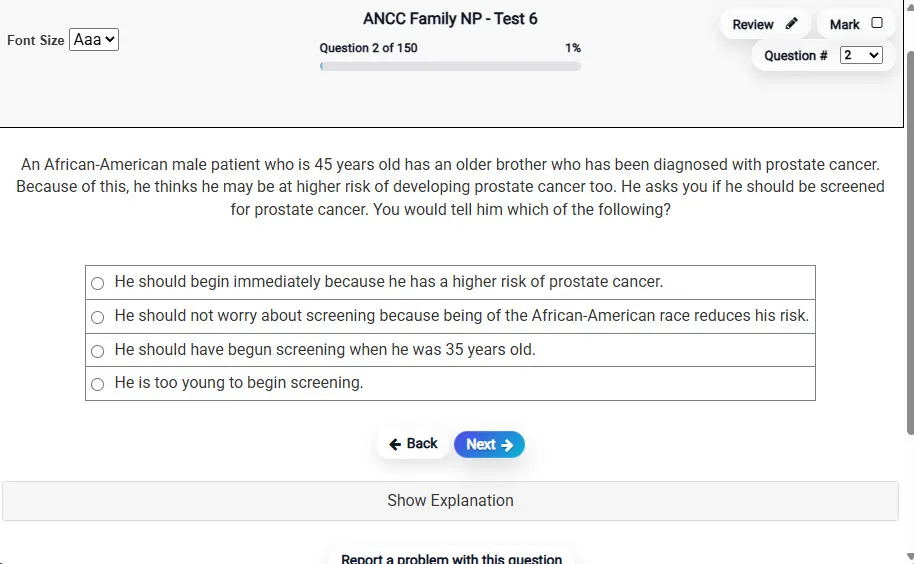
Answering a Question screen – Multiple-choice item view with navigation controls and progress tracker.
Answering a Question Multiple-choice item view with navigation controls and progress tracker.

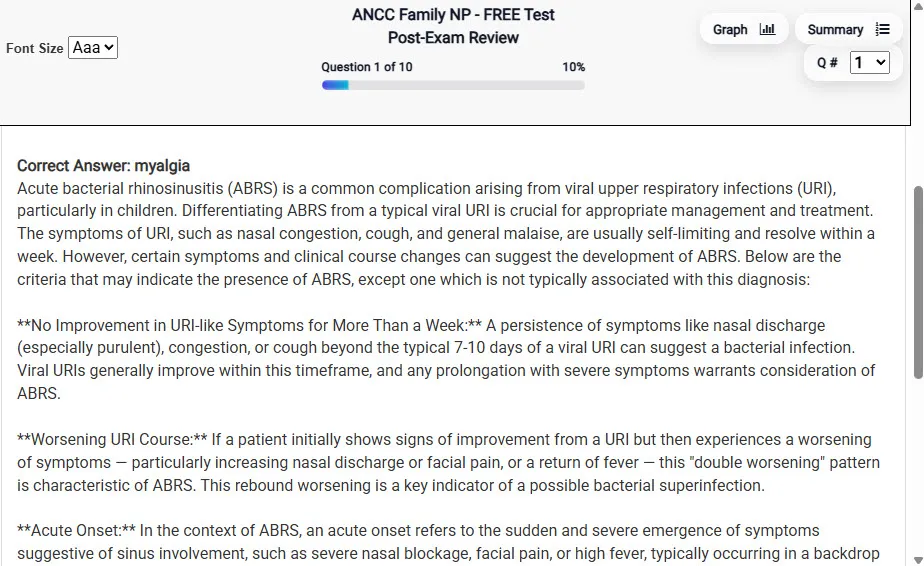
                           Detailed Explanation screen – 
                         Review mode showing chosen answer and rationale and references.
Detailed Explanation Review mode showing chosen answer and rationale and references.

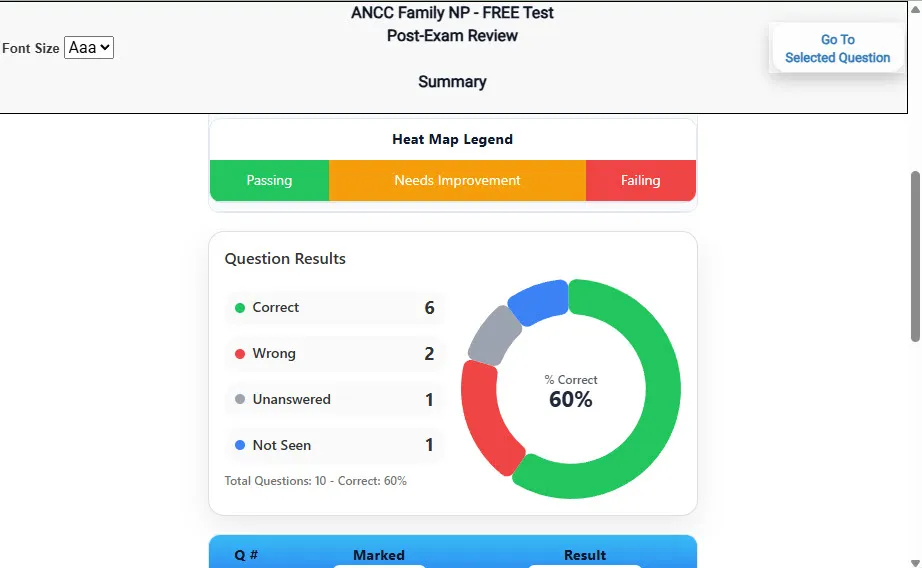
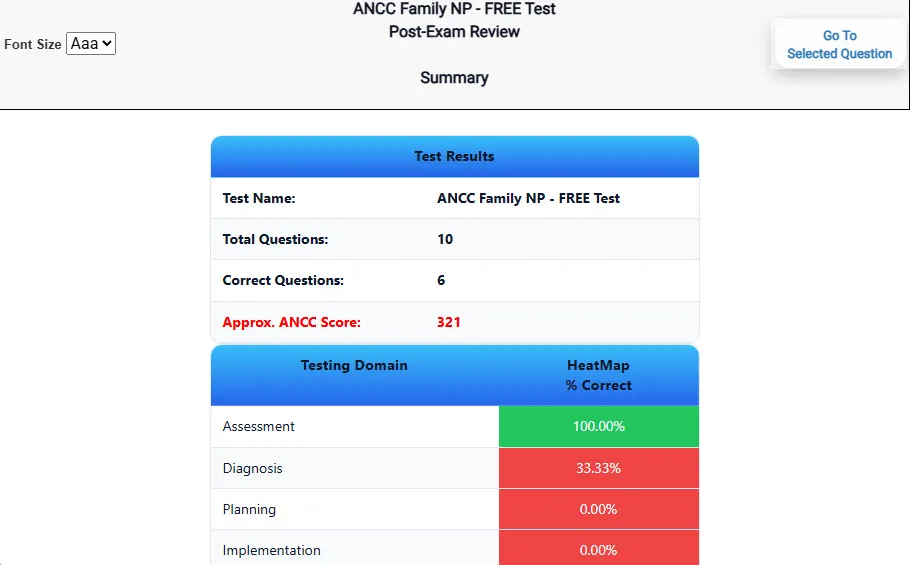
                           Review Summary 1 screen – 
                         Summary with counts for correct/wrong/unanswered and not seen items.
Review Summary 1 Summary with counts for correct/wrong/unanswered and not seen items.

                           Review Summary 2 screen – 
                         Advanced summary with category/domain breakdown and performance insights.
Review Summary 2 Advanced summary with category/domain breakdown and performance insights.

What Each Screen Shows

Answer Question Screen

  • Clean multiple-choice interface with progress bar.
  • Mark for review feature.
  • Matches real test pacing.

Detailed Explanation

  • Correct answer plus rationale.
  • Key concepts and guidelines highlighted.
  • Move between questions to fill knowledge gaps.

Review Summary 1

  • Overall results with total questions and scaled score.
  • Domain heatmap shows strengths and weaknesses.
  • Quick visual feedback on study priorities.

Review Summary 2

  • Chart of correct, wrong, unanswered, not seen.
  • Color-coded results for easy review.
  • Links back to missed items.

Top 10 Reasons to Use Exam Edge for your NYSTCE CST Library Media Specialist Exam Prep

  1. Focused on the NYSTCE CST Library Media Specialist Exam

    Our practice tests are built specifically for the NYSTCE CST Library Media Specialist exam — every question mirrors the real topics, format, and difficulty so you're studying exactly what matters.

  2. Real Exam Simulation

    We match the per-question time limits and pressure of the actual NYSTCE exam, so test day feels familiar and stress-free.

  3. 20 Full Practice Tests & 1,800 Unique Questions

    You'll have more than enough material to master every NYSTCE CST Library Media Specialist concept — no repeats, no fluff.

  4. Lower Cost Than a Retake

    Ordering 5 practice exams costs less than retaking the NYSTCE CST Library Media Specialist exam after a failure. One low fee could save you both time and money.

  5. Flexible Testing

    Need to step away mid-exam? Pick up right where you left off — with your remaining time intact.

  6. Instant Scoring & Feedback

    See your raw score and an estimated NYSTCE CST Library Media Specialist score immediately after finishing each practice test.

  7. Detailed Explanations for Every Question

    Review correct and incorrect answers with clear, step-by-step explanations so you truly understand each topic.

  8. Trusted & Accredited

    We're fully accredited by the Better Business Bureau and uphold the highest standards of trust and transparency.

  9. Web-Based & Always Available

    No software to install. Access your NYSTCE CST Library Media Specialist practice exams 24/7 from any computer or mobile device.

  10. Expert Support When You Need It

    Need extra help? Our specialized tutors are highly qualified and ready to support your NYSTCE exam prep.


Pass the NYSTCE CST Library Media Specialist Exam with Realistic Practice Tests from Exam Edge

Preparing for your upcoming NYSTCE CST Library Media Specialist (074) Certification Exam can feel overwhelming — but the right practice makes all the difference. Exam Edge gives you the tools, structure, and confidence to pass on your first try. Our online practice exams are built to match the real NYSTCE CST Library Media Specialist exam in content, format, and difficulty.

  • 📝 20 NYSTCE CST Library Media Specialist Practice Tests: Access 20 full-length exams with 90 questions each, covering every major NYSTCE CST Library Media Specialist topic in depth.
  • Instant Online Access: Start practicing right away — no software, no waiting.
  • 🧠 Step-by-Step Explanations: Understand the reasoning behind every correct answer so you can master NYSTCE CST Library Media Specialist exam concepts.
  • 🔄 Retake Each Exam Up to 4 Times: Build knowledge through repetition and track your improvement over time.
  • 🌐 Web-Based & Available 24/7: Study anywhere, anytime, on any device.
  • 🧘 Boost Your Test-Day Confidence: Familiarity with the NYSTCE format reduces anxiety and helps you perform under pressure.

These NYSTCE CST Library Media Specialist practice exams are designed to simulate the real testing experience by matching question types, timing, and difficulty level. This approach helps you get comfortable not just with the exam content, but also with the testing environment, so you walk into your exam day focused and confident.


Exam Edge NYSTCE Reviews


Not a user friendly experience

Amelia , Rochester, New York

Didn't really reflect the questions that were on the test for the most part. Also, they totally got the format of the constructed response question wrong, which never changes. Overall OK if you have nothing else, but definitely not worth the price they charge in my opinion.

Randy , Queens, New York

It was a good test run. Now I know what to expect and what I need to study.

Timothy , Eden, New York

The experience was very practical and I did well.

Trina , Silver Spring , MD

Very easy to navigate.

Collene , Silver Spring , MD

Exam Edge was terrific. Even better than I hoped. Just completing and reviewing the tests are a great learning experience. I can't wait to take the certification test. Tom S.

Thomas , Port Washington, NY


NYSTCE CST Library Media Specialist Aliases Test Name

Here is a list of alternative names used for this exam.

  • NYSTCE CST Library Media Specialist
  • NYSTCE CST Library Media Specialist test
  • NYSTCE CST Library Media Specialist Certification Test
  • NYSTCE
  • NYSTCE 074
  • 074 test
  • NYSTCE CST Library Media Specialist (074)
  • CST Library Media Specialist certification