This is the content of the pop-over!

NYSTCE CQST (80) Practice Tests & Test Prep by Exam Edge


NYSTCE Communication and Quantitative Skills Test   product image
(4.7)
Based on 28 Reviews

  • Real Exam Simulation: Timed questions and matching content build comfort for your NYSTCE CQST test day.
  • Instant, 24/7 Access: Web-based NYSTCE Communication and Quantitative Skills Test practice exams with no software needed.
  • Clear Explanations: Step-by-step answers and explanations for your NYSTCE exam to strengthen understanding.
  • Boosted Confidence: Reduces anxiety and improves test-taking skills to ace your NYSTCE Communication and Quantitative Skills Test (80).

Featured on

NYSTCE Communication and Quantitative Skills Test Online Practice Test Bundles

BEST VALUE
20 practice tests

$174.00

$799.00

SAVE $625

Only $8.70 per test!

  • 100% Pass Guarantee
  • 20 online practice tests
  • 100 questions per test
  • Bonus: 100 Flash Cards + Study Guide
  • Instant access
  • Detailed Explanations
  • Practice tests never expire
  • Timed, untimed, or study guide mode
MOST POPULAR
10 practice tests

$99.50

$399.50

SAVE $300

Only $9.95 per test!

  • 10 online practice tests
  • 100 questions per test
  • Bonus: 100 Flash Cards + Study Guide
  • Instant access
  • Detailed Explanations
  • Practice tests never expire
  • Timed, untimed, or study guide mode
5 practice tests

$69.75

$199.75

SAVE $130

Only $13.95 per test!

  • 5 online practice tests
  • 100 questions per test
  • Bonus: 100 Flash Cards
  • Instant access
  • Detailed Explanations
  • Practice tests never expire
  • Timed, untimed, or study guide mode
1 practice test

$39.95

  • 1 online practice test
  • 100 questions per test
  • Instant access
  • Detailed Explanations
  • Practice tests never expire
  • Timed, untimed, or study guide mode
Quick Select
Tap to choose a bundle

** All Prices are in US Dollars (USD) **


NYSTCE CQST (80) Resources

Jump to the section you need most.

Understanding the exact breakdown of the NYSTCE Communication and Quantitative Skills Test test will help you know what to expect and how to most effectively prepare. The NYSTCE Communication and Quantitative Skills Test has multiple-choice questions . The exam will be broken down into the sections below:

NYSTCE Communication and Quantitative Skills Test Exam Blueprint
Domain Name % Number of
Questions
Reading 33% 33
     Understand the meaning of general vocabulary words  
     Understand the stated main idea of a reading passage  
     Understand the sequence of ideas in a reading passage  
     Interpret textual and graphic information  
Writing 33% 33
     Understand the standard use of verbs  
     Understand the standard use of pronouns and modifiers  
     Understand standard sentence structure and punctuation  
     Understand the standard use of capitalization and spelling  
Math 33% 33
     Understand number concepts  
     Understand the addition and subtraction of whole numbers  
     Understand multiplication and division of whole numbers  
     Understand operations involving fractions - decimals percents  

NYSTCE Communication and Quantitative Skills Test Study Tips by Domain

  • Identify the passage’s stated main idea by matching it to sentences the author explicitly says—red flag: choices that are broader than any paragraph or introduce a new topic.
  • Track the sequence of ideas (cause/effect, problem/solution, chronology) using transitions like “however,” “therefore,” and “first/next”—common trap: selecting an answer that is true but occurs in a different part of the passage.
  • Answer questions with direct textual support; if you can’t point to a specific line or phrase, it’s likely an inference too far—priority rule: choose the option best supported, not the one that sounds most reasonable.
  • Use context clues (definition, example, contrast) to determine general vocabulary meaning—red flag: picking the most common dictionary meaning when the surrounding sentence signals a different sense.
  • Interpret graphic information (charts, tables, captions) by confirming what is measured and the units before comparing values—common trap: confusing totals with rates or misreading the axis/legend.
  • Distinguish fact from opinion and note the author’s purpose or tone by looking for loaded words and qualifiers (“always,” “likely”)—contraindication: treating a strongly worded claim as a stated fact without evidence.
  • Use context clues (definition, restatement, example) to infer meaning; red flag: choosing a familiar-looking word that doesn’t fit the sentence’s tone.
  • Watch for connotation (positive/negative/neutral) and register (formal/informal); common trap: treating “childish” as a synonym for “childlike.”
  • Confirm meaning by checking how the word functions in the sentence (part of speech and role); red flag: an option that matches a different form (e.g., noun vs. verb).
  • Use morphology (prefix/root/suffix) to narrow meaning; priority rule: if the prefix suggests the opposite (e.g., “in-,” “non-”), eliminate choices that ignore it.
  • Distinguish between denotation and figurative/idiomatic use; common trap: interpreting “break the ice” or “on the other hand” literally.
  • For near-synonyms, pick the choice that best matches the passage’s specificity; red flag: overly broad answers like “good” or “thing” when a precise meaning is implied.
  • Identify the stated main idea by locating the sentence that explicitly summarizes the author’s point (often in the first or last paragraph)—red flag: choosing an interesting detail instead of the passage-wide claim.
  • Distinguish topic vs. main idea: the topic is the general subject, but the stated main idea is a complete sentence about that subject—trap: selecting a single noun phrase as the answer.
  • Use the “umbrella test”: the stated main-idea sentence should cover most paragraphs’ key points—warning sign: an option that fits only one paragraph or example.
  • When multiple sentences feel central, choose the one the author explicitly uses to generalize or conclude (signal words like “overall,” “in summary,” “therefore”)—common trap: mistaking a hook or anecdote for the main idea.
  • In passages with headings or opening definitions, verify the stated main idea by checking that supporting details directly explain, prove, or illustrate it—red flag: an answer that introduces new information not supported in the text.
  • Eliminate choices that are too broad or too narrow compared with the stated main-idea sentence in the passage—priority rule: pick the option that matches the author’s scope (who/what/when/where) without adding or omitting limits.
  • Track the passage’s organizational pattern (chronological, cause–effect, problem–solution, compare–contrast) and choose the option that preserves that pattern—red flag: answers that jump to the conclusion too early.
  • Use transition words (e.g., “however,” “therefore,” “next,” “for example”) to predict what must come before/after—common trap: treating “however” like an addition instead of a contrast.
  • When ordering events, rely on explicit time markers and verb tenses, not real-world assumptions—red flag: an answer that requires an implied step the author never states.
  • For questions about where a sentence/paragraph belongs, place it where it most logically supports the preceding point and sets up the next point—priority rule: definitions and background usually come before analysis or conclusions.
  • Distinguish main line vs. supporting detail: examples, statistics, and anecdotes typically follow the claim they illustrate—common trap: putting an example before the idea it’s supposed to explain.
  • Check referents (this/that/these, he/she/they, “the former”) to keep ideas linked correctly—red flag: a reordered version where pronouns point to an unclear or missing antecedent.
  • Translate the prompt first: identify what the question asks (value, comparison, trend, or inference) before scanning the text/graphic—red flag: answering a “best supported” item with an outside assumption.
  • In charts/graphs, confirm the axis labels, units, and scale (including breaks or nonzero baselines) before computing—common trap: treating a truncated y-axis as proportional change.
  • Use legend/key decoding as a required step for maps, tables, and multi-series graphs—red flag: mixing categories (e.g., colors/symbols) and pulling the right number from the wrong series.
  • When comparing data points, compute the correct quantity (difference vs percent change) and state direction clearly—common trap: reporting percent change when the item asks for absolute change.
  • For tables, locate row/column headers and verify you’re using the correct intersection cell—priority rule: re-check the header after scrolling/reading across to avoid off-by-one row/column errors.
  • For text-based information, separate stated facts from implications and match answer choices to explicit evidence—red flag: selecting a choice that sounds reasonable but is not directly supported by the passage/graphic.
  • Prioritize clarity and purpose: identify the task (inform, argue, explain) and write a thesis/controlling idea that answers it; red flag—an introduction that is all background but never states a point.
  • Organize with a logical progression (e.g., claim → reasons → evidence → conclusion) and use transitions to show relationships; common trap—listing points without explaining how they connect.
  • Support assertions with specific details (examples, facts, brief explanation) and ensure each paragraph has one focus; red flag—paragraphs that start with a new idea but end on a different one.
  • Control sentence structure for readability by avoiding run-ons and fragments and varying sentence types; priority rule—if you see multiple independent clauses, add a period/semicolon or a coordinating conjunction with a comma.
  • Maintain consistent tone and appropriate word choice (formal vs. informal) and avoid vague references; common trap—using “this” or “it” without a clear noun antecedent.
  • Edit quickly for high-impact errors (agreement, tense consistency, punctuation) and remove redundancy; red flag—shifts in verb tense or person (you/we/they) within the same paragraph without a reason.
  • Maintain subject–verb agreement, especially with intervening phrases (e.g., “The list of items is”)—red flag: matching the verb to the nearest noun instead of the subject.
  • Use correct verb tense and keep it consistent within a time frame—common trap: shifting from past to present (or present perfect) without a clear reason.
  • Choose the right verb form for irregular verbs (e.g., lay/lie, sit/set, rise/raise)—priority rule: check whether the verb needs a direct object.
  • Form and place auxiliaries correctly in questions and negatives (e.g., did + base verb; doesn’t + base)—red flag: “did went” or double negatives with auxiliary + not.
  • Use the correct participle in perfect and passive constructions (have written; was written)—common trap: using the simple past where a past participle is required (e.g., “has ran”).
  • Handle tricky agreement cases: collective nouns, indefinite pronouns, and either/neither—threshold: singular pronouns (each, everyone, neither) typically take singular verbs unless a prepositional phrase changes meaning.
  • Ensure every pronoun has a clear, singular antecedent; red flag: “it/this/they” referring to an entire previous sentence or multiple nouns.
  • Match pronoun number and person consistently; common trap: shifting from “one” to “you” or using “they” with a strictly singular antecedent when the sentence requires agreement.
  • Use correct pronoun case (subject vs. object) especially in compound structures; test cue: remove the other noun to check (“between you and me” not “between you and I”).
  • For possessives before gerunds, prefer possessive form when it modifies the gerund; trap: “him running” when the meaning is the act (often “his running”).
  • Place modifiers next to the word they modify to avoid dangling/misplaced modifiers; red flag: an introductory phrase that seems to modify the wrong noun (“Walking to class, the backpack…”).
  • Use comparative/superlative modifiers correctly and avoid illogical comparisons; threshold rule: compare two with “more/less” and three+ with “most/least,” and don’t compare something to itself (add “other” when needed).
  • Ensure every sentence has an independent clause (subject + finite verb) — red flag: a dependent clause introduced by because/although/when standing alone.
  • Avoid comma splices and fused sentences; priority rule: if two independent clauses are joined without a conjunction, use a semicolon or add a coordinating conjunction (FANBOYS) after the comma.
  • Place commas correctly with introductory elements and nonessential information — common trap: omitting the comma after a long introductory phrase or mispunctuating a nonrestrictive clause that should be set off by commas.
  • Use apostrophes for possession and contractions only; red flag: pluralizing with an apostrophe (e.g., “1990’s” or “apple’s”).
  • Maintain parallel structure in lists, comparisons, and paired constructions; common trap: mixing forms (e.g., “to read, writing, and to speak”) which signals a sentence-structure error.
  • Use end punctuation and quotation marks consistently — priority rule: periods and commas go inside quotation marks in standard American usage, while question marks go inside only if part of the quoted material.
  • Capitalize proper nouns consistently (people, places, organizations, languages, specific historical events); red flag: a generic term capitalized without a specific name (e.g., “the school” vs. “Lincoln School”).
  • Use correct capitalization for titles and headings—capitalize first/last words and major words; common trap: capitalizing short articles/prepositions (a, an, the, of, in) mid-title when they should be lowercase.
  • Capitalize the first word of every sentence and of direct quotations; priority rule: after a colon, capitalize only if what follows is a complete sentence or a formal statement.
  • Spell common homophones correctly using context cues (their/there/they’re; to/too/two); red flag: a sentence that still “sounds right” when read aloud but is wrong in meaning.
  • Apply spelling rules with endings (drop final silent e before -ing/-ed except to keep soft c/g; change y to i before -es/-ed when preceded by a consonant); common trap: mixing patterns (e.g., “studyed”).
  • Maintain consistent American English spelling on the NYSTCE (color, center, organize) and watch for frequently misspelled academic words (separate, accommodate, definitely); red flag: relying on spellcheck-like intuition during error-identification items.
  • Know your number line priorities: negatives, absolute value, and order of operations (PEMDAS) drive many NYSTCE math items—red flag when a distractor comes from doing operations left-to-right without parentheses.
  • Convert flexibly among fractions, decimals, and percents using benchmarks (e.g., 1/2=0.5=50%, 1/4=25%)—common trap is confusing percent increase/decrease with the new total versus the change amount.
  • Set up ratio/proportion and unit-rate problems with labels attached to every number—priority rule: keep units consistent or you’ll invert the relationship (e.g., miles per hour vs hours per mile).
  • Handle multi-step word problems by identifying givens, unknowns, and the operation sequence before computing—red flag when extra information is included to bait an unnecessary calculation.
  • Interpret tables, graphs, and charts by reading titles, axes, and scales first—common trap is missing a nonzero axis start or unequal intervals that change the apparent size of differences.
  • Estimate to verify reasonableness (rounding, compatible numbers) after you compute—threshold cue: if the magnitude is off by a factor of 10, re-check decimal placement and percent conversion.
  • Know place value through large whole numbers and decimals; red flag: mixing up which digit is in the tenths vs. hundreds place when comparing numbers.
  • Convert among standard, expanded, and word form; common trap: writing “two hundred six” as 2006 instead of 206 because the “and” is omitted.
  • Use ordering and comparison symbols (<, >, =) correctly for whole numbers and decimals; priority rule: line up decimal points before comparing.
  • Understand factors, multiples, and prime/composite classification; red flag: calling 1 a prime number (it is neither prime nor composite).
  • Apply basic properties of numbers (commutative, associative, distributive, identity, zero property); common trap: assuming subtraction/division are commutative.
  • Interpret signs and absolute value for integers and distances on a number line; priority rule: absolute value is always nonnegative, so |−7| = 7.
  • Align digits by place value before adding/subtracting—red flag if regrouping is needed in more than one column and you only carry/borrow once.
  • For subtraction, regroup from the nearest nonzero digit to the left (e.g., across zeros)—common trap is forgetting that borrowing turns a 0 into 9 after cascading.
  • Use estimation to validate (round to the nearest ten/hundred)—if your exact answer is far from the estimate, recheck regrouping and alignment.
  • In multi-step word problems, decide whether the situation is combining (addition) or finding a difference (subtraction)—red flag is key-word hunting that ignores what the question is asking.
  • When adding multiple addends, group to make tens/hundreds first—priority rule: look for pairs that sum to 10, 100, 1000 to reduce arithmetic errors.
  • Check results with the inverse operation (add to check subtraction, subtract to check addition)—common trap is miscopying a digit; the inverse check catches most transcription errors.
  • Use place value to estimate products/quotients first; red flag: an exact answer far from a reasonable estimate (e.g., 48×62 can’t be 29,760).
  • Know that multiplying by 10, 100, 1000 shifts digits left (adds zeros) and dividing by these shifts right; common trap: shifting the wrong direction when dividing (e.g., 4,800÷100 = 48, not 480).
  • Apply long division with consistent subtraction and bring-down steps; red flag: a remainder greater than or equal to the divisor means you missed a subtraction step.
  • Use factors and divisibility rules to simplify mental math (e.g., 36×25 = 9×100); common trap: canceling across addition (you can only factor/cancel in multiplication).
  • Interpret remainders in context (round up, round down, or keep as remainder); priority rule: with “how many groups” or capacity problems, you often must round up to meet the requirement.
  • Check division by multiplication (quotient×divisor + remainder = dividend); red flag: forgetting to add the remainder back when verifying.
  • Convert between fractions, decimals, and percents using reliable anchors (e.g., 1/4 = 0.25 = 25%)—red flag: mixing up 0.04 (4%) with 0.4 (40%).
  • When adding/subtracting fractions, use a common denominator and simplify at the end—common trap: adding numerators and denominators directly (e.g., 1/2 + 1/3 ≠ 2/5).
  • Multiply fractions by multiplying numerators and denominators, then reduce (or cross-cancel first)—priority rule: simplify before multiplying to avoid arithmetic errors.
  • Divide fractions by multiplying by the reciprocal, and keep the sign rules straight—contraindication: do not invert the first fraction (only the divisor gets reciprocated).
  • For percent problems, translate precisely: “of” means multiply, “is” means equals, and “what percent” sets up part/whole—common trap: using the wrong base (percent of what?).
  • In word problems, estimate to sanity-check (e.g., 30% of 50 is about 15)—red flag: an answer greater than the whole when finding a proper fraction/percent of a quantity.


Built to Fit Into Your Busy Life

Everything you need to prepare with confidence—without wasting a minute.

Three Study Modes

Timed, No Time Limit, or Explanation mode.

Actionable Analytics

Heatmaps and scaled scores highlight weak areas.

High-Yield Rationales

Concise explanations emphasize key concepts.

Realistic Interface

Matches the feel of the actual exam environment.

Accessible by Design

Clean layout reduces cognitive load.

Anytime, Anywhere

Web-based access 24/7 on any device.
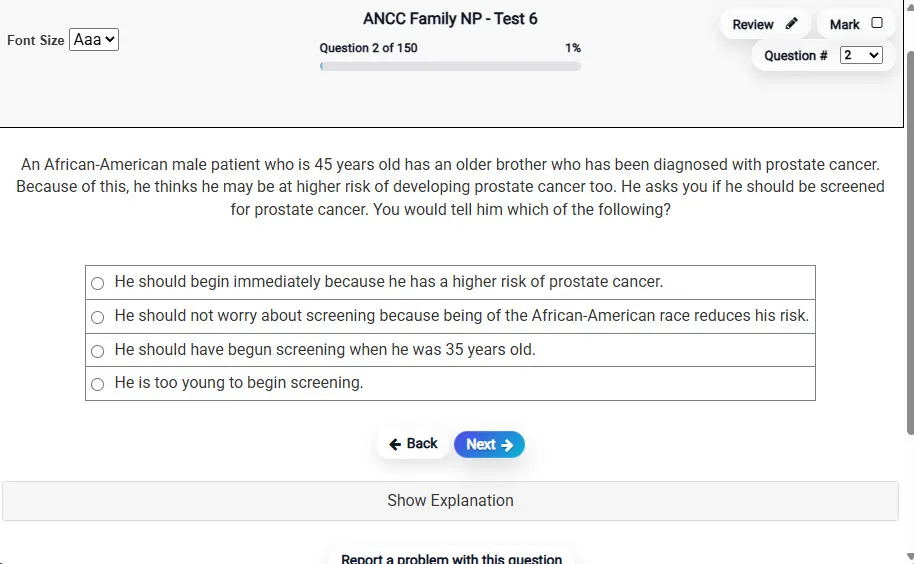
Answering a Question screen – Multiple-choice item view with navigation controls and progress tracker.
Answering a Question Multiple-choice item view with navigation controls and progress tracker.

                           Detailed Explanation screen – 
                         Review mode showing chosen answer and rationale and references.
Detailed Explanation Review mode showing chosen answer and rationale and references.

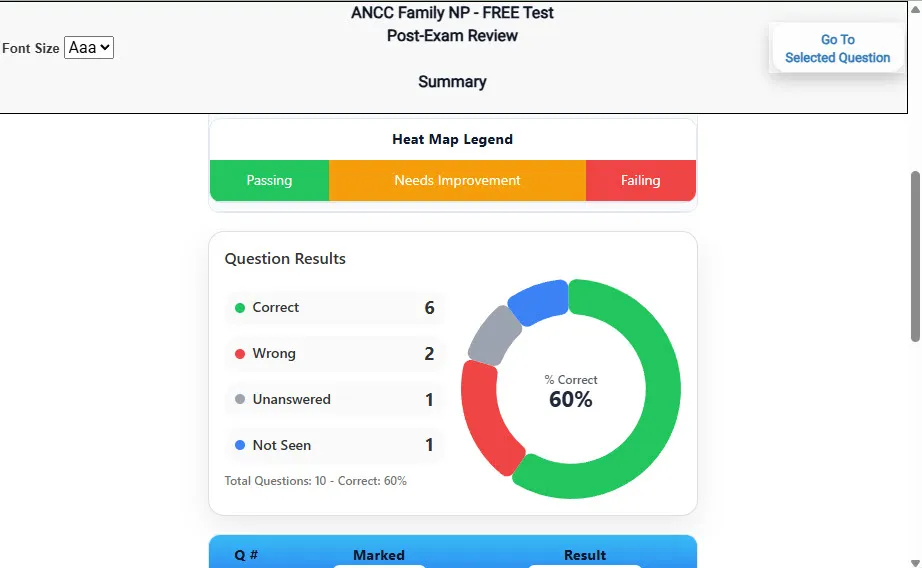
                           Review Summary 1 screen – 
                         Summary with counts for correct/wrong/unanswered and not seen items.
Review Summary 1 Summary with counts for correct/wrong/unanswered and not seen items.

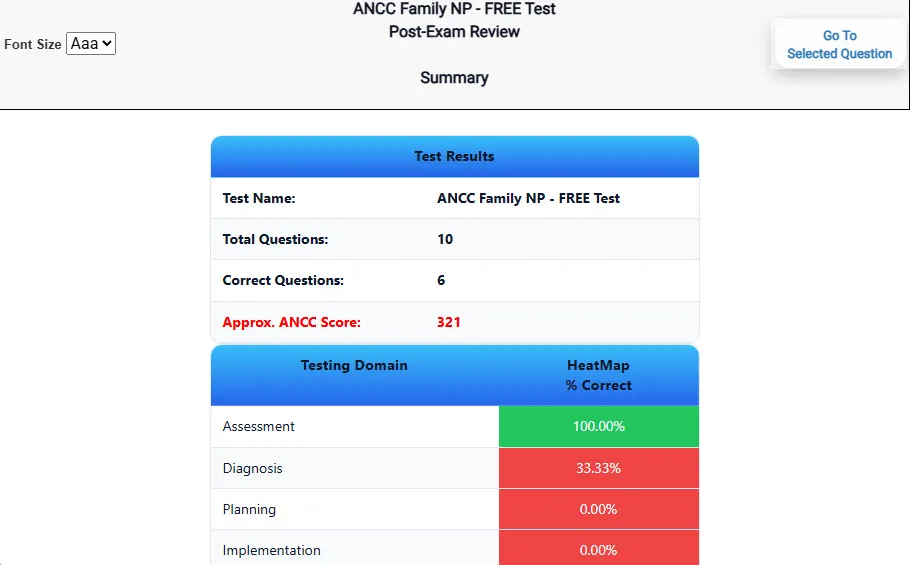
                           Review Summary 2 screen – 
                         Advanced summary with category/domain breakdown and performance insights.
Review Summary 2 Advanced summary with category/domain breakdown and performance insights.

What Each Screen Shows

Answer Question Screen

  • Clean multiple-choice interface with progress bar.
  • Mark for review feature.
  • Matches real test pacing.

Detailed Explanation

  • Correct answer plus rationale.
  • Key concepts and guidelines highlighted.
  • Move between questions to fill knowledge gaps.

Review Summary 1

  • Overall results with total questions and scaled score.
  • Domain heatmap shows strengths and weaknesses.
  • Quick visual feedback on study priorities.

Review Summary 2

  • Chart of correct, wrong, unanswered, not seen.
  • Color-coded results for easy review.
  • Links back to missed items.

Top 10 Reasons to Use Exam Edge for your NYSTCE Communication and Quantitative Skills Test Exam Prep

  1. Focused on the NYSTCE Communication and Quantitative Skills Test Exam

    Our practice tests are built specifically for the NYSTCE CQST exam — every question mirrors the real topics, format, and difficulty so you're studying exactly what matters.

  2. Real Exam Simulation

    We match the per-question time limits and pressure of the actual NYSTCE exam, so test day feels familiar and stress-free.

  3. 20 Full Practice Tests & 2,000 Unique Questions

    You'll have more than enough material to master every NYSTCE CQST concept — no repeats, no fluff.

  4. Lower Cost Than a Retake

    Ordering 5 practice exams costs less than retaking the NYSTCE Communication and Quantitative Skills Test exam after a failure. One low fee could save you both time and money.

  5. Flexible Testing

    Need to step away mid-exam? Pick up right where you left off — with your remaining time intact.

  6. Instant Scoring & Feedback

    See your raw score and an estimated NYSTCE Communication and Quantitative Skills Test score immediately after finishing each practice test.

  7. Detailed Explanations for Every Question

    Review correct and incorrect answers with clear, step-by-step explanations so you truly understand each topic.

  8. Trusted & Accredited

    We're fully accredited by the Better Business Bureau and uphold the highest standards of trust and transparency.

  9. Web-Based & Always Available

    No software to install. Access your NYSTCE CQST practice exams 24/7 from any computer or mobile device.

  10. Expert Support When You Need It

    Need extra help? Our specialized tutors are highly qualified and ready to support your NYSTCE exam prep.


Pass the NYSTCE Communication and Quantitative Skills Test Exam with Realistic Practice Tests from Exam Edge

Preparing for your upcoming NYSTCE Communication and Quantitative Skills Test (80) Certification Exam can feel overwhelming — but the right practice makes all the difference. Exam Edge gives you the tools, structure, and confidence to pass on your first try. Our online practice exams are built to match the real NYSTCE CQST exam in content, format, and difficulty.

  • 📝 20 NYSTCE Communication and Quantitative Skills Test Practice Tests: Access 20 full-length exams with 100 questions each, covering every major NYSTCE Communication and Quantitative Skills Test topic in depth.
  • Instant Online Access: Start practicing right away — no software, no waiting.
  • 🧠 Step-by-Step Explanations: Understand the reasoning behind every correct answer so you can master NYSTCE CQST exam concepts.
  • 🔄 Retake Each Exam Up to 4 Times: Build knowledge through repetition and track your improvement over time.
  • 🌐 Web-Based & Available 24/7: Study anywhere, anytime, on any device.
  • 🧘 Boost Your Test-Day Confidence: Familiarity with the NYSTCE format reduces anxiety and helps you perform under pressure.

These NYSTCE Communication and Quantitative Skills Test practice exams are designed to simulate the real testing experience by matching question types, timing, and difficulty level. This approach helps you get comfortable not just with the exam content, but also with the testing environment, so you walk into your exam day focused and confident.

Exam Edge NYSTCE Reviews


It was a good test run. Now I know what to expect and what I need to study.

Timothy , Eden, New York

Not a user friendly experience

Amelia , Rochester, New York

Didn't really reflect the questions that were on the test for the most part. Also, they totally got the format of the constructed response question wrong, which never changes. Overall OK if you have nothing else, but definitely not worth the price they charge in my opinion.

Randy , Queens, New York

The experience was very practical and I did well.

Trina , Silver Spring , MD

Very easy to navigate.

Collene , Silver Spring , MD

Exam Edge was terrific. Even better than I hoped. Just completing and reviewing the tests are a great learning experience. I can't wait to take the certification test. Tom S.

Thomas , Port Washington, NY


NYSTCE Communication and Quantitative Skills Test Aliases Test Name

Here is a list of alternative names used for this exam.

  • NYSTCE Communication and Quantitative Skills Test
  • NYSTCE Communication and Quantitative Skills Test test
  • NYSTCE Communication and Quantitative Skills Test Certification Test
  • NYSTCE CQST test
  • NYSTCE
  • NYSTCE 80
  • 80 test
  • NYSTCE Communication and Quantitative Skills Test (80)
  • Communication and Quantitative Skills Test certification